5. HOLD WARM
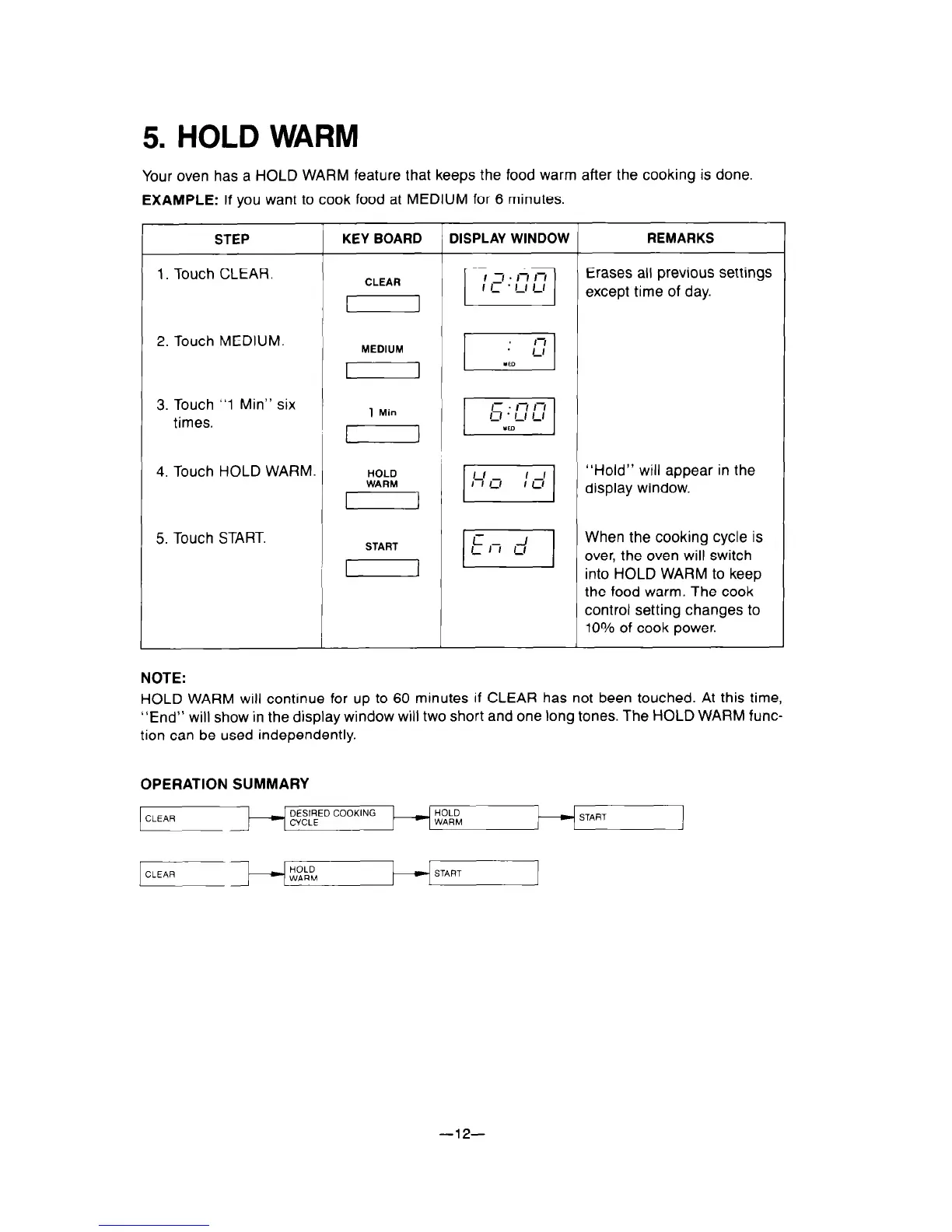
Your oven has a HOLD WARM feature that keeps the food warm after the cooking is done.
EXAMPLE:
If you want to cook food at MEDIUM for 6 minutes.
STEP
1. Touch CLEAR.
KEY BOARD DISPLAY WINDOW
REMARKS
2. Touch MEDIUM.
, MEDIUM , PI
3. Touch
“1
Min” six
times.
4.
Touch HOLD WARM.
5. Touch START.
START
‘I
the food warm. The cook
control setting changes to
loo/o
of cook power.
NOTE:
HOLD WARM will continue for up to 60 minutes if CLEAR has not been touched. At this time,
“End” will show in the display window will two short and one tong tones. The HOLD WARM func-
tion can be used independently.
OPERATION SUMMARY
CLEAR
DESIRED COOKING
HOLD
CYCLE
WARM
HOLD
WARM
START
1
-12-



 To Next Page