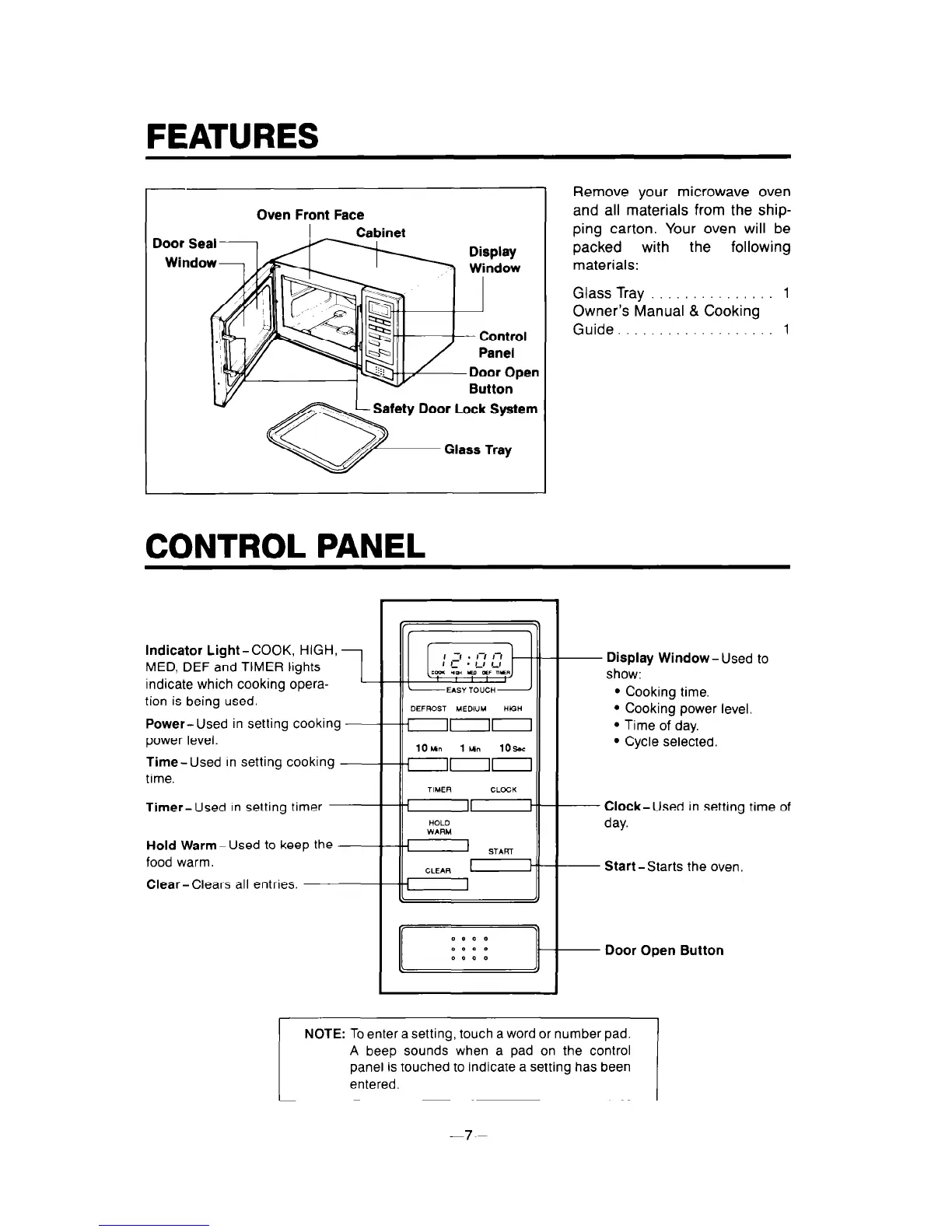
Oven Front Face
Safety Door Lock System
CONTROL PANEL
Remove your microwave oven
and all materials from the ship-
ping carton. Your oven will be
packed with
the following
materials:
Glass Tray 1
Owner’s Manual & Cooking
Guide. 1
Indicator Light-COOK, HIGH,
MED, DEF and TIMER lights
indicate which cooking opera-
tion is being used.
Power- Used in setting cooking
power level.
Time- Used In setting cooking
time.
Timer- Used In setting timer.
Hold Warm-Used to keep the
food warm.
Clear-Clears all entries.
10un lun lOsac
non
CLEAR u
I
I
- Display Window- Used to
show:
l
Cooking time.
l
Cooking power level.
l
Time of day.
l
Cycle selected.
- Clock-Used in setting time of
day.
- Start-Starts the oven.
- Door Open Button
NOTE: To enter a setting, touch a word or number pad.
A beep sounds when a pad on the control
panel is touched to indicate a setting has been
entered.
-7-



 To Next Page