9
Audio Streaming
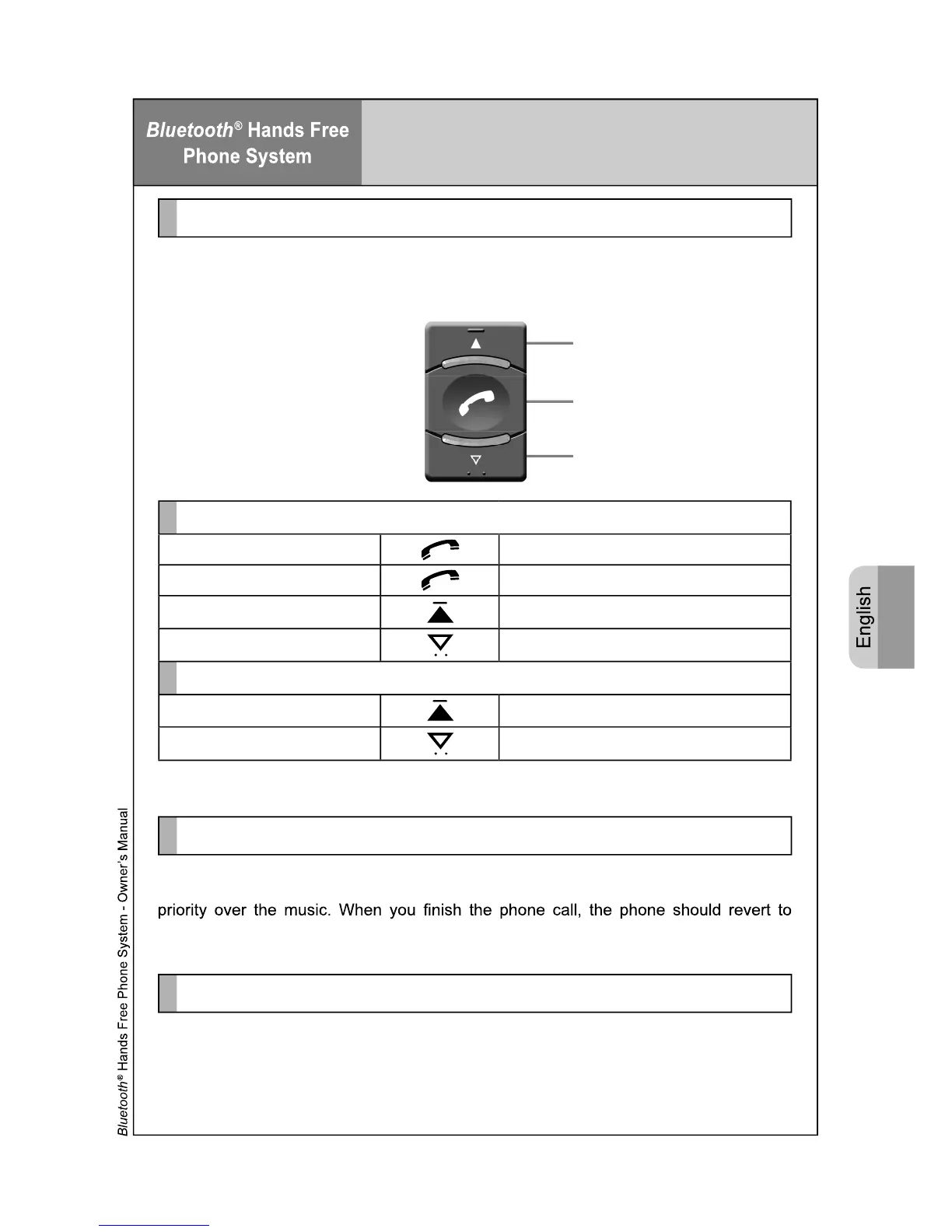
You can control the music playback either from the phone, or using the Bluetooth
®
button
in the car. Refer to the following guide:
Playback Control
Playback Control
Play Short Press on the Answer Key
Pause Short Press on the Answer Key
Next Track Double Press on the Up Key
Previous Track Double Press on the Down Key
Volume Adjustment
Volume Up Press and Hold on the Up Key
Volume Down Press and Hold on the Down key
Up Key
Answer Key
Down Key
If you receive a call while using Bluetooth
®
Audio Streaming, the phone call will take
playing music. If not, press the answer key or phone play button to resume audio.
Receiving Calls
When using Bluetooth
®
Audio Streaming, the vehicle Radio is in a “Muted” state as the
ph
one system takes control. To return back to the AM/FM Radio, CD or Cassette, you
mu
st stop the music playback from your Phone / PDA / Smart Phone.
Important Note
Note: All other phone functions as described on page 3 will work with the
exception of voice dial.



 To Next Page