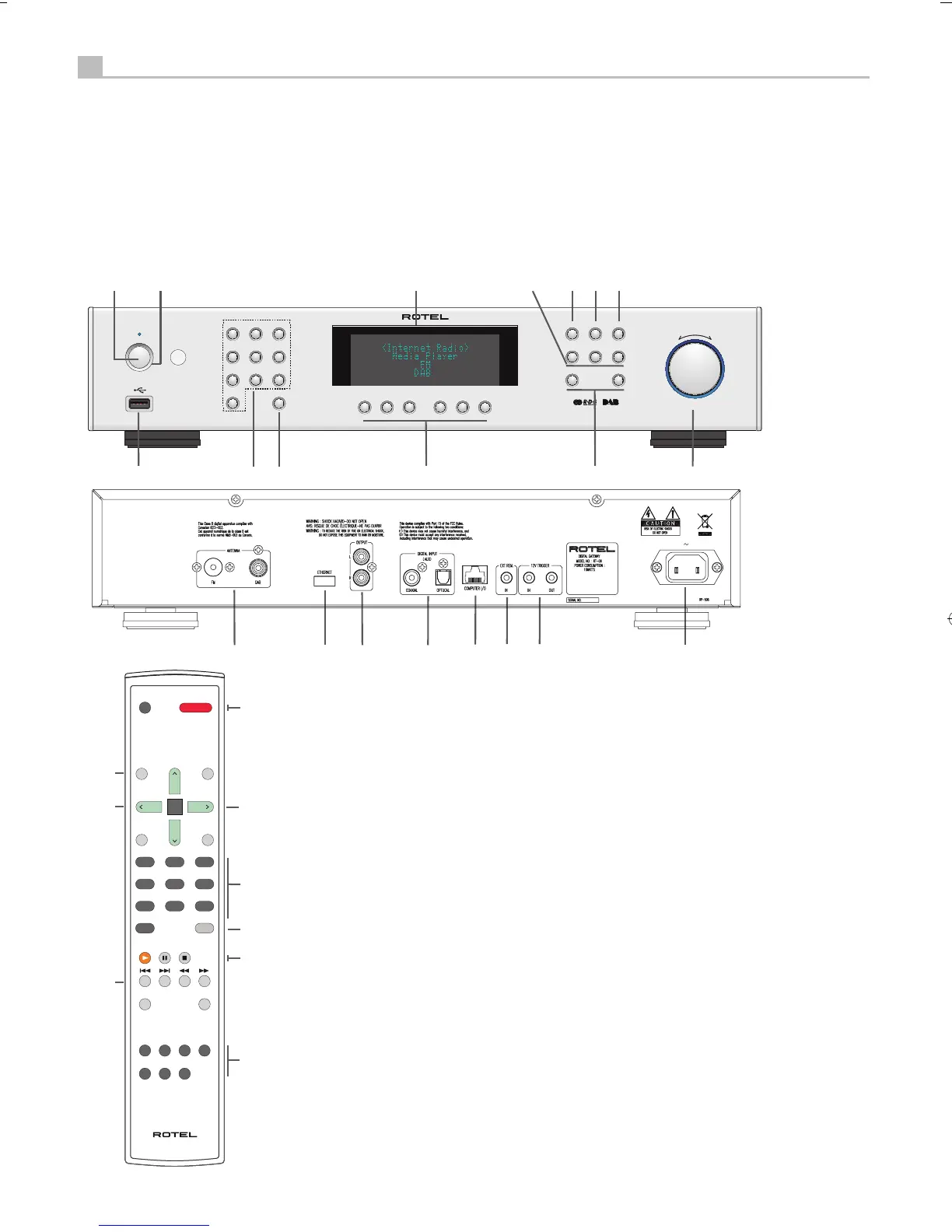
Front and Remote common function buttons
1,2 : Power on/off buttons
3 : iPod/mp3 USB slot
4,5 : Set and call out preset
6 : Display
7 : Music source select
8 : Playback button
9 : Queue ( Radio preset list )
0 : Back to upper level menu
- : iRadio menu
= : Previous /Next track
q ^ SEL : Navigate and Select
Rear Slots
w : FM/DAB Antenna
e : Wi-Fi/Ethernet dongle slot
r : Analogue output
t : Digital Input
y : Computer I/O
u : Ext remote In
i : 12v Trigger signal
o : Power mains connection
Remote Unit advanced buttons
SETUP & EXIT : Enter and Exit Factory menu
[ & ] : Auto search FM stations.
RANDOM/SHUFFLE : Playback mode
Note :
1. Most remote control keys duplicate front panel button
functions. Some controls can only be accessed through
the remote, which will be explained separately.
2. Front panel keys are used to explain most operations
of the unit. You can also use corresponding remote
control keys. For example, the alternative operation
of turning and pressing the push select knobq is
pressing ^ and
^
then SEL button of the remote to
select the desired function.
^


 To Next Page
 Loading...