9Instrukcja obsługi
Aplikacja NetHome Plus dla pomp ciepła Aquami Multi Split
PL
CZĘŚĆ 2. KONFIGURACJA I UŻYTKOWANIE APLIKACJI
4.3. Konguracja sieci według wybranego typu urządzenia
Wybierz tę metodę konguracji, jeśli konguracja poprzez Bluetooth nie powiedzie się.
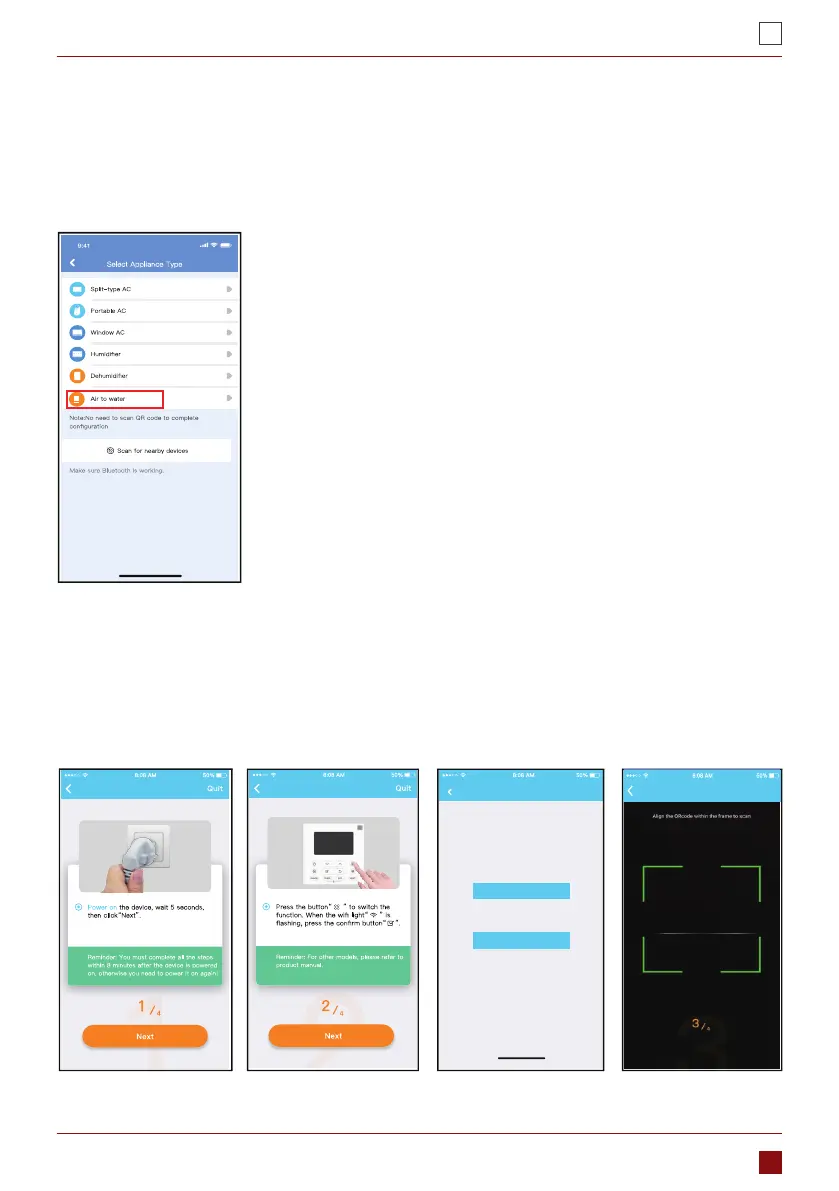
1. Wybierz typ urządzenia. (Rys. 4.3.1)
2. Wykonaj poniższe kroki, aby przejść do trybu „AP”. (Rys. 4.3.2)
3. Wybierz metodę konguracji sieci. (Rys. 4.3.3)
4. Wybierz metodę “Scan the QR code” (Zeskanuj kod QR). (Rys. 4.3.4)
Uwaga: Kroki 3 i 4 dotyczą tylko systemu Android. Wymienione kroki nie występują w systemie iOS.
Rys. 4.3.1
Rys. 4.3.2 Rys. 4.3.3 Rys. 4.3.4
Air To Water
Choose Method
Note:Wait5-10 seconds while your device is in
AP mode before scanning the QR code.
Manual Setup
Scan QR code on the unit
Air To Water
Air To Water
Air To Water
Choose Method
Note:Wait5-10 seconds while your device is in
AP mode before scanning the QR code.
Manual Setup
Scan QR code on the unit
Air To Water
Choose Method
Note:Wait5-10 seconds while your device is in
AP mode before scanning the QR code.
Manual Setup
Scan QR code on the unit
Air To Water
Choose Method
Note:Wait5-10 seconds while your device is in
AP mode before scanning the QR code.
Manual Setup
Scan QR code on the unit
Air To Water
Air To Water



 To Next Page