SMART WiFi modem for LCAC units
7User manual
PART 3. INSTALLATION AND CONFIGURATION
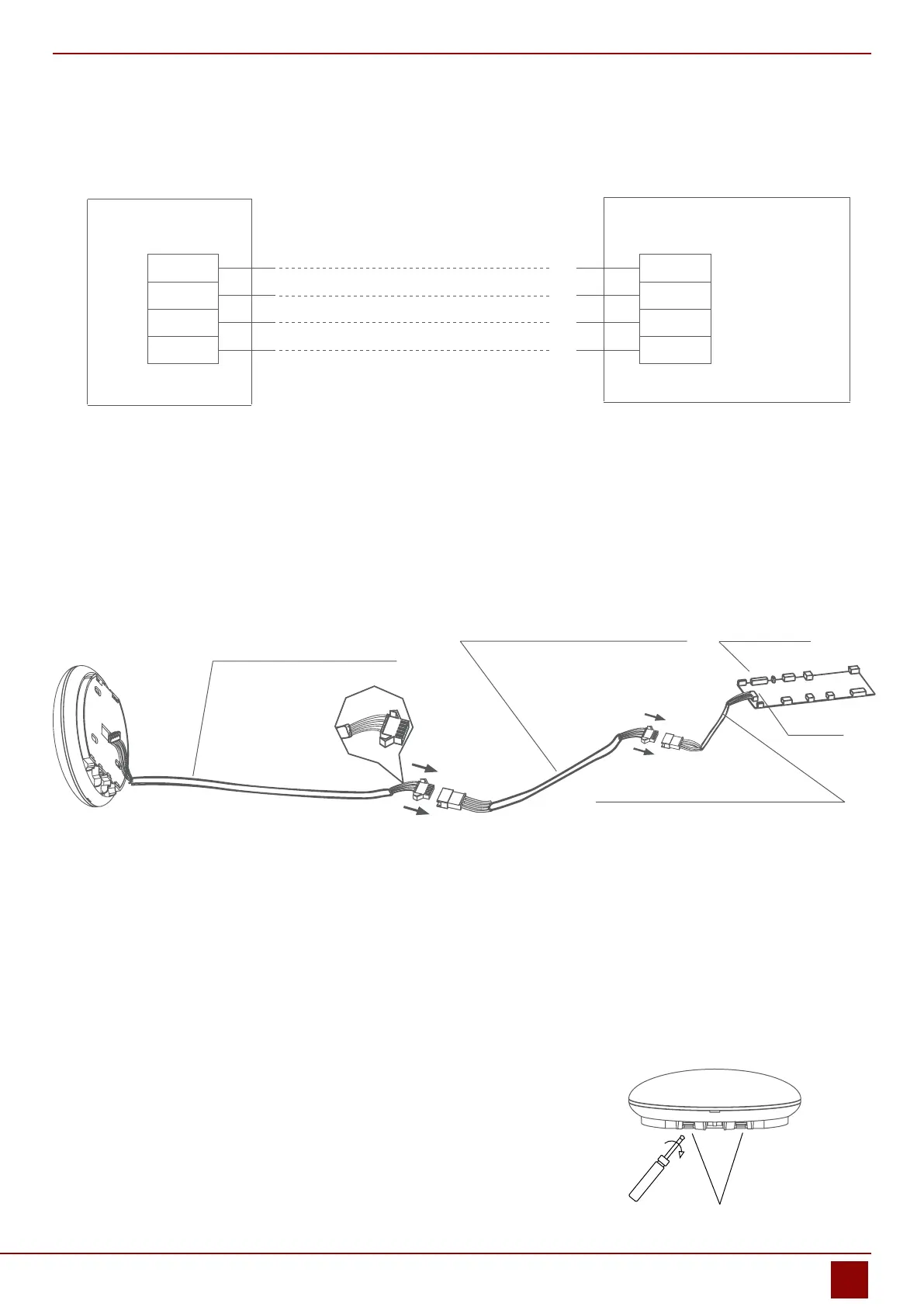
2.2. Wiring principle sketch:
red
black
yellow
brown
red
black
yellow
brown
Applicable to WF-60A1 only
Applicable to WF-60A1 only
Wi control box
4-Core Shield Cable, the length is decided
by installation
Fig. 2.2
2.3. Wiring gure
• Connect the male joint of the connective wires group-1 to the mainboard then connect the other side of the
connective wires group-1 to the 4-core shielding wire of the smart port. (See Fig.2.3)
• If want to extent the wire ,please use extension cord (purchased separately) . (See Fig.2.3)
4-core shielding wire
Extension cord (purchased separately) Mainboard
The connective wires group-1
CN40
Fig. 2.3
2.4. Remove the upper part of the smart port
• Insert a slot screwdriver into the slots in the lower part of the
smart port (2 places), and remove the upper part of the smart
port. (Fig.2.4)
Slots
Fig. 2.4


 To Next Page