rothaudio.co.uk | 9
USER MANUAL
ENGLISH
Setup Instructions
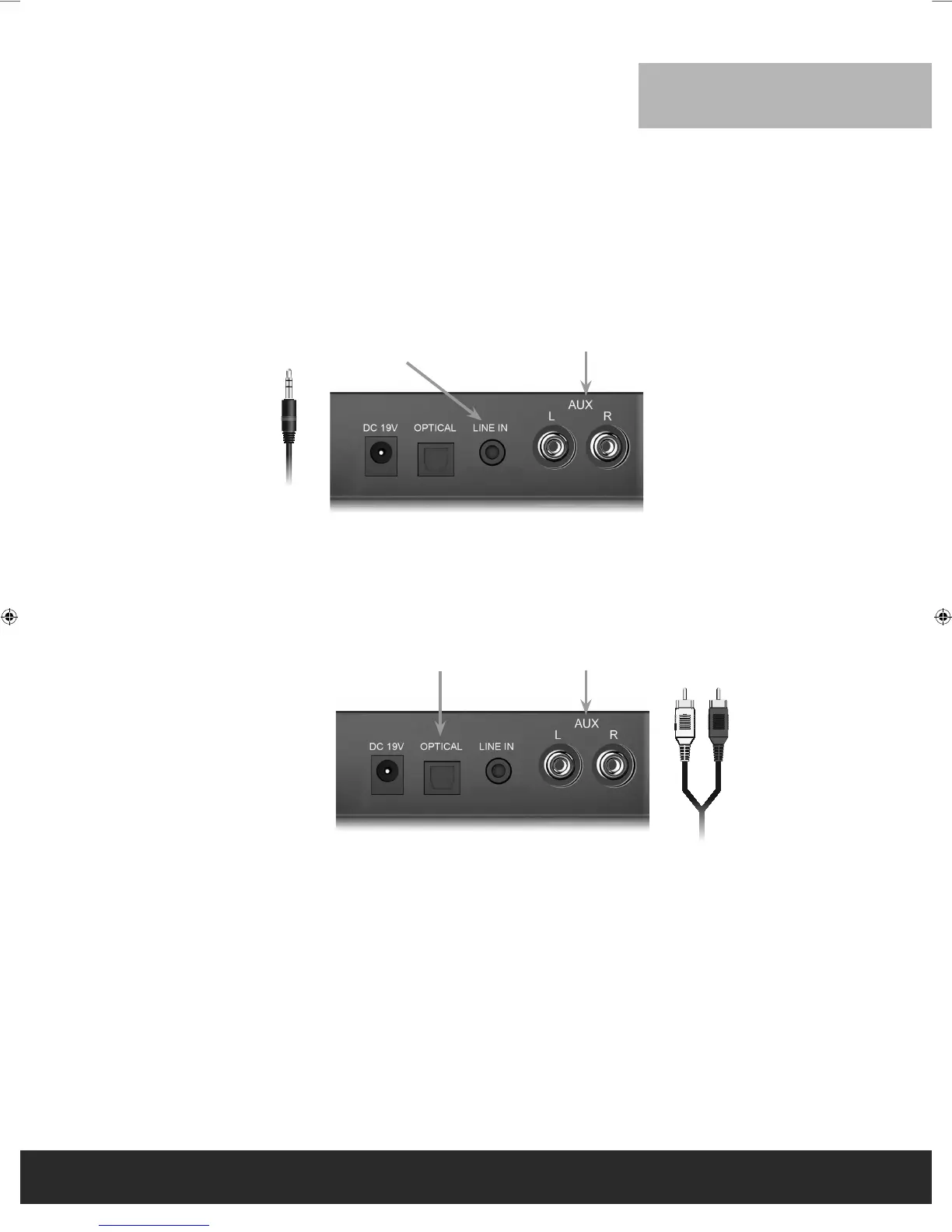
1. If your TV has a headphone output, plug the supplied 3.5 mm mini stereo cable into the headphone jack output of your TV
and the other end goes to the input jack (Input 2) on the back of your Sub Zero II (shown below).
2. If your TV does not have a headphone output and you are using a set top box, plug one end of the included RCA cable into
the audio outputs of your set top box and the other end into input 1 on the back of your Sub Zero II. The Sub Zero II remote
control and the control buttons on the front panel of the Sub Zero II will always function no matter what the audio input
source is.
[Note] Some TV’s do not have a headphone output but do have Audio outputs with RCA jacks. You can connect them to input 2 by using the RCA cable. This will also work fine
except that the Sub Zero II volume must now be adjusted using the Sub Zero II remote.
3. Input 3 is an Optical Input. If your TV does not have a headphone output, use this input to connect with the set-top-box by
using an Optical Input cable (not included).
Input 2
3.5 mm Stereo Cable
RCA Cable
Input 3 Input 1
Input 1
Roth Sub Zero II Manual UK EM.indd 9 11/10/2013 10:12


 To Next Page