Mounting Plate Instruction Sheet
Universal Mounting Plate:
This Mounting Plate allows for mounting of Fuel Packs on many different
surfaces.
Step 1 – If using the Universal Mounting Plate for a 4-gallon Fuel Pack or a combination of 2-gallon Fuel
Packs (for multiple 1-gallon Fuel Packs, only do step A but attach tightly):
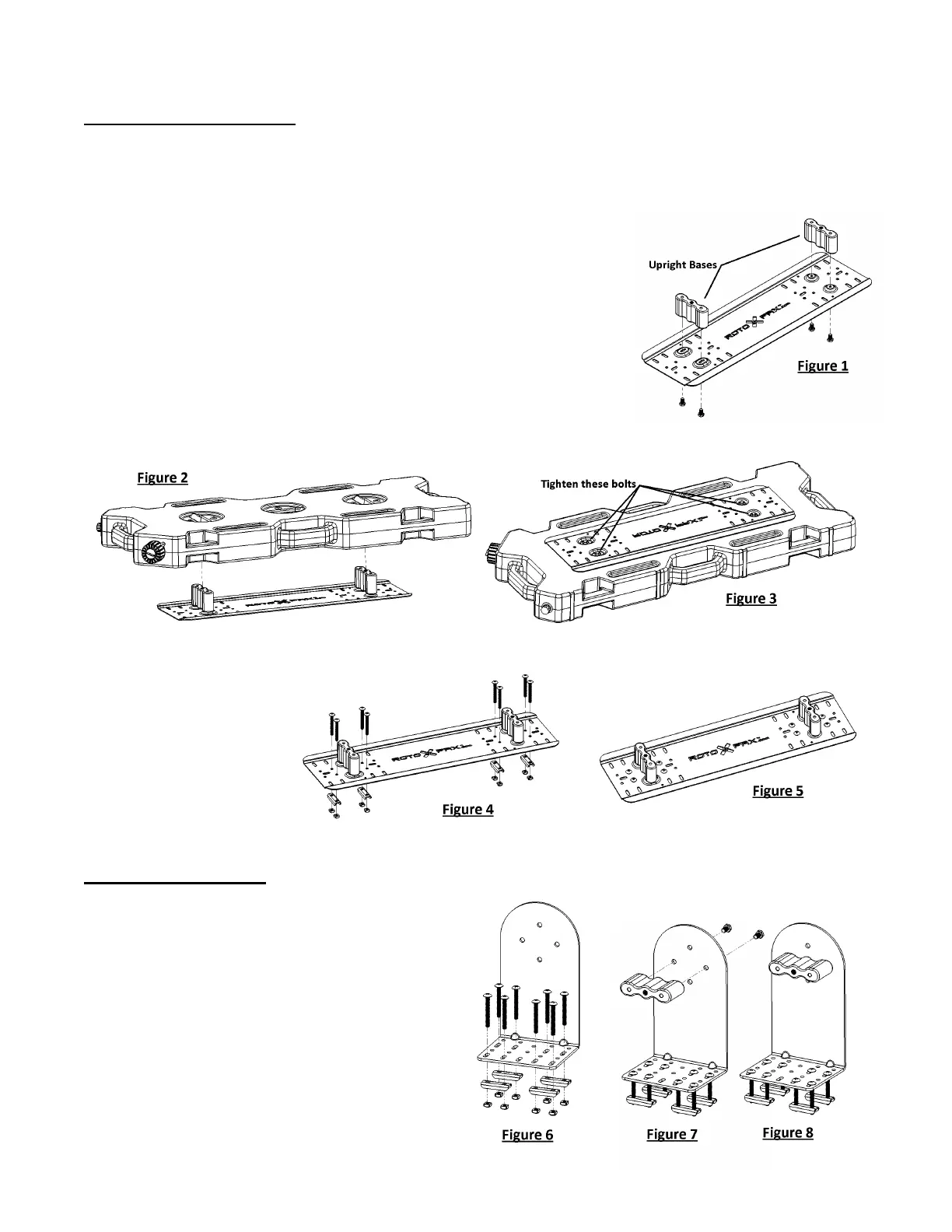
A – Attach Upright Bases loosely to Universal Mounting Plate
using the hardware included with the Upright Bases.
(see Figure 1)
B – Mount the Fuel Pack(s) onto the loosely attached Upright
Bases. (see Figure 2)
C – While the Fuel Pack(s) are still mounted, tighten the Base
bolts from the underside of the Universal Mounting Plate. (see Figure 3)
Step 2 – Once the Upright Bases have been attached properly, remove the Fuel Pack and attach the
Universal Mounting Plate to a desired surface using
any arrangement of holes in the Universal
Mounting Plate and the
provided hardware.
(see Figure 4 and 5)
Pack Mount L-Bracket:
The L-Bracket is excellent for mounting next to storage containers or when an
upright position is desired.
Step 1 – Attach the L-Bracket to a desired
surface using the hardware provided.
(see Figure 6)
Step 2 – Attach Upright Base to the L-Bracket
using the hardware included.
(see Figures 7 and 8)



 To Next Page