
 Need help?
Do you have a question about the ROVE Aurora Sky and is the answer not in the manual?
Highlights key functionalities and benefits of the projector, including lighting effects and Bluetooth speaker capability.
Covers essential safety instructions, handling advice, and usage precautions for the projector.
Details on how to use the power button to turn the projector on and off.
Explains the Aurora button's modes: default, voice control, and LED-only effects.
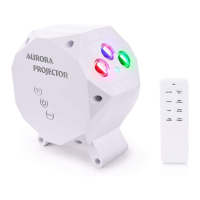
The ROVE Aurora Sky Projector is an innovative indoor star projector designed to transform any room into a captivating celestial environment. This device utilizes high-quality LED lights and holographic technology to create stunning visual effects, including Nebulae, Aurora Borealis lights (Northern Lights), and a Starry Sky atmosphere. It's suitable for various occasions, from special events to everyday relaxation, and can enhance dining experiences or home theater setups.
One of the primary functions of the ROVE Aurora Sky Projector is to instantly project Northern Lights or a Starry Sky, often referred to as a Nebula Cloud. These soothing nebular and Northern Light effects are crafted to create a relaxing and otherworldly ambiance, making any room feel more serene and immersive. The projector acts as an instant mood changer, allowing users to enjoy dining under the stars or elevate their home entertainment.
A key usage feature of the projector is its remote control, which provides effortless navigation through various light effects. Users can easily power the device on or off, change LED colors, and activate voice control modes. The remote simplifies the process of customizing the visual experience to suit different preferences or moods.
The projector also boasts a built-in Bluetooth speaker, allowing users to connect their cellphones, iPods, or tablets to play lullabies or relaxing music. This integration of audio and visual elements enhances the immersive experience, providing both a calming soundscape and a mesmerizing light show.
Setting up the ROVE Aurora Sky Projector is straightforward. After removing the projector from its packaging, users need to prepare the remote control by opening the battery cover, removing plastic protective covers from the two AAA batteries, inserting them, and then closing the cover. The projector is powered by plugging the provided adapter into the power port at the bottom of the device and then connecting it to an electrical outlet. Once powered, the projector should be placed on a flat, solid surface and aimed towards the desired ceiling or wall. Control can then be exercised either via the smart remote or the touch-sensitive buttons on the device itself.
The device features several touch-sensitive buttons for direct control. The "Power Button" allows users to turn the projector on and off with a single touch. The "Aurora Button" activates the default lighting effect, which is an automatic sequence of red, green, and blue LED lighting, accompanied by laser lighting that fades in and out. Pressing the "Aurora" button again switches the projector to Voice Control mode, where the LED lights and laser respond dynamically to the beat of music played through the Bluetooth speaker. A third press of the "Aurora" button returns to the LED lighting effect without the laser.
Similarly, the "Starry Sky Button" enables the Nebula Cloud effect, characterized by blue LED lighting with laser lighting that fades in and out. Pressing this button a second time activates Voice Control mode for the Nebula effect, where the laser lighting (but not the blue Nebula effect) becomes responsive to music. A third press of the "Starry Sky" button will display only the blue LED lighting.
The remote control offers extensive functionality. It includes a power ON/OFF button and a dedicated button to control LED lights ON/OFF. Users can enter Blue Nebula Cloud Mode, adjust brightness (Normal Brightness, Night/Sleeping Mode for less brightness), and control the speed of moving laser stars (Decrease Speed, Increase Speed). The remote also has buttons to make LED lights responsive to music beats, activate laser dots effects (steady or fading in and out), and turn the laser ON/OFF. Individual ON/OFF buttons are provided for Red, Green, and Blue LED lighting. Additionally, the remote features a timer function with selections for 1, 2, 3, or 4 hours, allowing users to set the projector to turn off automatically.
The Bluetooth speaker functionality is enabled by default. Upon turning on the projector, a voice prompt will announce "Bluetooth Mode." To connect, users should activate Bluetooth on their smartphone, tablet, or computer and search for new devices. The projector will appear as "ROVE AuroraSky Projector" in the device list. Once selected and paired, a voice prompt will confirm "Bluetooth Pairing Successful." After initial pairing, the projector and device will automatically connect when both are on and within range, eliminating the need for repeated setup.
Maintenance of the ROVE Aurora Sky Projector involves careful handling. It is not a toy and should be kept away from children or used under supervision. Only the provided power adapter should be used, as third-party adapters may cause damage and void the warranty. The device is designed for indoor use only and is not waterproof; exposure to rain, moisture, or water can cause internal or external damage. Users should avoid dropping, puncturing, or disassembling the product. Any issues with the device or accessories should be directed to the seller for assistance, as self-repair is not recommended.
A critical safety precaution involves the laser light. Users must never stare directly into the laser pointer beam, as it can be hazardous and cause eye damage. The device should always be kept away from a person's head and eyes during operation. Furthermore, the laser beam should not be pointed towards the sky, especially if within 10 miles (approximately 19 km) of an airport or aviation facility. Such actions can disturb pilot maneuverability and aircraft safety. Users are responsible for checking local airport guidelines and laws regarding laser use.
The ROVE Aurora Sky Projector comes with a one-year limited warranty from the date of purchase, covering defects in materials and craftsmanship. Proof of original purchase, such as an online order receipt, is required for any warranty service. For detailed warranty information, terms, and conditions, users can visit the provided website.
For disposal, the product should not be treated as household or general waste. It must be handed over to an applicable collection point for the recycling of electrical and electronic equipment, in accordance with local municipality collection facilities.
Customer support is available for any difficulties encountered during setup. Users can email for assistance, with responses typically provided within six hours. For faster responses, a text message service is also available. Support hours are Monday to Friday, 9 am to 5 pm PST. The manual also encourages users to visit the website for the latest and updated user manual and other useful content.
 General
| Projection Size | 30-120 inches |
|---|---|
| Battery Life | Up to 3 hours |
| Contrast Ratio | 1000:1 |
| Aspect Ratio | 16:9 |
| Lamp Life/Light Source Life | 30, 000 hours |
| Light Source | LED |
| Battery | 5000mAh |
| Resolution | 854x480 pixels |
| Connectivity | HDMI, USB, 3.5mm Audio Jack |
| Throw Distance | 1-4m |
| Built-in Speaker | Yes |
| Operating System | Android |
| Wi-Fi | Yes |
| Bluetooth | Yes |

 To Next Page