14
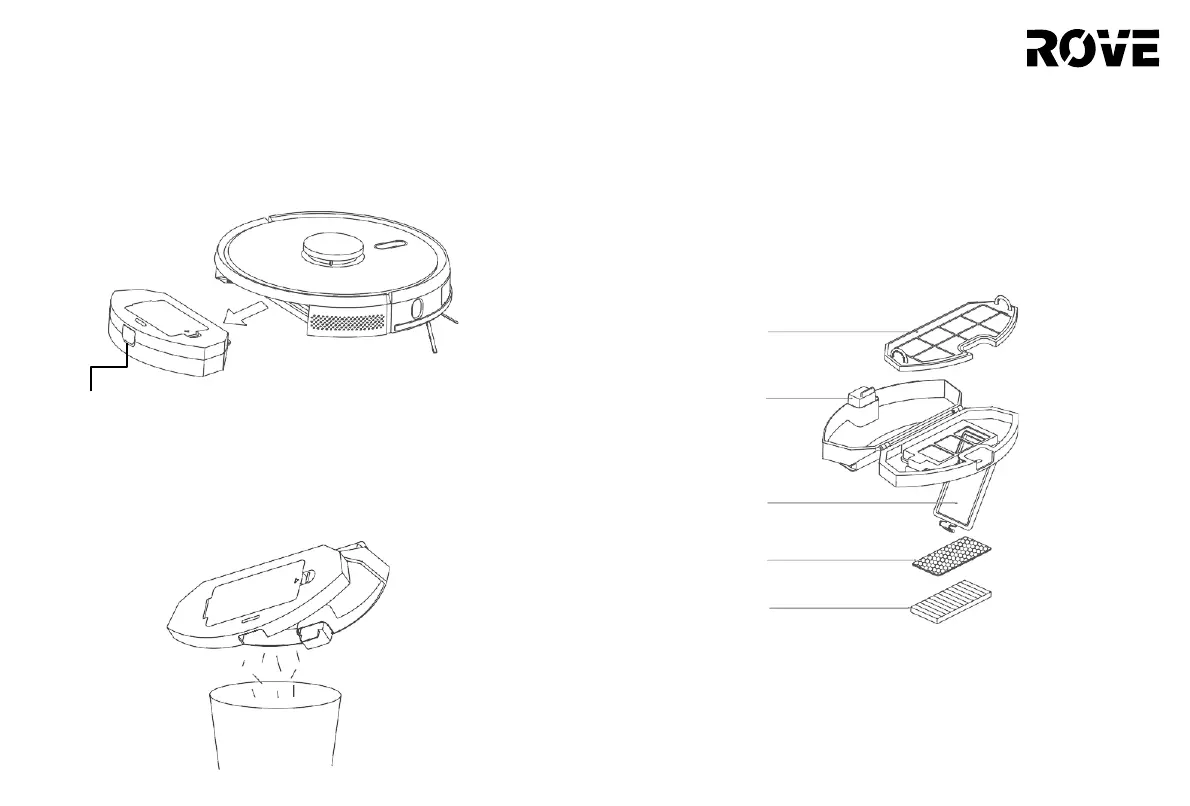
Dust Bin
1. Press and hold the dust bin release button, then pull out the
dust bin as shown below.
Filters
1. After a long period of use, remove the Net Filter, Sponge Foam
Filter and HEPA Filter.
2. Rinse the removed filters and dust bin under a tap.
3. After rinsing , shake off water drops. Let the filters and dust
bin dry completely.
4. After thoroughly drying, reinstall the filters in the following order:
Net Filter > Sponge Foam Filter > HEPA Filter (shown in the diagram
below).
Net Filter
2. Open the dust bin and empty the dirt into the
trash. Once cleaned up, close the dust bin
cover and then slide it in vacuum body.
Dust Bin Release
Button
Filter Cover
Sponge Foam
Filter
HEPA Filter
Note:
• Rinse the filters with clean water only. Do not add any
detergents.
• Do not use a brush or your fingers to clean the filters.
• Allow the filters to dry thoroughly for at least 24 hours.
• It is recommended to replace the filters every 3- 6 months.
ROUTINE MAINTENANECE
Dust Bin Release
Button


 To Next Page