21
User
Manual
Tunable White*
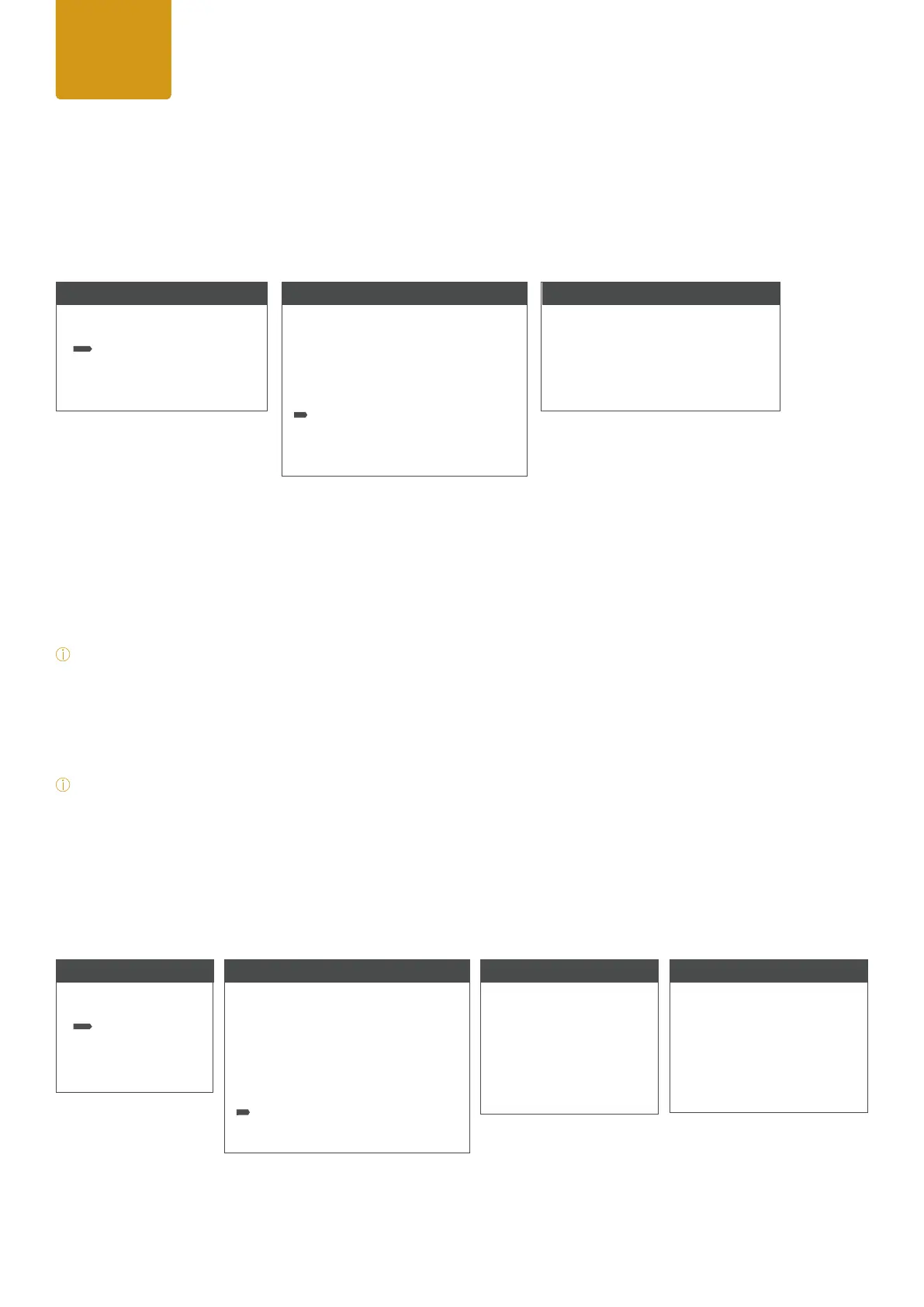
The standalone mode “Tuneable White” allows the color temperature (CCT) to be adjusted from 2.000K – 10.000K
in 100K steps and affects both RGB panels only. Besides brightness and shutter also a +/- green and magenta cor-
rection is available.
Starting from home screen press ENTER to access to main menu (level 1).
While using the UP / DOWN arrows select the menu item “Stand Alone” and conrm by pressing ENTER.
After please select the item “Tunable White” by using the up/down arrows and press ENTER again.
Using UP and DOWN controls to select your desired menu item, conrm by ENTER and adjust the desired value by up
and down controls and conrm all entries with ENTER.
*
Note:
Tint values
000 = no function/neutral
001 - 127 = + green
-001 to - 127 = - green
*
Note: Using UP/DOWN arrows at homescreen the selected CCT value can be changed in +/- 100K steps.
Shutter: Please see detailed explanation for strobe effects inside DMX chart at the end of this manual.
User Color*
The standalone mode “User Color” allows to store up to 5 customized color presets out of Red, Green, Blue, brightness
and shutter.
User
Manual
Menu
Level 1
DMX Mode
Stand Alone
Settings
System Info
Stand Alone Mode
Level 2
Stop Stand Alone
Auto FX
Color Macro
Quick Color
Tunable White
User Color
Color Settings
Tunable White
Level 3
CCT <5600>
TINT <000> (+/-127)
Dimmer <0-255>
Shutter <0-255>
Menu
Level 1
DMX Mode
Stand Alone
Settings
System Info
User Color
Level 3
Color 1
Color 2
Color 3
Color 4
Color 5
User Color
Level 4
Dimmer <0-100>
Shutter <0-255>
Red <0-255>
Green <0-255>
Blue <0-255>
Stand Alone Mode
Level 2
Stop Stand Alone
Auto FX
Color Macro
Quick Color
Tunable White
User Color
Color Settings


 To Next Page
 Loading...