41
User
Manual
8. TROUBLESHOOTING
Did you try turning the device off and on again?
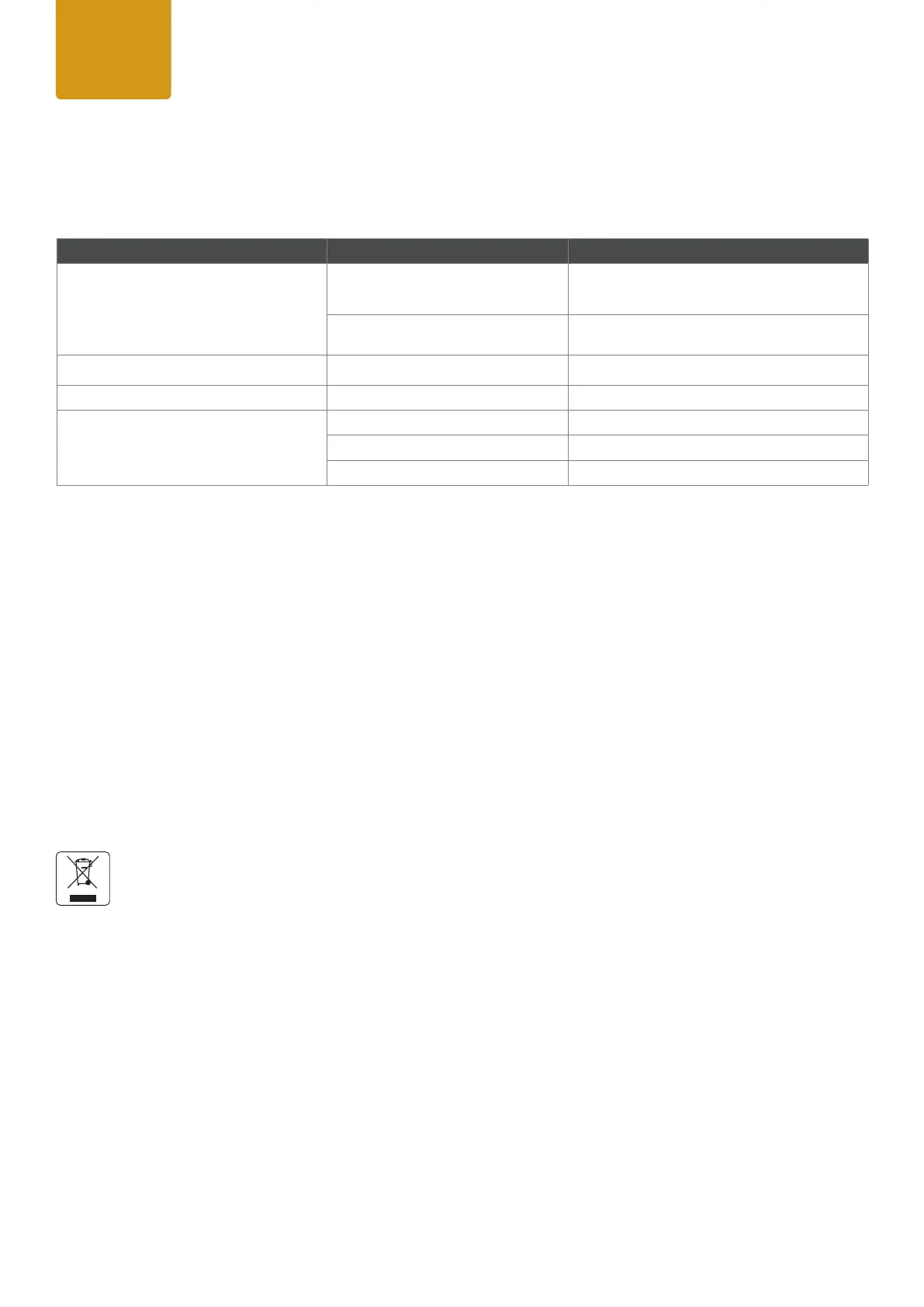
Problem Reason Solution
Device is not responding.
No power.
Check cable connections and conform that power
is switched on.
Fuse defect.
Contact your qualied service technician / manu
-
facturer.
Device has turned off. Power failure or power was turned off.
Check power supply, fuse, connections, switches.
Device has stopped responding. DMX cable correct? Check cables.
Device operates strangely.
DMX cable inverted (pins correct?) Use a phase inverter or different cables.
DMX cable terminated?
If not, install DMX termination at the end of the cable.
Stand Alone program running? Stop internal Stand Alone.
9. MANUFACTURER´S DECLARATION
Manufacturer´s Warranty & Limitations of Liability
Please nd our warranty conditions and limitations of liability inside our manufacturer´s declaration at
www.roxxlight.com/support
Requesting Warranty-Service
To request warranty service for your product, please contact:
ROXX GmbH,
Hansestr. 91
51149 Köln
Email: info@roxxlight.com or the ROXX authorized reseller in your country, from where you purchased your product.
Correct Disposal of this product
This is for the European Union and European countries with electrical waste collection systems. When this label is
shown on the product or brochure it means that the item cannot be disposed with household waste. In order to pre-
vent damage to the environment or human health please do not dispose this product uncontrolled. Make sure to act
responsible, recycle this product separately from other types of waste to enable lasting reuse of resources. Private
users please contact the retailer where you purchased this product or your local authorities to nd out where and
how proper recycling of this item is possible. Business users please contact your supplier or check the terms and
conditions of your purchasing contract. Make sure not to mix this product with other commercial waste.


 To Next Page
 Loading...