P. 4
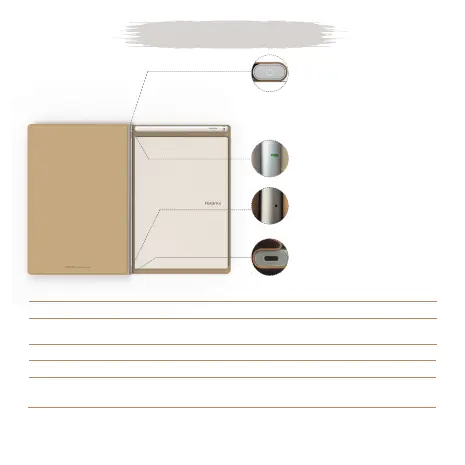
Product Overview
Power button/Create
new page button
Light indicator
System reset
USB-C charging port
* Long press the button
for 5 seconds to power
RoWrite 2 on/o
* Tap to create a new
page on RoWrite App
* Reset RoWrite 2 to default
settings
Light Indicator
Blue
Blue light
ashing 2 times
Blue ashing
Green
Green light
ashing 2 times
RoWrite 2 connected with RoWrite App
Create a new page on RoWrite App
(RoWrite 2 is connected to App)
Data transferring through Bluetooth
RoWrite 2 is powered on but not connected with RoWrite App
Create a new page on RoWrite
(RoWrite 2 is not connected to App)
Tips: Use a small pin to reset the RoWrite 2 if any issues occur


 To Next Page