OPERATING THE AIR PURIFIER
04
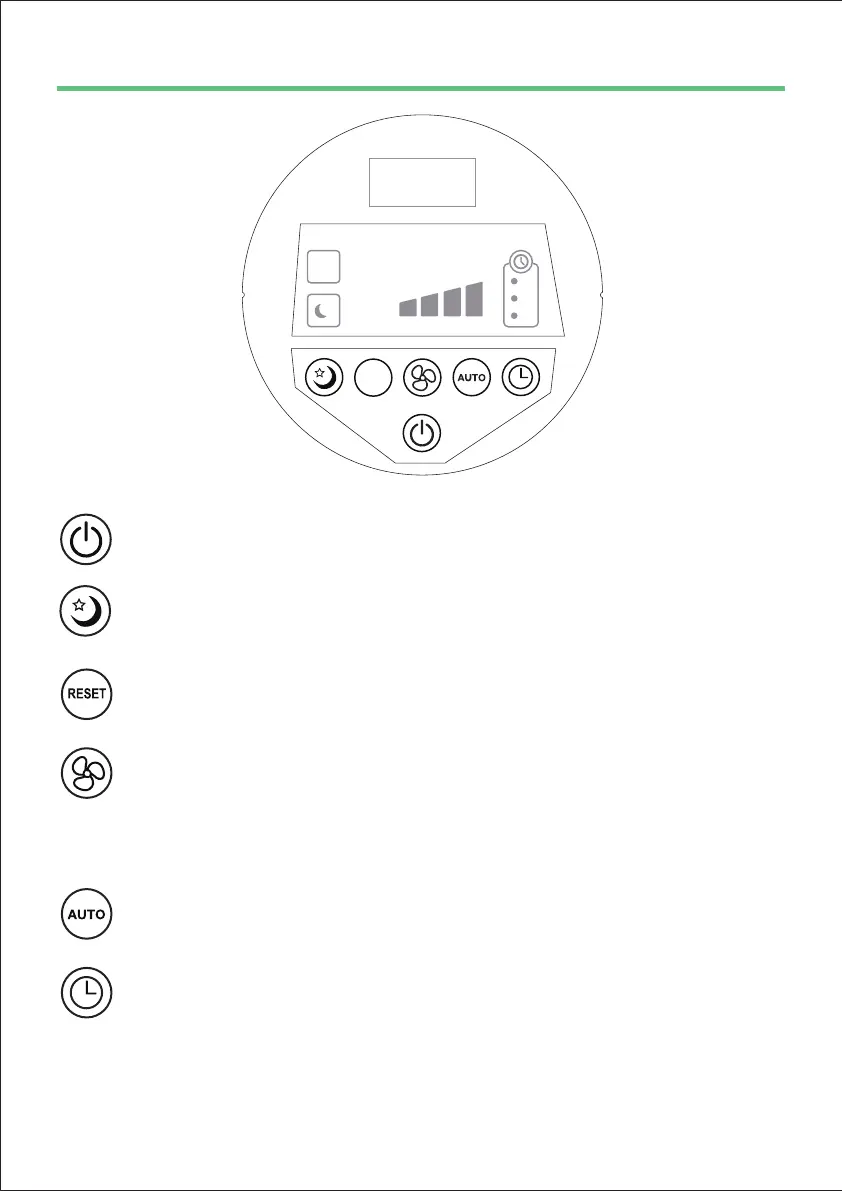
2. “SLEEP Mode”: Press this button to turn on the SLEEP mode.
Note: During Sleep mode, the unit will run in low speed.
4. “SPEED”: The fan speed of the unit can be adjusted when the unit is in
operation (L, M, H, Turbo). Each time that you press the (SPEED) button,
the speed is adjusted from L (low) to M (medium) to H (high) and Turbo.
Note: In Turbo speed, all the three LEDs will be light on.
3.“FILTER RESET”: Press and hold this button for 5 seconds to reset Filter
Replace Indicator.
1. “POWER”: Press to turn the unit on/o.
5. “AUTO”: Press button to turn on AUTO mode, the fan speed will change
according to the air quality level.(1-Blue, 2-Yellow, 3-Orange, 4-Red)
6. “TIMER”: Press this button to set the working time as you want for 2H, 4H
and 8H.
IMPORTANT: When the unit is not in use, please switch it o and unplug it.
LOW
AUTO
MED HIGH
TURBO
RESET
Z
Z
Z
REPLACE
FILTER
2H
PM
2.5
4H
8H



 To Next Page