Series 5 10G Network Daughter Card Installation Guide
Series 5 10G Network Daughter Card Installation
Expansion cardscan be installed in RSA Series 5NetWitness Suite appliancestoadd
functionality to the system. This topic provides the general procedure for installing a 10G
Network Daughter cardinto the NetWitness Suite Series 5 appliances. All but one of the Series
5 appliances arebased on the Dell PowerEdge R630chassis. The exception isthe Hybrid
appliance,which is based on the Dell PowerEdge R730xd chassis.
10G Network Daughter Card KitPackage Contents
The kit consists of the following:
1. 10G Network Daughter card
2. ESD Wrist Strap
3. Warranty Label
4. Series 5 10G Network Daughter Card Installation Guide(this document)
Caution: The 10G Network Daughter card includes a Small Form-factor Pluggable
Transceiver (SFP).
It is important that you only use the SFP that comes with the 10G Network Daughter card.
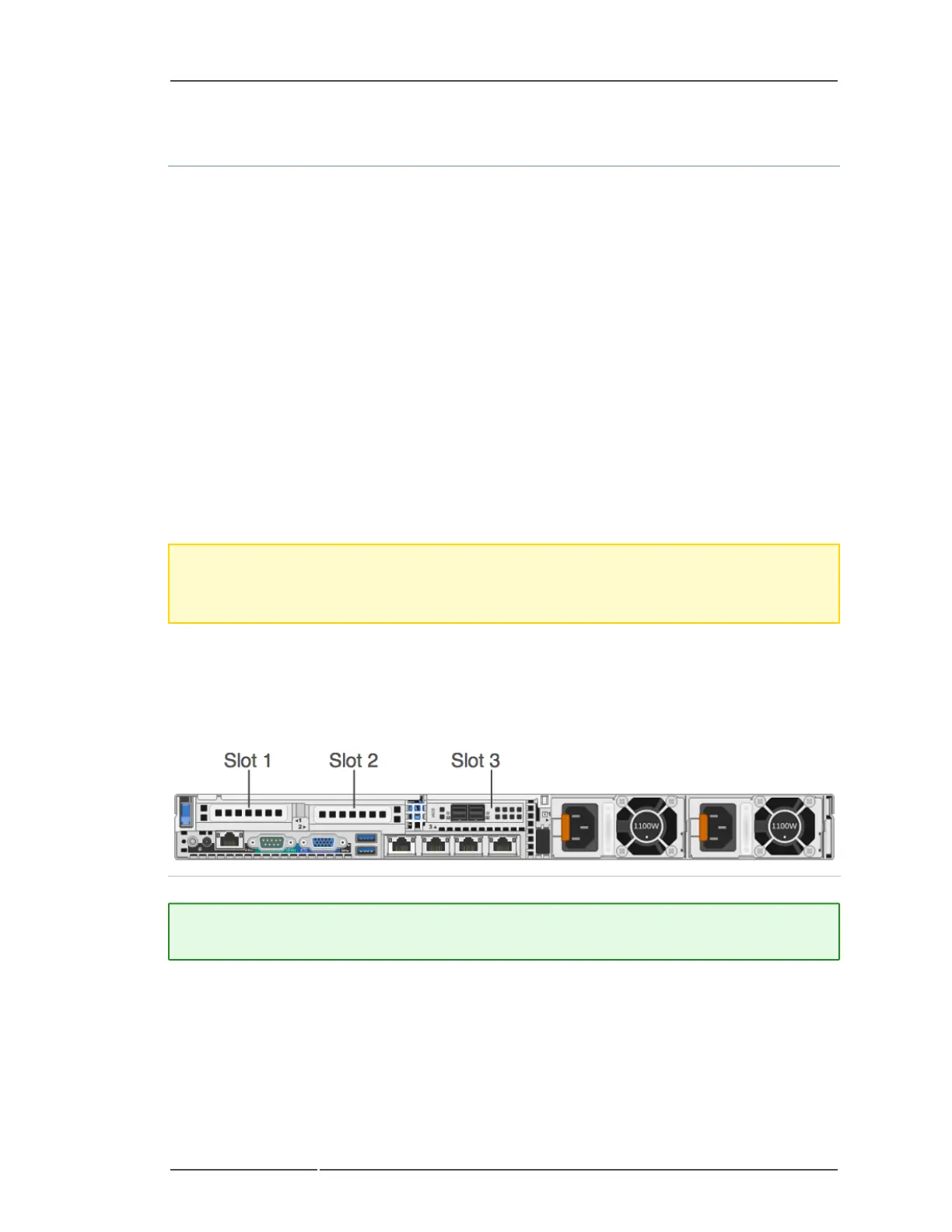
RearView of Series 5 Appliances (Except Hybrid)
The following figure shows a PERC H830 RAID controller in slot 3.
Note: A missing or an unsupportedcardriser logs an SEL event. It does not prevent your
system from powering on and aBIOS POST message or F1/F2 pause is not displayed.
5 Series 5 10G Network Daughter Card Installation



 To Next Page