EN
Controls
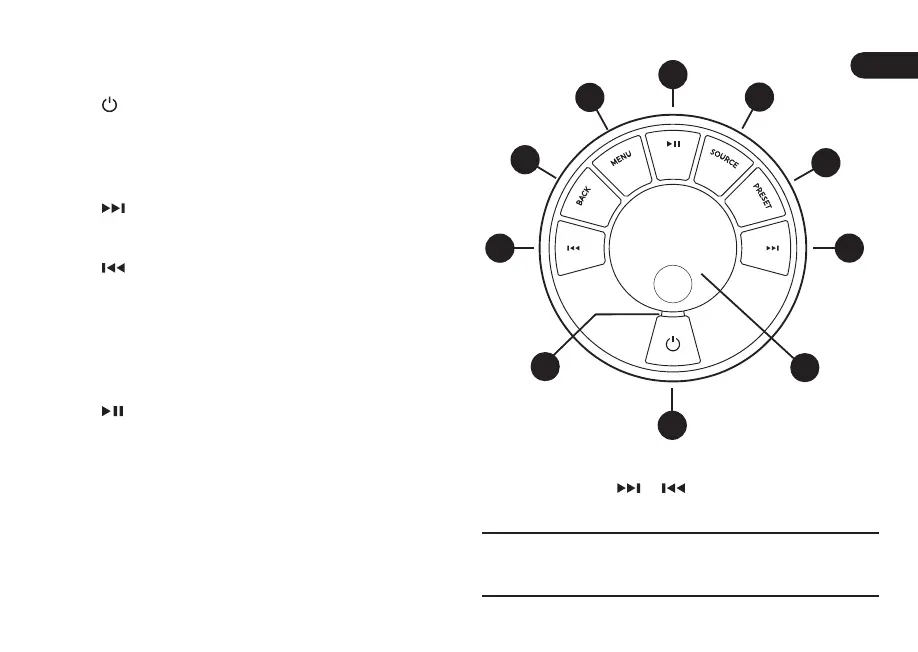
9. – STANDBY
10. CONTROL KNOB / SELECT
Rotate to adjust volume from a Now Playing screen
Rotate to browse menus, tracks or station lists*
Press to SELECT
11.
– press to skip to next station or track, press
and hold to fast forward. In standby, press to
increase display brightness.
12.
– press to skip to previous station or track,
press and hold to rewind. In standby, press to
decrease display brightness.
13. PRESET – press to recall a saved station or
playlist, press and hold for two seconds to save a
station or playlist
14. SOURCE – press to change audio source
15.
– press to play/pause a track or mute audio
inputs and radio
16. MENU – press to view the menu
17. BACK – press to return to the previous menu or list
screen
18. INDICATOR LIGHT
Indicates your music system is on and ashes
when Bluetooth is ready to pair or when using the
remote.
*You can also press
or to browse menus, tracks,
sources or station lists.
How long you press a key is important
Press = tap or press and immediately release
Press and hold = press and release after two seconds
9
11
12
13
14
10
16
17
15
18



 To Next Page