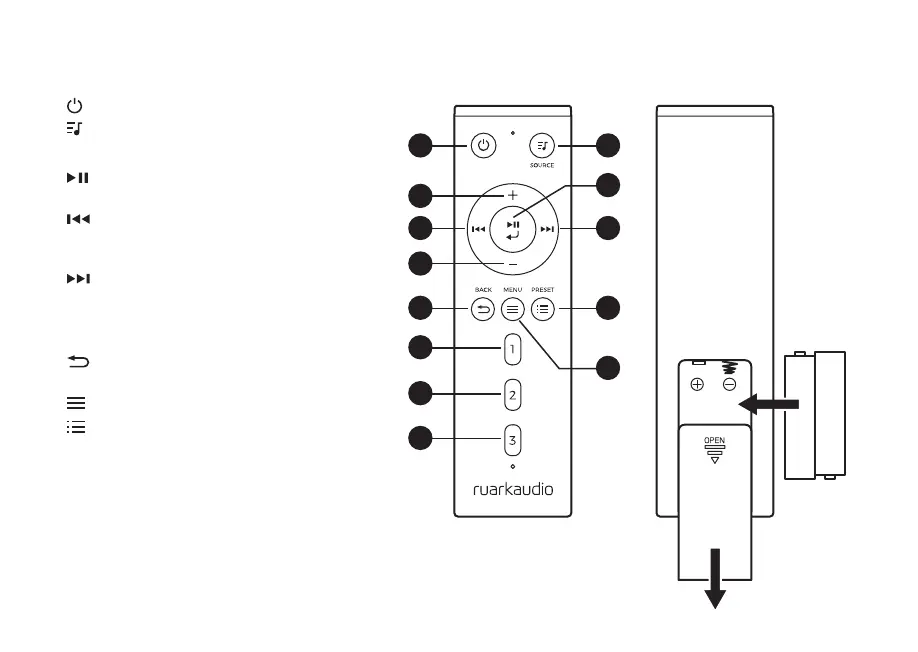
Remote
19. – STANDBY
20.
SOURCE – press to change audio source.
21. INCREASE VOLUME
22.
/ SELECT – press to play/pause a track,
mute/unmute radio or to select a menu item.
23.
– press to skip to previous station or
track, press and hold to rewind. In standby,
press to decrease display brightness.
24.
– press to skip to next station or track,
press and hold to fast forward. In standby,
press to increase display brightness.
25. DECREASE VOLUME
26.
BACK – press to return to the previous
menu or list screen.
27.
MENU – press to view the menu.
28.
PRESET – press to recall a saved station
or playlist, press and hold for two seconds to
save a station or playlist.
29. PRESET 1
30. PRESET 2
31. PRESET 3
+
-
+
-
21
25
19
26
29
31
30
23
20
22
27
24
28



 To Next Page