6 RG500 DEsk ChaRGER Manual 7RG500 DEsk ChaRGER Manual
En
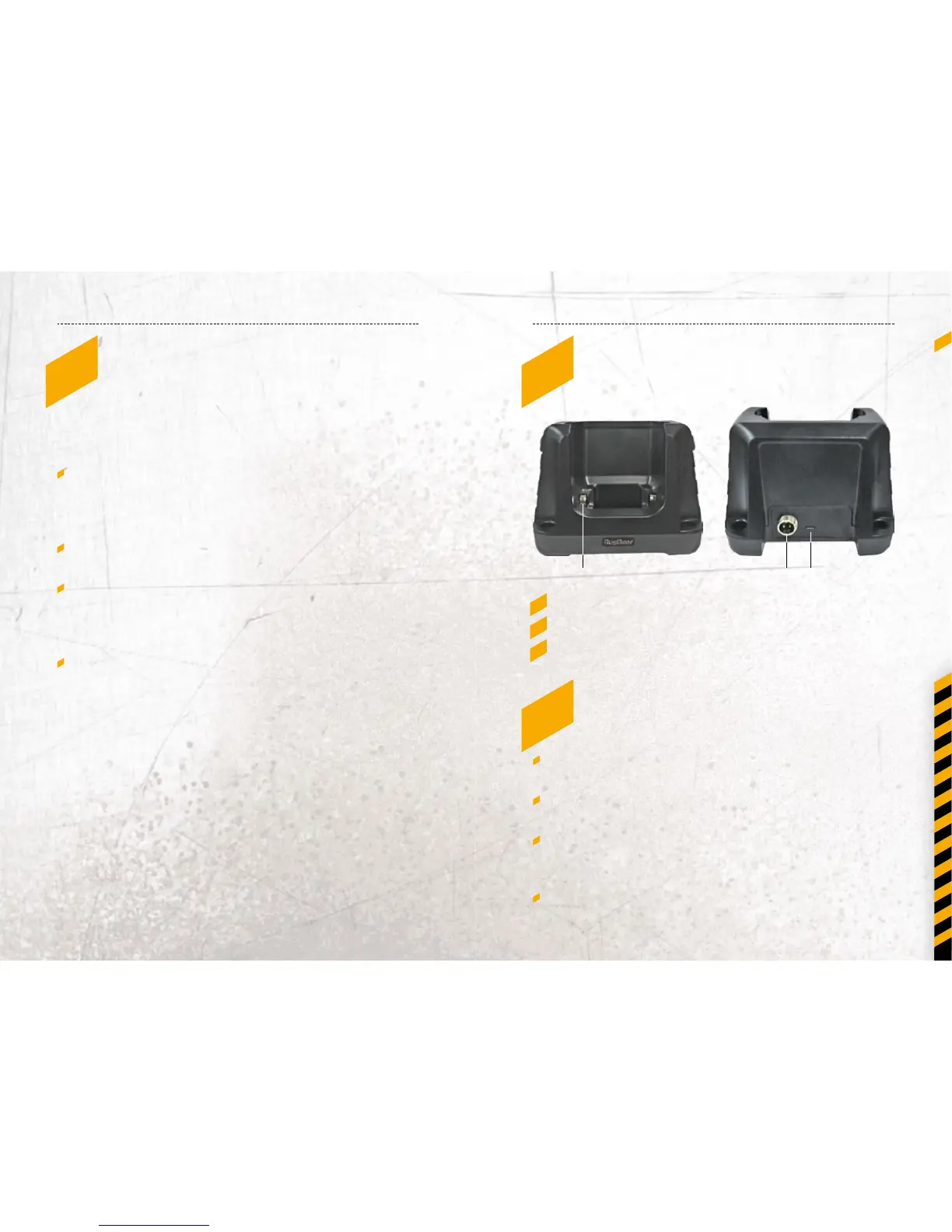
4_DIaGRaM oF pRoDuCT
1_ Charging contact
2_ 5V industrial cable port
3_ USB 5V port
5_saFETy GuIDE
Please use the RG500 Desk Charger in dry places /
environment.
Please connect the RG500 Desk Charger to right
output voltage (marked on product).
The cable should be placed in the proper position;
so that no one can step on, stumbling, ooding or
squeezing it.
This charger is specially designed for RG500.
3_saFETy pRECauTIons
Safety problems have been considered in manufactured
and designing process, but user should use this product
carefully according to the following basic safety measures:
To charge the RG500 the original accessories from
RugGear should be used. But if a dierent power supply
should be used, then always in accordance with the
required rated current and voltage values.
Do never use or install the RG500 Desk Charger
on hot surfaces.
Do not use the RG500 Desk Charger in damp or wet
environments. When there are damage by moisture,
return the unit to your nearest dealer or send it to the
RugGear Europe Service Center.
If the cord is damaged, the power supply must be
replaced in order to avoid danger. Please do not perform
the repairs by yourself but send the unit to the Service
Center.
2 31


 To Next Page