8 9
En
Quick Start Quick Start
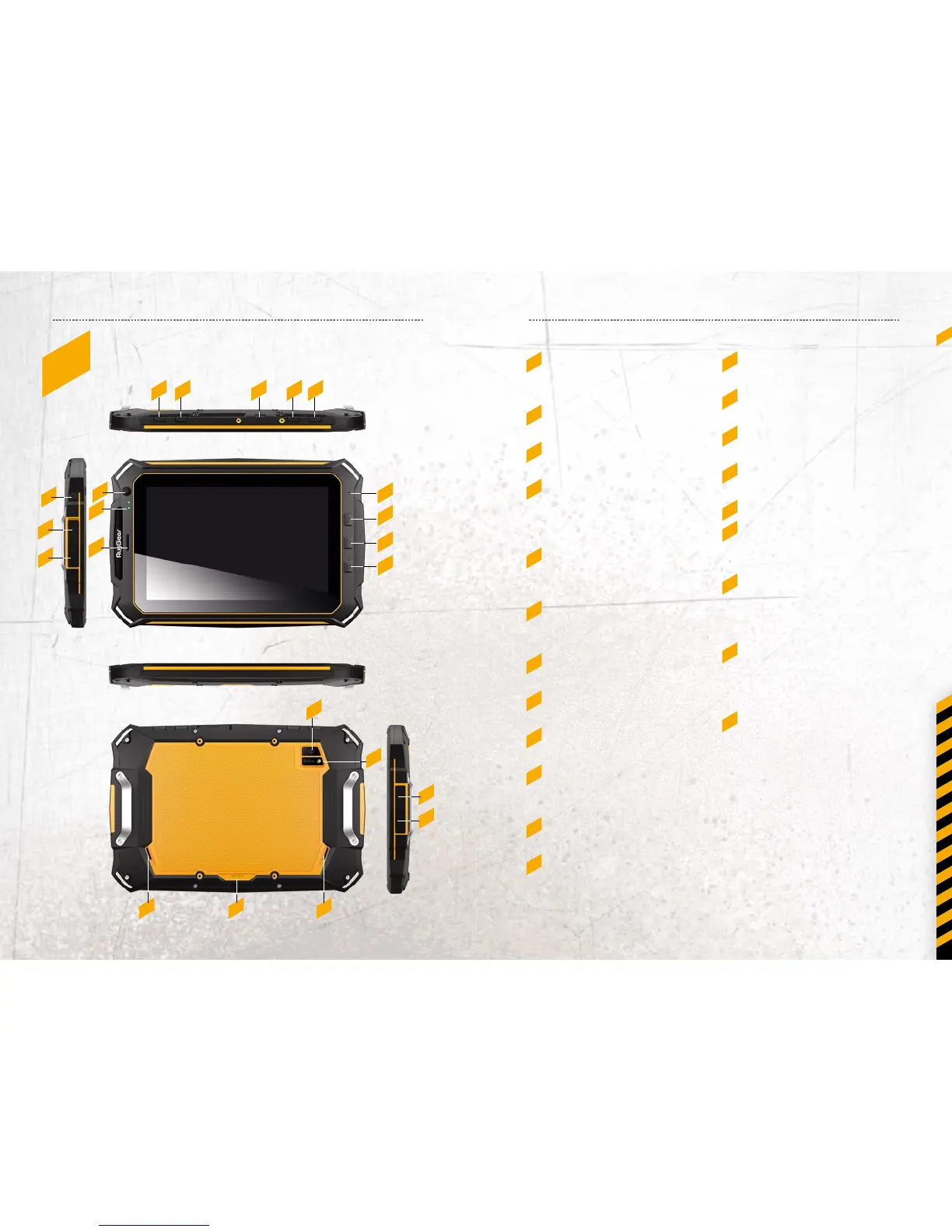
4_kEyS 13_ Shortcut key:
For back to last step
14_ Shortcut key:
For back to Home page
15_ Shortcut key:
For back to Menu
16_ Rear Camera:
8.0 MP
17_ Flash for Rear Camera
18_ Speaker:
Left speaker and right
speaker
19_ Dock contactor:
Use for connecting PAD
with charging dock for
charging
20_ Micro USB:
Connect to external USB
device or other mobile
device.
21_ Earphone Jack:
The built-in speaker will
shut down automatically
when plug in the earphone.
1_ SOS Key:
Poke the hole to make a
SOS call.
2_ Card Slot:
Use for SIM card
3_ Card Slot:
Use for memory card
4_ Power Button:
Press power button to select
power o or press for 10
seconds to reset your tablet.
5_ Camera Shortcut Key:
Use for opening camera
function
6_ External Module Jack:
Use for connecting with
external modules
7_ Volume Button:
To control the volume for –
8_ Volume Button:
To control the volume for +
9_ Front Camera:
2.0 MP
10_ Charging Lamp:
To indicate the charging
status of battery
11_ Receiver:
To listen to the coming call
12_ MIC:
Used for record
1
12
18 19 18
16
17
20
21
13
14
15
4 5 6 7 8
2
3
9
10
11



 To Next Page