EasyManua.ls Logo

Rugged Radios 696 Plus - User Manual

Rugged Radios 696 Plus
2 pages
Print Icon
To Next Page IconTo Next Page
Loading...
1A 2
5
3
1B
Rugged Radios | www.ruggedradios.com | 888-541-7223
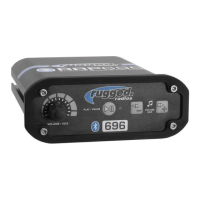
1. COMMUNICATION VOLUME / VOX
VOLUME / VOX knob (1A) controls intercom volume.
Knob (1B) controls voice activation (VOX) sensitivity.
2. PLAY / PAUSE
Plays or pauses music, answers or ends phone calls.
3. LED
Blue indicates power is on, red indicates transmitting.
4. SKIP
Quick press or skips forward or reverse.
Intercom Operation
Power On / O the intercom by rotating the volume control (1A) clockwise / counterclockwise.
VOX Adjustment
Bluetooth Pairing for Music and Cell
PRO TIPS
Rotate the VOX and VOLUME all the way clockwise, putting the mic in an open state. Listen for the ambient sound picked up. Slowly rotate
the VOX counter-clockwise one click at a time until the ambient noise is silenced. Now set VOLUME at about 50%, position the mic
AGAINST THE LIPS, and begin speaking normally. You should hear your own voice (Side-Tone). Adjust volume for comfort. If your voice does
not open the mic, increase VOX slightly (clockwise). If the mic opens too easily, decrease VOX slightly (counter-clockwise).
2-Way Radio Use
Received audio is controlled by your radio’s volume control, not the intercom volume control. Push-To-Talk (PTT) Buttons are only used for
transmitting over a 2-way radio connected to your intercom. To transmit, press and hold the PTT button, speak, then release when finished.
NOTE: Bluetooth audio will attenuate or “dim down” when VOX activates.
The higher the background noise level (engine, wind, etc.), the further counterclockwise you will need to adjust the VOX control.
Be sure to have all helmet / headset microphones positioned so they are touching the lips. This ensures proper microphone
activation and promotes noise canceling.
If the music is always quiet, adjust the VOX control on the intercom until the mic turns o and music volume increases.
Only driver can speak on cell phone call.
PRO TIPS
PTT buttons only activate one mic (ie: Driver PTT activates Driver mic). If receiving radios do not hear your voice but hear a
"click" indicating your radio is transmitting, verify your PTT and headset cables are in the correct ports.
When transmitting the LED on both the intercom and radio will illuminate red.
The radio’s hand mic is incompatible with intercom systems. We do recommend storing it in the vehicle in case of emergency
(in which case, power o the intercom).
Start with the intercom powered o and the bluetooth function of your phone or device powered o.
Turn on the intercom.
Turn on the phone or device's bluetooth and begin scanning (scanning is automatic on most phones).
Wait for "RUGGED696+" to be displayed on the list of found devices.
Select "RUGGED696+" and wait for the device to pair. If pairing is not successful, restart the process.
696 PLUS INTERCOM
USER MANUAL
5. MUSIC VOLUME
Quick press or increases/decreases volume.
4
Question and Answer IconNeed help?

Do you have a question about the Rugged Radios 696 Plus and is the answer not in the manual?

Summary

Intercom Controls and Operation

Communication Volume and VOX Control

Controls intercom volume and voice activation (VOX) sensitivity.

Play;Pause Button Function

Manages music playback and phone call interactions.

LED Status Indicator

Indicates power status (blue) and transmission (red).

Skip Functionality

Allows quick skipping forward or reverse through media.

Music Volume Adjustment

Controls music volume by quick press, increasing/decreasing.

Intercom Power Operation

Turn intercom on/off by rotating the volume control clockwise/counterclockwise.

VOX Sensitivity Adjustment

Guidance on setting VOX sensitivity for optimal voice activation.

Bluetooth Pairing Procedure

Steps for pairing a phone or device for music and cell functionality.

2-Way Radio Communication

Instructions for transmitting and receiving audio over a 2-way radio.

System Wiring and Mounting

Wiring Diagram Explanation

Details connections for headsets, PTT, radio, and audio output.

Radio and Intercom Mounting Guidelines

Recommendations for mounting intercom and radio units to minimize interference.

Power Connection Instructions

Guidance on connecting power cables directly to the battery for optimal performance.

Summary

Intercom Controls and Operation

Communication Volume and VOX Control

Controls intercom volume and voice activation (VOX) sensitivity.

Play;Pause Button Function

Manages music playback and phone call interactions.

LED Status Indicator

Indicates power status (blue) and transmission (red).

Skip Functionality

Allows quick skipping forward or reverse through media.

Music Volume Adjustment

Controls music volume by quick press, increasing/decreasing.

Intercom Power Operation

Turn intercom on/off by rotating the volume control clockwise/counterclockwise.

VOX Sensitivity Adjustment

Guidance on setting VOX sensitivity for optimal voice activation.

Bluetooth Pairing Procedure

Steps for pairing a phone or device for music and cell functionality.

2-Way Radio Communication

Instructions for transmitting and receiving audio over a 2-way radio.

System Wiring and Mounting

Wiring Diagram Explanation

Details connections for headsets, PTT, radio, and audio output.

Radio and Intercom Mounting Guidelines

Recommendations for mounting intercom and radio units to minimize interference.

Power Connection Instructions

Guidance on connecting power cables directly to the battery for optimal performance.

Overview

The Rugged Radios 696 PLUS INTERCOM is a communication system designed for in-vehicle use, facilitating communication between occupants, connecting to two-way radios, and integrating with Bluetooth-enabled devices for music and phone calls.

Function Description

The 696 PLUS INTERCOM serves as a central hub for various communication needs within a vehicle. Its primary functions include:

  • Intercom Communication: Enables clear voice communication between the driver and co-driver, and additional crew members via connected headsets.
  • Voice Activation (VOX): Features a VOX system that automatically opens the microphone when a user speaks, eliminating the need for manual activation. This system is adjustable to suit different background noise levels.
  • Two-Way Radio Integration: Connects to an optional two-way radio, allowing users to transmit and receive radio communications. Push-To-Talk (PTT) buttons are used for transmitting over the radio.
  • Bluetooth Connectivity: Provides seamless integration with Bluetooth-enabled phones or devices for streaming music and handling phone calls. Music volume automatically attenuates when VOX activates.
  • Audio Output: Includes an AUX OUT port for connecting to sound systems or recording devices, allowing the intercom's audio to be outputted externally.

Important Technical Specifications

While specific numerical specifications like frequency ranges or power output are not explicitly detailed in the provided manual, the functional descriptions imply several key technical aspects:

  • Volume Control: Features a dedicated VOLUME knob (1A) for adjusting intercom volume.
  • VOX Sensitivity Control: Equipped with a VOX knob (1B) to adjust the sensitivity of voice activation, allowing users to fine-tune when the microphone opens based on their speaking volume and ambient noise.
  • LED Indicators: Includes an LED (3) that indicates power status (blue for on) and transmission status (red for transmitting).
  • Audio Inputs/Outputs: Supports multiple headset connections (driver, co-driver, crew), a two-way radio connection, and an AUX OUT for external audio.
  • Power Requirement: Operates on a 12v battery, with specific instructions for direct connection to avoid interference. An optional Active Filter can be used for power conditioning.

Usage Features

The 696 PLUS INTERCOM is designed for user-friendly operation with several convenient features:

  • Power On/Off: The intercom is powered on or off by rotating the volume control (1A) clockwise or counterclockwise.
  • VOX Adjustment Procedure: A detailed procedure is provided for setting the VOX sensitivity, involving rotating the VOX and VOLUME knobs, listening for ambient noise, and speaking normally to adjust for optimal microphone activation and noise cancellation.
  • Bluetooth Pairing: A straightforward pairing process is outlined, requiring the intercom and phone/device Bluetooth to be off initially, then turning them on and scanning for "RUGGED696+" to connect.
  • Music Playback Control: Features dedicated buttons (4, 5) for playing/pausing music, skipping tracks forward/reverse, and increasing/decreasing music volume.
  • Phone Call Management: The play/pause button (2) also functions to answer or end phone calls. Only the driver can speak on cell phone calls.
  • PTT Operation: Transmitting over the two-way radio is done by pressing and holding the PTT button, speaking, and then releasing. PTT buttons are specific to individual microphones (e.g., Driver PTT activates Driver mic).
  • Noise Cancellation: Proper microphone positioning (touching the lips) is emphasized to ensure effective microphone activation and promote noise canceling.
  • Bluetooth Audio Attenuation: Bluetooth audio automatically "dims down" when VOX activates, ensuring intercom communication takes precedence.

Maintenance Features

While the manual does not detail routine maintenance, it provides crucial information regarding installation and troubleshooting that can be considered part of maintaining optimal system performance:

  • Mounting Guidelines:
    • The intercom and radio come with universal mounting brackets, with vehicle-specific options sold separately.
    • It is critical NOT to mount the radio or intercom near an ignition box to prevent RF interference.
    • Antenna cables should be routed away from power leads and headset cables to minimize interference.
  • Power Connection Guidelines:
    • All power cables should be routed directly to the battery, away from other power/headset cables.
    • DO NOT connect inline with other components. Tying power to ignition, lights, or other power sources can lead to ground loop problems and system noise.
    • DO NOT remove any factory fuses or modify power cables.
    • If using an optional Active Filter, the radio and intercom power leads should connect directly to the Active Filter, NOT the battery.
  • Troubleshooting Tips (PRO TIPS):
    • VOX Adjustment: Adjusting VOX further counterclockwise is needed in higher background noise environments.
    • Microphone Positioning: Ensure all helmet/headset microphones are positioned touching the lips for proper activation and noise canceling.
    • Music Volume: If music is always quiet, adjust the VOX control until the mic turns off and music volume increases.
    • PTT Verification: If receiving radios hear a "click" but not voice during transmission, verify PTT and headset cables are in the correct ports.
    • Transmission Indicator: The LED on both the intercom and radio will illuminate red when transmitting.
    • Hand Mic Incompatibility: The radio's hand mic is incompatible with intercom systems and should be stored in the vehicle for emergencies, with the intercom powered off if used.

The manual emphasizes proper installation and configuration to ensure reliable operation and prevent common issues like noise or interference, which are key aspects of maintaining the system's performance over time.

Rugged Radios 696 Plus Specifications

General IconGeneral
BrandRugged Radios
Model696 Plus
CategoryMotorcycle Accessories
LanguageEnglish

Related product manuals