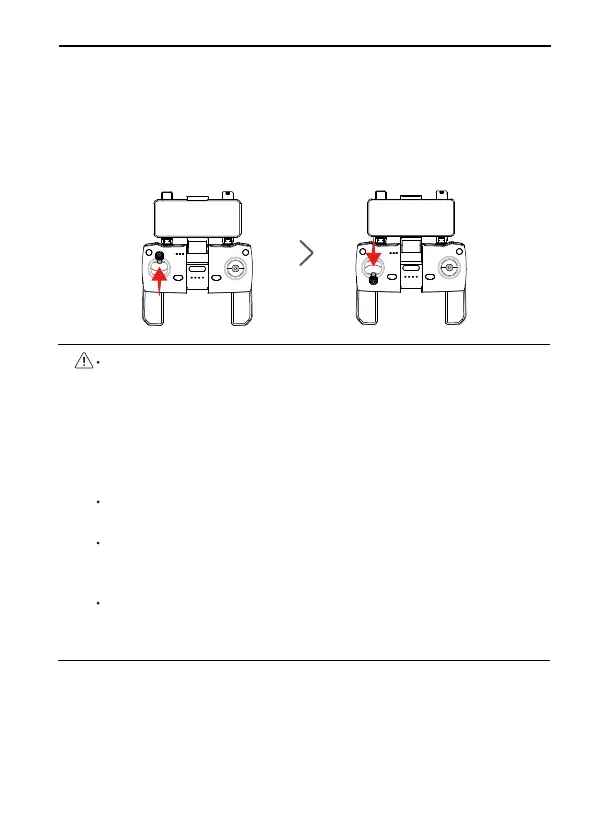
Push up the left stick of the transmitter to 12 o’clock and then pull
it down to 6 o’clock to unlock the link. After the aircraft emits a
“beep” sound, the aircraft’s light programming is pink, which means
the linking is successful, and the phone screen displays the Aircraft’s
calibration compass, transmitter’s battery signal and other informa-
tion.
F11 User Manual
⑤
Copyright ©2022 Ruko All Rights Reserved.
45
When the Android phone is connected to aircraft’s WiFi (named
RUKO-F11-xxxxxx), as the aircraft’s WiFi has no network, wait for
about 10-40 seconds on the phone WiFi setting page, the phone
will pop up the network setting option to ask whether to continue
to connect to aircraft’s WiFi, please set it to continue to use
aircraft’s WiFi, so as not to cause the APP to be unable to see the
image transmission screen.
Please turn off the VPN switch of the phone to avoid the APP not
being able to see the image transmission screen.
If the mobile phone is set to priority on Internet speed and the
APP cannot see the image transmission screen, please set the
mobile phone to airplane mode and try.
Aircraft image transmission WiFi is 5.8G, mobile phone WLAN
function must be supported; dual-band WiFi, 2.4G+5.8G, can be
applied.



 To Next Page