MicroSD U3 card is recommended;
Capacity of card is suppoed up to 512GB.
Notice:
Use carefully when handling memo cards. Avoid liquids, dust, and
debris. As a precaution, please power o the camera before inseing
or removing the card. Check manufacturer guidelines regarding use
in acceptable temperature ranges.
If camera cannot record, please format the used microSD card via
RunCam App or computer.
Micro SD Card
6
Computer Connection
7
Firmware update
8
GyroFlow Suppo
9
Remote Control
Remote Control via UART (Recommended)
10
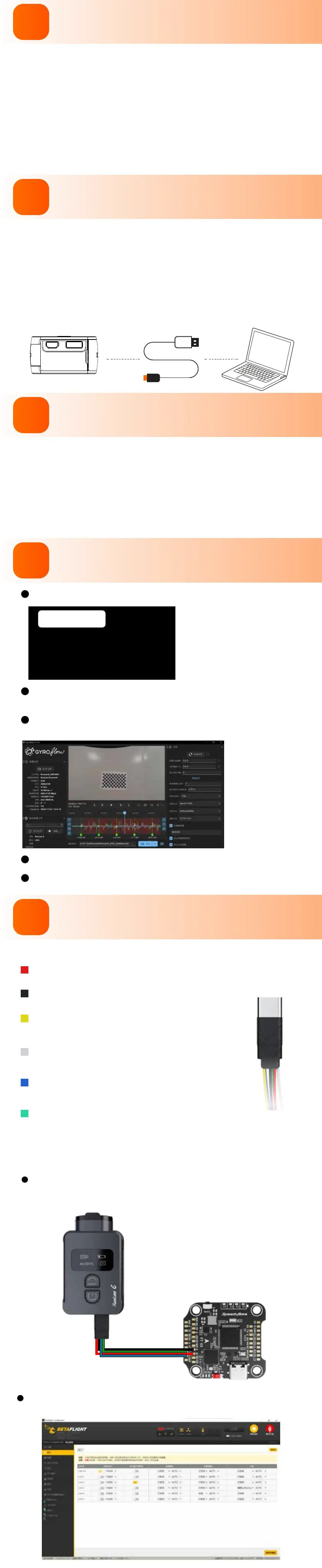
Use camera to record, and there will be Runcam6_0001.mp4 and
Runcam6_0001.gcsv generated.
Turn o stabilization
Download GyroFlow from https://gyroow.xyz/, install and run
the software.
After stabilizing the recording video via GyroFlow, expo the video.
Please refer to an electronic document for more details.
Connect the camera to a computer via Type-C
cable, the camera will be recognized as a
U-Disk.
Notice:
If the camera cannot be recognized by the computer after connecting,
please make sure that a microSD card is inseed well. If you cannot
access the les inside the microSD card, please t another Type-C
cable or po of PC.
For camera’s best peormance, please use
the latest rmware.
Camera rmware update status: Light alternates quick-blinking blue
Wi-Fi/Menu light and quick-blinkng red Power light, and camera shuts
o automatically when the update is nished.
Firmware update method/download and RunCam App:
https://www.runcam.com/download/Runcam6
Type-C Control cable instruction
Power wire
It suppos external power input of DC5-18V.
Ground
Power ground wire / Remote control signal ground wire
Video
It can be soldered to VI pad of Flight Controller or Video In
pad of Video Transmitter to transmit video signal to VTX.
PWM
It can be soldered to a spare M pad or LED pad of Flight
Controller to achieve remote control for camera.
TX
It can be soldered to a R3 pad or other spare UART of Flight
Controller to achieve remote control for camera.
RX
It can be soldered to a T3 pad or other spare UART of Flight
Controller to achieve remote control for camera.
Here we take Flight Controller Speedy Bee-F7 for an example
Solder the wires of TypeC control cable to the pads on
Speedy Bee F7 V3, with Power wire to 5V pad, GND wire
to GND pad, Tx wire to R3 pad and Rx wire to T3 pad.
Use BetaFlight to congure, setting the UART3 of
SpeedyBee F7 V3 as RunCam device.



 To Next Page
 Loading...