Need help?
Do you have a question about the RunCam Swift and is the answer not in the manual?
Details the camera's resolution, voltage, FOV, and physical dimensions.
Distinguishes between 'Up Interfaces' and 'Down Interfaces' versions.
Illustrates the connection for OSD settings using the 5D-OSD module and monitor.
Shows how to connect the camera for FPV use, linking it to a transmitter.
Details the primary OSD menu structure, including Setup, Exposure, and basic settings like Shutter and Brightness.
Explains Backlight Compensation settings, including BLC and HLC options and their parameters.
Covers Day & Night settings, differentiating between AUTO and B&W modes with adjustable parameters.
Details image adjustments like Lens Shad, DNR, Mirror, Font Color, Contrast, Sharpness, and Display.
Provides a comprehensive list of the camera's technical attributes including sensor, resolution, power, and dimensions.
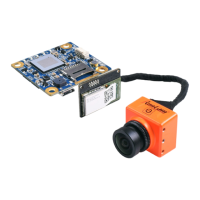
The RunCam Swift is a compact mini FPV camera designed for use in various applications, particularly in the realm of drone racing and aerial photography where a small form factor and robust performance are crucial. Its primary function is to capture video footage with a 600TVL resolution, providing clear images for both real-time viewing (FPV) and recording. The camera supports a wide voltage input range of 5-17V DC, making it versatile for integration with different power systems commonly found in FPV setups.
One of the key usage features of the RunCam Swift is its D-WDR (Digital Wide Dynamic Range) capability. This feature is essential for FPV cameras as it helps to balance exposure in scenes with both very bright and very dark areas, such as when flying from a shaded area into direct sunlight or vice versa. D-WDR ensures that details are not lost in either the highlights or shadows, providing a more consistent and usable video feed for pilots. The camera also boasts a horizontal field of view (FOV) of 90°, offering a balanced perspective that is wide enough to provide good situational awareness without introducing excessive fisheye distortion.
The RunCam Swift is designed with user-friendliness in mind, featuring an On-Screen Display (OSD) menu that allows for easy configuration of various camera settings. This OSD can be accessed via a 5D-OSD menu cable, which connects the camera to a monitor for setting adjustments. The connection process for OSD setting involves connecting the camera's video out to a monitor, and the camera's power in to a power source, with the 5D-OSD cable bridging the camera and the monitor. This setup enables pilots to fine-tune parameters such as exposure, backlight compensation, white balance, day and night modes, and image adjustments directly through an intuitive menu system displayed on the monitor.
For FPV use, after the OSD settings have been configured, the 5D-OSD menu cable is unplugged. The camera then connects directly to a video transmitter. The connection for FPV involves supplying power to the camera and connecting its video output to the video input of the transmitter. The transmitter then sends the video signal wirelessly to the pilot's FPV goggles or monitor. This streamlined connection ensures that the camera is ready for flight without unnecessary cables or bulk.
The OSD menu offers a comprehensive range of settings to optimize the camera's performance for different lighting conditions and personal preferences. Under the "MAIN MENU," users can adjust the "CAM TITLE" (ON/OFF), "EXPOSURE," "BACKLIGHT," "WHITE BAL," "DAY & NIGHT," "IMAGE ADJ," "DPC," and "LANGUAGE." The "EXPOSURE" submenu allows for control over "SHUTTER" (AUTO / 250-100000 / FLK), "BRIGHTNESS" (50 / 0-255), "AGC," and "DWDR" (ON:58 0-63 / OFF). These settings are crucial for adapting the camera to varying light levels, from bright daylight to low-light conditions.
"BACKLIGHT" compensation can be configured through "BLC" (Backlight Compensation) or "HLC" (Highlight Compensation). In the "BLC" submenu, users can select "AREA SEL" (AREA1/AREA2), adjust "GAIN" (144 / 0-255), "HEIGHT" (3 / 0-3), "WIDTH" (15 / 0-15), "LEFT / RIGHT" (0 / 0-3), and "TOP / BOTTOM" (12 / 0-12). These granular controls allow for precise adjustment of how the camera handles areas with strong backlighting, ensuring that the main subject remains visible. The "HLC" submenu provides "LEVEL" (200 / 0-255) and "MODE" (ALL DAY / NIGHT ONLY) options, which are useful for suppressing bright light sources that might otherwise overexpose the image.
The "DAY & NIGHT" settings offer modes such as "AUTO," "COLOR," "B/W," and "EXT." In "D&N AUTO," users can set "D->N LEVEL" (144 / 0-157), "D->N DELAYL" (3 / 1-30 SEC), "N->D LEVEL" (112 / 0-255), and "N->D DELAY" (1 / 1-30 SEC). These parameters control the thresholds and delays for the camera to switch between day (color) and night (black and white) modes, optimizing image quality for different times of day. For "D&N B&W," options include "BURST" (OFF/ON), "IR SMART" (ON/OFF), and "IR LEVEL" (HIGH/LOW), which are relevant for enhancing visibility in very low light conditions, often with the aid of infrared illumination.
"IMAGE ADJ" provides further customization of the video output. This submenu includes "LENS SHAD" (OFF/ON:29 0-255), "2DNR" (ON), "MIRROR" (OFF), "FONT COLOR," "CONTRAST" (146 / 0-255), "SHARPNESS" (26 / 0-31), "DISPLAY" (CRT/LCD/USER), and "NEG IMAGE" (OFF). "2DNR" (2D Digital Noise Reduction) helps to clean up the image, especially in low light, by reducing visual noise. "MIRROR" can be useful for correcting image orientation depending on how the camera is mounted. The "FONT COLOR" submenu allows for customization of the OSD text, with "FONT" (3 / 0-15) and "ID & TITLE" (3 / 0-15) options.
Maintenance features for the RunCam Swift are primarily focused on ensuring optimal image quality and longevity. The "DPC" (Defect Pixel Correction) setting in the main menu is a maintenance feature that allows users to correct dead or stuck pixels on the sensor. To use this, the user is instructed to cover the lens and then press the enter key, which initiates the pixel correction process. This helps to maintain a clean and artifact-free image over time. Regular cleaning of the lens is also implied for optimal performance, though not explicitly detailed in the OSD menu. The robust design and wide voltage input range contribute to the camera's overall reliability and ease of maintenance in demanding FPV environments.
In summary, the RunCam Swift is a highly configurable and robust mini FPV camera designed to deliver clear and adaptable video footage. Its extensive OSD menu provides pilots with detailed control over image parameters, allowing for fine-tuning to suit various flying conditions and personal preferences. The D-WDR and 2DNR features enhance image quality in challenging lighting, while the DPC function offers a simple maintenance solution for pixel defects. Its compact size and wide voltage compatibility make it an ideal choice for a broad range of FPV applications.
 General
| Sensor Type | CCD |
|---|---|
| Weight | 12g |
| Signal System | PAL/NTSC |
| Auto Gain Control (AGC) | Yes |
| Back Light Compensation (BLC) | Yes |
| Dimensions | 32mm x 32mm x 26mm |
| Operating Temperature | -10°C ~ +50°C |
| Image Sensor | 1/3" SONY Super HAD II CCD |
| Lens | 2.8mm |
| Minimum Illumination | 0.01 Lux @ F1.2 |
| Power Supply | DC 5V-36V |
| Electronic Shutter Speed | PAL: 1/50~1/100, 000s, NTSC: 1/60~1/100, 000s |
| Min. Illumination | 0.01 Lux @ F1.2 |
| Voltage | DC 5V-36V |


 To Next Page