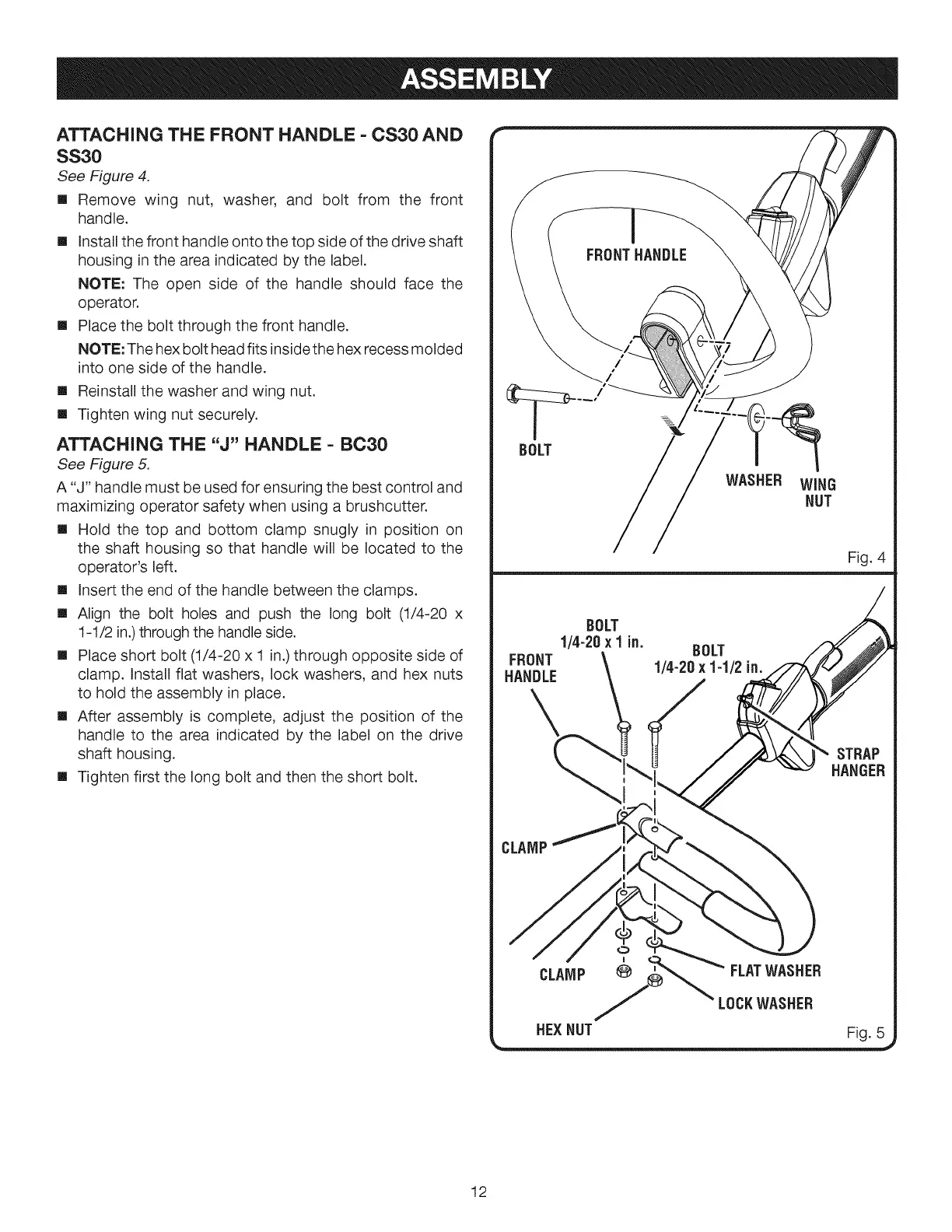
ATTACHING THE FRONT HANDLE = CS30 AND
SS30
See Figure 4.
[] Remove wing nut, washer, and bolt from the front
handle.
[] Install the front handle onto the top side of the drive shaft
housing in the area indicated by the label.
NOTE: The open side of the handle should face the
operator.
[] Place the bolt through the front handle.
NOTE: The hex bolt head fits inside the hex recess molded
into one side of the handle.
[] Reinstall the washer and wing nut.
[] Tighten wing nut securely.
ATTACHING THE "J" HANDLE = BC30
See Figure 5.
A "J" handle must be used for ensuring the best control and
maximizing operator safety when using a brushcutter.
[] Hold the top and bottom clamp snugly in position on
the shaft housing so that handle will be located to the
operator's left.
[] Insert the end of the handle between the clamps.
[] Align the bolt holes and push the long bolt (1/4-20 x
1-1/2 in.)through the handle side.
[] Place short bolt (1/4-20 x 1 in.) through opposite side of
clamp. Install flat washers, lock washers, and hex nuts
to hold the assembly in place.
[] After assembly is complete, adjust the position of the
handle to the area indicated by the label on the drive
shaft housing.
[] Tighten first the long bolt and then the short bolt.
BOLT
FRONT
HANDLE
CLAMP
CLAMP
HEXNUT
WASHER WING
NOT
BOLT
1/4-20 x 1 in.
BOLT
1/4-20 x 1-1/2 in.
@ FLATWASHER
LOCKWASHER
Fig. 4
STRAP
HANGER
Fig. 5
12



 To Next Page