The Ryobi Impact Drill, models EID550RE and EID750REN, is a versatile power tool designed for a range of drilling applications in various materials. This owner's operating manual provides comprehensive instructions for its safe and effective use, emphasizing dependability, ease of operation, and operator safety. With proper care, this impact drill is engineered to deliver years of rugged, trouble-free performance.
Function Description
The primary function of the Ryobi Impact Drill is to create holes in different materials, including wood, metal, and masonry. It offers both standard drilling and impact drilling modes, making it suitable for a wide array of tasks. The impact drilling mode is particularly effective for harder materials like concrete and masonry, where a hammering action assists the rotation of the drill bit to penetrate the surface more efficiently. For softer materials such as wood, resin boards, and various metals (steel, brass, aluminum sheets, stainless steel, and pipe), the standard drilling mode is recommended. The tool is equipped with a trigger switch for starting and stopping, and a variable speed control allows the user to adjust the drilling speed based on the material and application. A forward/reverse lever enables changes in the rotation direction, which is crucial for both drilling and removing bits from the workpiece.
Usage Features
The Ryobi Impact Drill incorporates several features designed to enhance its usability and safety.
- Variable Speed Control: The trigger switch (A) allows for precise control over the drilling speed. The harder the trigger is squeezed, the faster the drill bit rotates. Additionally, a variable speed control dial (D) can be used to set the maximum speed, providing greater control for delicate tasks or when working with specific materials.
- Lock-on Button: For continuous operation, the lock-on button (E) can be engaged while the trigger is squeezed, eliminating the need to constantly hold the trigger. Squeezing the trigger again releases the lock.
- Forward/Reverse Lever: The forward/reverse lever (B) enables quick changes in the rotation direction. Pushing the forward button in results in clockwise rotation (when viewed from the handle end), suitable for drilling. Pushing the reverse button in results in counterclockwise rotation, useful for backing out drill bits or screws. It is important to stop the tool before changing the rotation direction.
- Drilling Mode Selector: The drilling mode shift knob (F) is located on the top of the tool, allowing users to easily switch between standard drilling mode (indicated by a rotation symbol) and impact drilling mode (indicated by an impact symbol). This versatility makes the tool adaptable to different material requirements.
- Keyless Chuck: The keyless chuck (C) simplifies the process of inserting and removing drill bits. For the EID550RE, bits are inserted as far as the plain part of the shank and then the chuck head is rotated clockwise to tighten securely. To remove, the chuck is rotated counterclockwise.
- Spindle Lock (EID750REN): The EID750REN model features an automatic spindle lock button (M). To insert a drill bit, the spindle lock button is pressed with one hand while the chuck is rotated anti-clockwise with the other hand until it opens sufficiently. The bit is then fully inserted, and the chuck is tightened by rotating it clockwise while still holding the spindle lock button. This mechanism ensures the spindle remains stationary during bit changes, making the process quicker and more secure. It's crucial to ensure the spindle lock button is released and disengaged before operating the drill.
- Auxiliary Handle: An auxiliary handle (H) is provided for enhanced control and stability, especially during demanding drilling tasks. This handle can be rotated 360° and tightened in any desired position by turning the grip clockwise after loosening it anticlockwise. This feature allows users to find a comfortable and secure grip, reducing fatigue and improving accuracy.
- Depth Gauge: The depth gauge (G) is a practical accessory that helps control the drilling depth, preventing over-drilling and ensuring consistent hole depths.
- PowerLight™ (EID750REN): The EID750REN model includes a PowerLight™ (K) that illuminates as soon as the tool is connected to the power supply. This serves as a visual warning that the tool is live and ready to operate when the switch is pressed, enhancing safety by indicating power status.
- Bit Storage (EID750REN): The auxiliary handle on the EID750REN model also incorporates a compartment for storing up to five drill bits. This compartment is accessed by unscrewing the end cap below the yellow trim on the handle in an anticlockwise direction. This convenient storage keeps essential bits readily accessible.
- Auxiliary Side Handle Bit Holder (EID750REN): Further enhancing convenience, the auxiliary side handle on the EID750REN impact drill is equipped with a removable base cap that can hold up to 5 drill bits. To access, the cap is screwed in an anticlockwise direction, and bits are removed by pulling them up. To replace, the cap is screwed in a clockwise direction.
- Bubble Level (EID750REN): The EID750REN model also features a bubble level (N), which aids in achieving accurate, straight drilling by providing a visual reference for horizontal alignment.
Maintenance Features
Proper maintenance is essential for the longevity and safe operation of the Ryobi Impact Drill. The manual outlines several key maintenance practices:
- Regular Inspection: After each use, the tool should be checked to ensure it is in good condition. This includes inspecting the power cord periodically for damage and having it repaired by an authorized service facility if necessary. Extension cords should also be inspected and replaced if damaged.
- Cleaning: Handles should be kept dry, clean, and free from oil and grease to maintain a secure grip. The tool should be kept clean, especially cutting tools, for better and safer performance.
- Professional Servicing: It is recommended to take the tool to a Ryobi Authorized Service Centre at least once a year for thorough cleaning and lubrication. This ensures that all internal components are functioning correctly and helps prevent premature wear.
- Part Replacement: When servicing, only identical replacement parts should be used. Any damaged guards or other parts that affect the tool's operation should be properly repaired or replaced by an authorized service center. Defective parts should always be replaced by an authorized service facility.
- Safety Precautions During Maintenance: Crucially, no adjustments should be made while the motor is in motion. The power cord must always be disconnected from the power supply before changing any removable or consumable parts (like blades, bits, or sanding paper), lubricating the unit, or performing any work on it.
- Air Vents: The air vents (J) must never be covered, as they are essential for proper motor cooling. Keeping them clear prevents overheating and potential damage to the tool.
- Storage: When not in use, the tool should be stored in a dry, high, and locked-up place, out of reach of children, to prevent unauthorized access and potential accidents.
By adhering to these usage and maintenance guidelines, users can ensure the Ryobi Impact Drill remains a reliable and safe tool for all their drilling needs. The manual emphasizes reading all instructions carefully, paying close attention to safety rules, warnings, and cautions to prevent injury and ensure optimal performance.

 Need help?
 General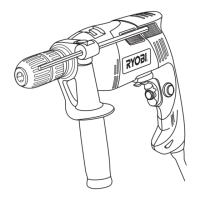

 To Next Page