17 — English
Fig. 20
HOLE
SLOT
SLOT
InSERT STRInGS THROuGH SLOTS unTIL
AppROx. 1 In. pROTRuDES fROM HOLES
HOLE
puLL STRInGS
fROM HOLES
TO REMOVE
SpOOL
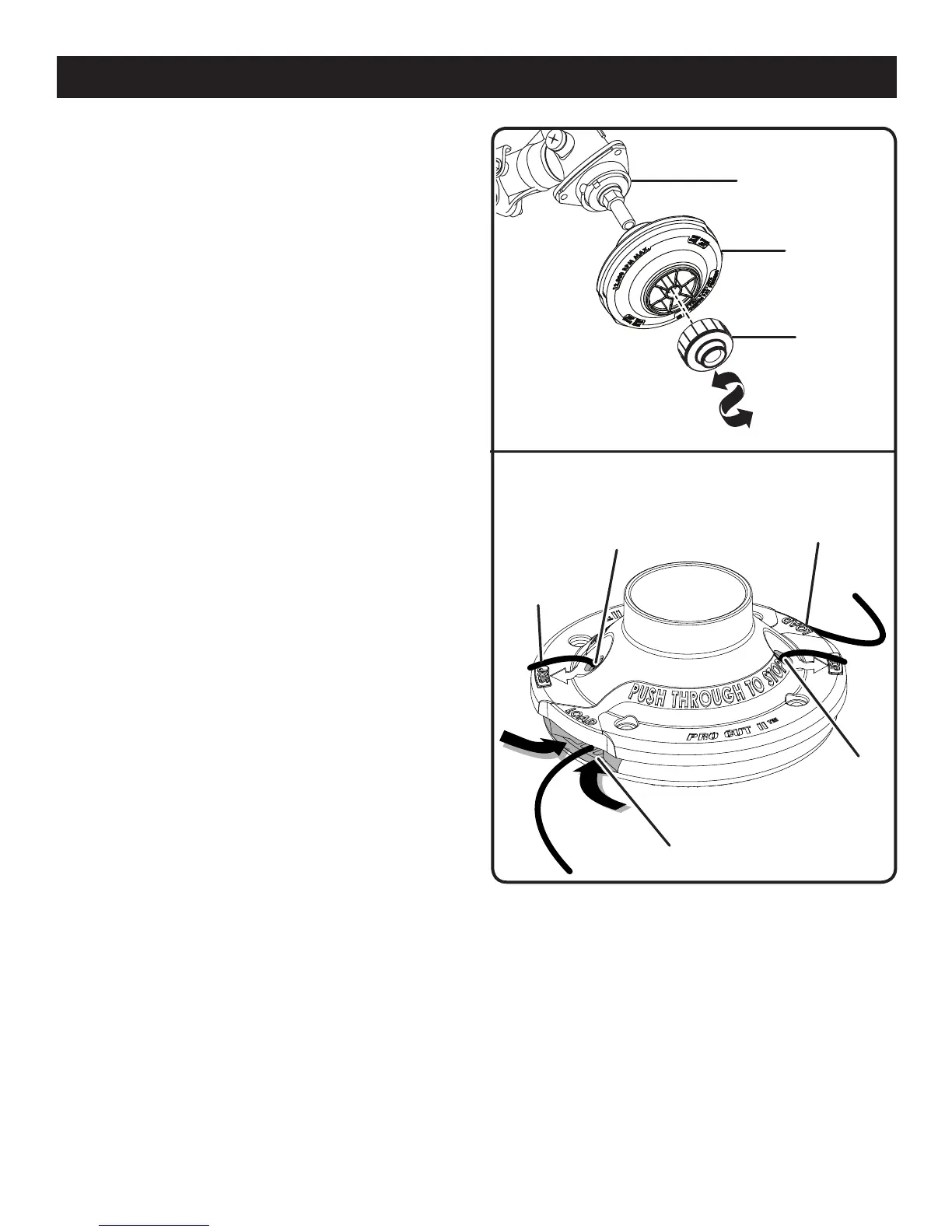
RETAInER
STRInG
HEAD
DRIVE SHAfT
Fig. 19
MAINTENANCE
INSTALLING PRO CUT II STRING HEAD
TM
See Figure 19.
Stop the engine and disconnect the spark plug wire.
Remove currently installed string head.
Install the string head on the drive shaft until fully
seated.
Install the spool retainer and turn counterclockwise.
Install string as described in the next section of this
manual.
INSTALLING STRING IN PRO CUT II
TM
STRING
HEAD
See Figure 20.
Use monofilament string between .095 in. and .105 in.
diameter. Use original manufacturer’s replacement string
for best performance.
Stop the engine and disconnect the spark plug wire.
Gather two of the pre-cut lengths of trimmer string provided
or cut two pieces of trimmer string, in 11 in. lengths.
Insert the strings into the slots located on the sides of the
string head. String should be pushed in until approximately
1 in. protrudes from the holes on the top of the string
head.
Remove old string by pulling it from the holes located on
the top of the string head.






 To Next Page