
EasyManua.ls Logo

SAAS Muscle Series - User Manual

SAAS Muscle Series
3 pages
Print Icon
To Next Page IconTo Next Page
Loading...
Installation Instructions
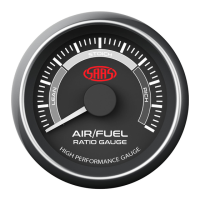
AIR/FUEL (Narrow Band)
Page 1/3
Wiring Guide:
Wire colour
Wire Function
Wire Connection Location
White
Vehicle body
Ground 12V-
Black
Orange
Illumination 12V+ (NOT adjustable)
Park light circuit (do NOT connect to a dimmer)
Typical Layout
Wiring Diagram
Ignition harness / Fuse box
Red
Ignition 12V+
Green
Sensor input
Ignition harness / Fuse box
Colour change button
Battery 12V+
Ground 12V-
Ignition 12V+
Illumination 12V+
Mounting studs for U bracket.
Fitting U bracket: Remove nuts
and replace with stud spacers
that are supplied in this kit.
Connector pinout
Batch #
Sensor input
Rear of gauge
Important notes before installing:
- Installing this product to your vehicle may require an adaptor. SAAS make a large range of
adaptors and installation parts, please check with your SAAS dealer for available adaptors.
- SAAS Muscle series gauges are designed for 12volt systems ONLY!
- All installation work should be done by a qualified professional to avoid damage to this product.
- SAAS RECOMMENDS all products be tested prior to installation. This will save time and speed up
the troubleshooting process if you encounter any issues.
SAAS Automotive PTY LTD
25 Metrolink Circuit West Campbellfield
Victoria 3061 Australia
ABN: 48166279670 ACN: 166279670
Phone: +61 3 9930 0100
Fax: +61 3 8339 2270
Email: tech@saasautomotive.com.au
SINCE 1954
Oxygen sensor / PCM Module

Other manuals for SAAS Muscle Series

Questions and Answers

  • E
    Elizabeth HenryAug 14, 2025
    How to troubleshoot a SAAS Controller gauge that won't turn on?
    • B
      Bethany BirdAug 14, 2025
      If your SAAS Controller gauge isn't turning on, start by ensuring that all connectors on both the gauge and the control box are properly plugged in. Then, inspect all power wires, including the ground cable, for secure connections. If the issue persists, try removing power for 10 seconds before retrying. Also, verify the temperature setting preset in the gauge, check the current draw, and consider wiring up external relays.
  • S
    sburkeAug 18, 2025
    What to do if my SAAS Controller has no temp display?
    • D
      Dennis PenaAug 18, 2025
      If your SAAS Controller shows no temperature display, first check the temperature sender for any bad connections. If the connection is good, the temperature sensor might be damaged and require repair or replacement.
  • J
    Jessica PrinceAug 21, 2025
    Why is my SAAS Muscle Automobile Accessories gauge not reading?
    • M
      mckinneypatriciaAug 21, 2025
      If your SAAS Automobile Accessories gauge isn't reading, there might be a few reasons. First, check for a bad connection on the gauge by testing for power at the back of it. Another potential cause is using the wrong signal wire; consult the oxygen sensor diagrams to ensure correct application. Lastly, the oxygen sensor might be cold, so wait for it to reach the proper temperature.
  • R
    Rachel BennettAug 25, 2025
    What to do if SAAS Automobile Accessories reading is constantly bouncing around?
    • P
      pjenkinsAug 25, 2025
      If the reading on your SAAS Automobile Accessories gauge is constantly bouncing around, it's likely due to the vehicle's computer adjusting the air/fuel mixtures. This is normal operation and not a fault.
  • C
    collinsmichaelAug 28, 2025
    How to fix no back lighting on SAAS Muscle gauge?
    • M
      Michael HouseAug 28, 2025
      If your SAAS Automobile Accessories gauge has no back lighting, the issue could be due to incorrect wiring or being connected to a dimmer. Refer to the fitting instructions to resolve these issues.
  • G
    Gerald DelgadoAug 31, 2025
    What to do if SAAS Muscle Automobile Accessories back lighting is stuck on white?
    • J
      Jonathan CarrAug 31, 2025
      If the back lighting on your SAAS Automobile Accessories gauge is stuck on white, the issue is likely due to incorrect wiring. To fix this, connect or check the orange wire for 12V+.
  • M
    Michael MonroeSep 3, 2025
    Why is the SAAS Muscle gauge needle jumping around?
    • H
      hoffmanlorraineSep 3, 2025
      If the SAAS Automobile Accessories gauge needle jumps around, it could be due to a bad connection. Test for power at the back of the gauge and check the ground at the sender. Also, the sender signal wire might be too long or too thick; ensure the wire thickness does not exceed 20AWG. Finally, the sensor could be damaged, so check if the sender is within specifications using a multimeter.
  • D
    Darren WillisSep 7, 2025
    What to do if SAAS Muscle Automobile Accessories back lighting defaults back to green?
    • G
      Gerald HallSep 7, 2025
      If the SAAS Automobile Accessories back lighting defaults back to green, check the orange wire for 12V+ to ensure correct wiring. Also, if the battery was disconnected, press the button to set the desired color.
  • G
    Gwendolyn BarnesSep 10, 2025
    How to fix SAAS Automobile Accessories when there is no back lighting or back lighting is stuck on white?
    • P
      Pamela MuellerSep 10, 2025
      If there is no back lighting or the back lighting is stuck on white in your SAAS Automobile Accessories, refer to the fitting instructions to check for incorrect wiring or if it is connected to a dimmer. Also, connect or check the orange wire for 12V+.

Summary

Installation Instructions

Important Notes Before Installing

General advice and precautions to follow before starting the installation process.

Wiring Guide

Details the wire colours, functions, and connection locations required for the gauge installation.

Wiring Diagram Typical Layout

Provides a visual representation of the gauge's typical wiring configuration.

Oxygen Sensor Types

Oxygen Sensor Connection Diagrams

Illustrations showing how to connect different types of oxygen sensors to the PCM.

Installation Tips for Oxygen Sensors

Advice on heating oxygen sensors for accurate readings and typical warm-up times.

Gauge Information and Troubleshooting

Gauge Specifications

Lists the technical specifications of the air/fuel gauge, including operating range and dimensions.

Troubleshooting Guide

Provides solutions for common problems encountered during gauge installation and operation.

Contents of the Box

Details the components included in the product package with their respective part numbers.

Warranty Terms and Conditions

Outlines the warranty period, coverage, and limitations for the SAAS Automotive product.

SAAS Muscle Series Specifications

General IconGeneral
BrandSAAS
ModelMuscle Series
CategoryAutomobile Accessories
LanguageEnglish