6
English
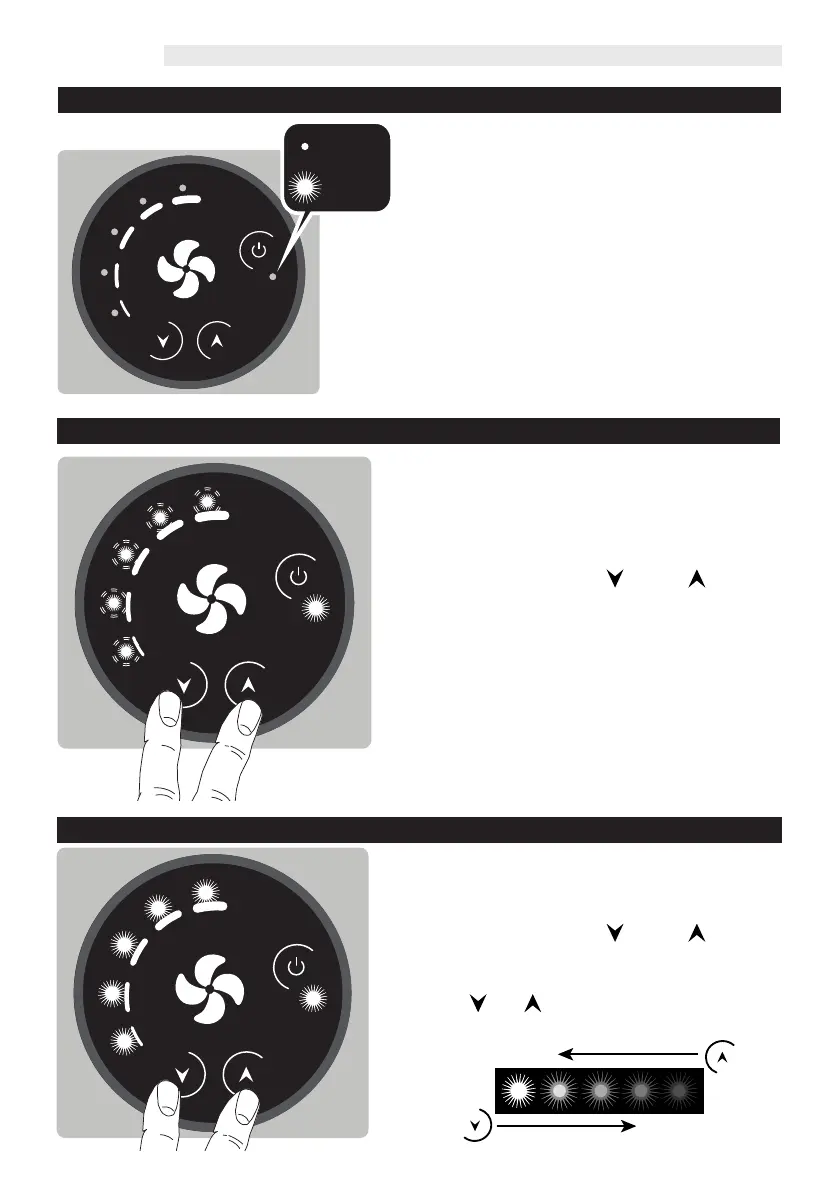
» Set temperature reached
The operation of the device is controlled by a
central thermostat or programmable thermostat.
When the set temperature is reached, the fan
stops and the ventilation indicator LEDs switch o.
The operating condition reached is signalled by
the control by the intermittent switching on of
the stand-by LED:
1 second on and 5 seconds o, to indicate that the
fan is stopped due to external control.
On / 1s
O / 5s
» Key Lock
In order to avoid that the fan speed, once selected,
can be modied by other people, it is possible to
activate the "Key Lock" function.
Set the control to ON.
Press and hold the and buttons
simultaneously for 5 seconds.
All speed LEDs ash twice to conrm the operation.
Repeat the operation to unlock the control
buttons.
» LED brightness adjustment
During stand-by the brightness of the LEDs will be
halved compared to the chosen value.
Put the control in stand-by mode.
Press and hold the and buttons
simultaneously for 5 seconds.
The LEDs light up at maximum brightness.
Use the and buttons to increase or decrease
the brightness of the LEDs to the desired value.



 To Next Page