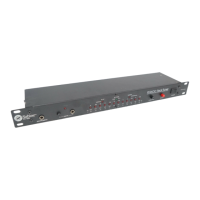
RT-7000
Quick Setup Directions
1.1.
1.1.
1. Power on the Sabine RT-7000 or RT-7100 Rack Tuner.
2.2.
2.2.
2. Plug your instrument into one of the ¼-inch input connectors.
3.3.
3.3.
3. Pluck the string you wish to tune—the nearest note will be displayed in the Note LED display and the distance to
in-tune (in relation to that note) will be shown by the number of Flat or Sharp LEDs lit.
4.4.
4.4.
4. Adjust the tuning of the string until the In-Tune LED lights.
Using your RT-7000 Rack Tuner
Inputs/Outputs
The RT-7000 Rack Tuner has two channels (A or B) with in-
puts (labeled “INST”) for these channels on both the front panel
and back panel.
NOTENOTE
NOTENOTE
NOTE: Only one input jack (front or back)
per channel can be used at a time. The Rack Tuner Outputs
are labeled “AMP.” The RT-7000 has Outputs for channels A
and B located on the back panel of the unit.
Foot Pedal
The
RT-7000RT-7000
RT-7000RT-7000
RT-7000 has ¼-inch TRS connectors for a two-switch
pedal (model # RTPED2). Use the Foot Pedal to toggle between
Channels A & BChannels A & B
Channels A & BChannels A & B
Channels A & B and/or to
Mute Mute
Mute Mute
Mute the tuner output. Connectors
are located on both the front and back panels (only one pedal
should be used at a time). When a foot pedal is connected, all
front panel switches still operate.
NOTE: if you use your ownNOTE: if you use your own
NOTE: if you use your ownNOTE: if you use your own
NOTE: if you use your own
pedal, the switches must be momentary, not latching.pedal, the switches must be momentary, not latching.
pedal, the switches must be momentary, not latching.pedal, the switches must be momentary, not latching.
pedal, the switches must be momentary, not latching.
A/B Switch Display
This LED array displays your input/output con-
figuration and the signal path of the
A/B A/B
A/B A/B
A/B circuit.
As you plug in your guitar(s) and amp(s) you will
immediately see the corresponding A or B INST
or AMP LED light on the Display.
When you touch the A/B switch, the signal path LEDs will clearly
show the input/output configuration. And, at the same time, the
A or B input LED will flash to indicate the active tuner channel.
Front Panel Switches
The front-panel
A/B ButtonA/B Button
A/B ButtonA/B Button
A/B Button (or optional
pedal switch) toggles the tuner between A
or B input/output. The current selection is
displayed on the
A/B Switch DisplayA/B Switch Display
A/B Switch DisplayA/B Switch Display
A/B Switch Display.
Use the front panel
Flat Tune ButtonFlat Tune Button
Flat Tune ButtonFlat Tune Button
Flat Tune Button
to quickly transpose your guitar down
from standard tuning — great for those
dark-n-heavy E
b
and D tunings.
NOTENOTE
NOTENOTE
NOTE: The
RT-7000RT-7000
RT-7000RT-7000
RT-7000 display
uses the tuning indicator LEDs in conjunction with the Flat Tune
Steps legend to display Flat Tune status. The LED below the
“0” of the Flat Tune Steps legend signifies standard tuning;
each position to the left of zero represents ½ tone down from
standard tuning. The current Flat Tune status will be displayed
briefly the first time the
Flat Tune ButtonFlat Tune Button
Flat Tune ButtonFlat Tune Button
Flat Tune Button is pressed. While the
status LED remains lit, each subsequent pressing will move
the setting one LED to the left. For example, to flat tune your
guitar down two half tones, press the
Flat Tune ButtonFlat Tune Button
Flat Tune ButtonFlat Tune Button
Flat Tune Button once
to display the current setting, and then two more times to lower
the setting two half tones. The LED below the current flat-tune
setting will remain lit briefly. The
Flat Tune Button Flat Tune Button
Flat Tune Button Flat Tune Button
Flat Tune Button will remain lit
whenever the tuner is set to other than standard tuning.
Tapping the front panel’s
Strobe But-Strobe But-
Strobe But-Strobe But-
Strobe But-
tonton
tonton
ton toggles the display mode between
Standard Standard
Standard Standard
Standard and
Strobe Strobe
Strobe Strobe
Strobe mode.
Standard Mode:Standard Mode:
Standard Mode:Standard Mode:
Standard Mode:
(resembles a bar graph)
Up to 8 sharp or
flat LEDs will light up to indicate the degree of sharpness or flat-
ness in cents. As the played note gets closer to the note indi-
cated by the Note LED, the corresponding sharp or flat LEDs will
dim and turn off one by one until the green “in tune” LED lights.
Strobe Mode: Strobe Mode:
Strobe Mode: Strobe Mode:
Strobe Mode:
LEDs strobe left to indicate flat, right to indi-
cate sharp. Strobe speed is a function of the distance the
played note is from being in tune. A pitch far from the closest
note (as indicated by the Note LED) will strobe quickly. As the
played note gets closer to the note indicated by the
Note LEDNote LED
Note LEDNote LED
Note LED,
the strobe effect will slow down and eventually stop for in tune.
NOTENOTE
NOTENOTE
NOTE: As in all strobe tuners, it can be difficult to get the strobe
effect to stop completely. This is due to the extreme accuracy
of the strobe tuner and the fluctuation in string vibration fre-
quency as it varies from “first plucked” to sustained note.
Use the Front Panel
CalibrateCalibrate
CalibrateCalibrate
Calibrate
ButtonButton
ButtonButton
Button
to
tune your instrument to a pitch other than
A = 440 Hz, or if you want to use alter-
nate scales.
NOTENOTE
NOTENOTE
NOTE: The RT-7000 display uses the tuning indica-
tor LEDs in conjunction with the Calibration Legend to display
calibration status. The current calibration status will be displayed
when the
CalibrateCalibrate
CalibrateCalibrate
Calibrate
ButtonButton
ButtonButton
Button is pressed once. While the status LED
remains lit, each subsequent pressing will move the status light
one LED to the right (past 445 Hz, the LED will cycle to 435 Hz).
For example, if you wish to recalibrate the tuner from standard A
= 440 Hz to A = 442 Hz, tap the
CalibrateCalibrate
CalibrateCalibrate
Calibrate
ButtonButton
ButtonButton
Button once to display
the current setting (A = 440 Hz), and then twice more. The 442
Hz LED will remain lit briefly. The
CalibrateCalibrate
CalibrateCalibrate
Calibrate
Button Button
Button Button
Button will remain lit
whenever the tuner is calibrated to other than A = 440 Hz.
The
Mute Button Mute Button
Mute Button Mute Button
Mute Button mutes both outputs
for silent tuning. The mute function can
also be operated with a foot switch.
8
11
11
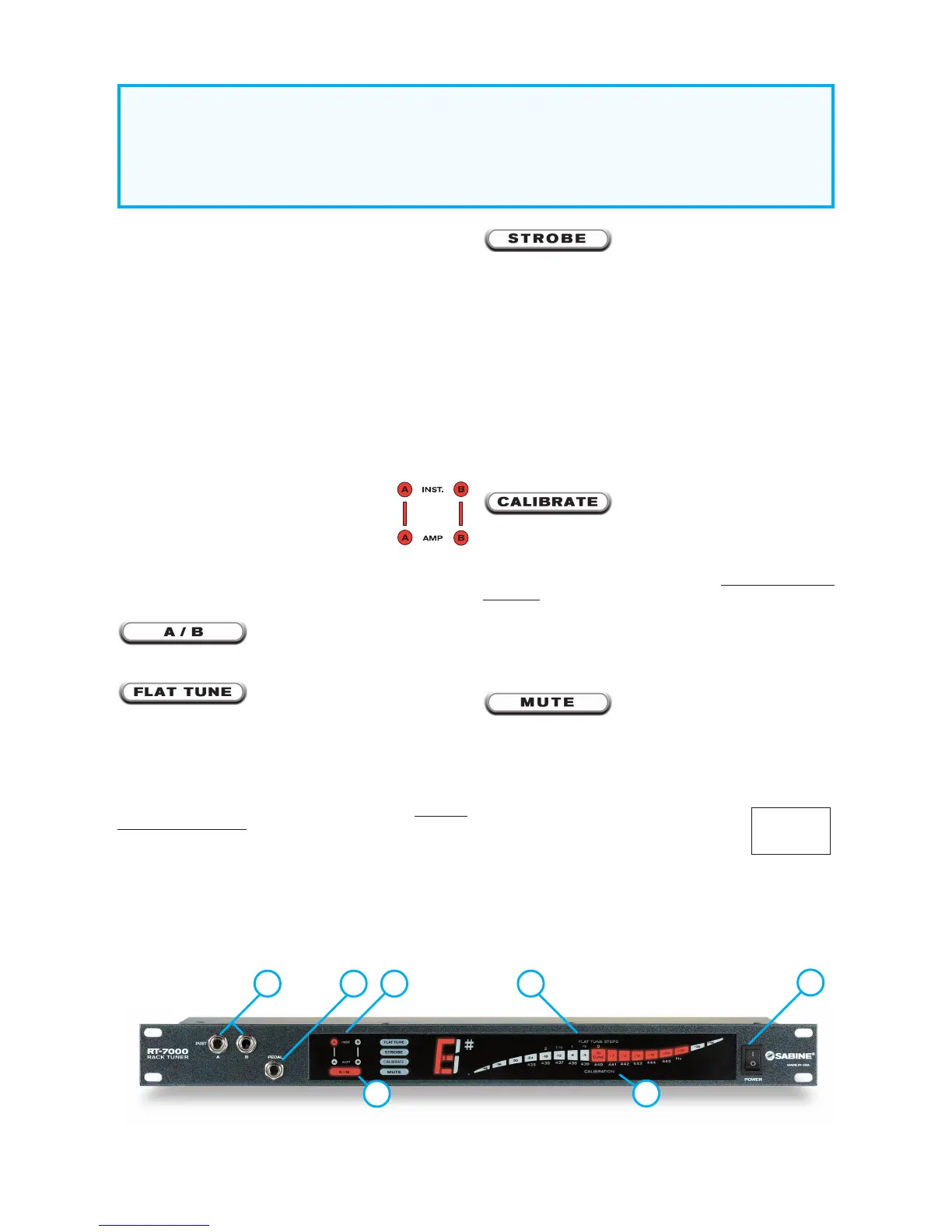
1 Instrument Inputs (See
NOTENOTE
NOTENOTE
NOTE on last page)
22
22
2 Outputs
33
33
3 Pedal Switch
44
44
4 SmartSwitch™ A/B Display
55
55
5 A/B Display
66
66
6 A/B Switch
77
77
7 Function Buttons
88
88
8 Note Display
99
99
9 Flat Tune Step LEDs (RT-7100 only)
1010
1010
10 Flat Tune Step markers (RT-7000)
1111
1111
11 Calibration Scale LEDs (RT-7100 only)
1212
1212
12 Calibration Scale Markers (RT-7000)
1313
1313
13 In Tune LED
1414
1414
14 AC Power Cord & Fuse Holder
1515
1515
15 Power Switch
RT-7000 Front PanelRT-7000 Front Panel
RT-7000 Front PanelRT-7000 Front Panel
RT-7000 Front Panel
1212
1212
12
11
11
1
55
55
5
1010
1010
10
33
33
3
1515
1515
15
66
66
6
NOTE: A/B switch
does not combine sig-
nals from inputs or
outputs. Only one out-
put is active at a time.


 To Next Page
 Loading...