Need help?
Do you have a question about the Sabrent EC-HDFN and is the answer not in the manual?
Allows easy Hot-Swap of 2.5"/3.5" SATA Hard Drives with desktops or notebooks.
Can be used to duplicate or clone an existing hard drive without connecting to a computer.
Connect the power adapter to the back of the docking station.
Connect the power cord to the power adapter brick.
Plug the power cord into a wall power outlet.
Check the power adapter brick for a solid green LED.
Switch the dock to the 'LOCK' position on the back panel.
Connect the USB cable to the USB 3.0 port on the back of the dock.
Connect the other end of the USB cable to your computer's USB port.
Press the power button on the back of the dock.
Observe RED power lights upon initial power-on.
Insert the first hard drive into HDD1; expect a beep and BLUE LED.
Insert the second hard drive into HDD2; expect 2 beeps and BLUE LEDs.
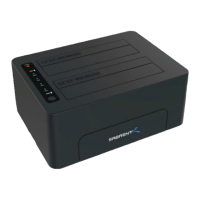
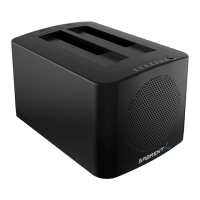
The Sabrent EC-HDFN is a versatile USB 3.0 to SATA Dual Bay External Hard Drive Docking Station, designed to offer seamless integration and management of 2.5-inch and 3.5-inch SATA hard drives. This device serves a dual purpose: it functions as a docking station for hot-swapping hard drives with a computer and as a standalone duplicator for cloning drives without requiring a computer connection. Its robust design includes a built-in cooling fan, ensuring optimal operating temperatures for your hard drives during intensive use.
As a docking station, the EC-HDFN provides a convenient and efficient way to access data from multiple hard drives. Users can easily insert and remove SATA hard drives, making it ideal for data recovery, system backups, or simply expanding storage capacity for desktop or notebook computers. The hot-swap capability means drives can be exchanged without needing to power down the computer or the docking station, enhancing workflow efficiency. The USB 3.0 interface ensures high-speed data transfer rates, compatible with modern computer systems, while also being backward compatible with USB 2.0. This allows for quick and reliable access to large files and applications stored on the drives.
The standalone duplicator function is a key feature of the EC-HDFN, setting it apart from basic docking stations. This mode allows users to clone an existing hard drive (source drive) to another hard drive (target drive) without the need for a computer. This is particularly useful for creating exact copies of operating system drives, migrating data to a new, larger drive, or performing data backups for archival purposes. The cloning process is initiated directly on the device, simplifying what can often be a complex and time-consuming task when performed through software on a computer. The progress of the cloning operation is indicated by a series of LED lights, providing clear visual feedback on the percentage of completion.
The device's physical design is both practical and user-friendly. It features two bays, clearly labeled for HDD1 and HDD2, accommodating both 2.5-inch and 3.5-inch SATA drives. The sturdy construction ensures that drives are held securely in place. On the front panel, a series of LED indicators provide crucial status information. These include percentage indicators (25%, 50%, 75%, 100%) for cloning progress, individual indicators for HDD1 and HDD2 activity, a power indicator, and a clone indicator. These lights change color (e.g., red for power, blue for HDD activity) to signify different states, making it easy for users to monitor the device's operation at a glance.
Maintenance features are integrated to ensure the longevity and reliable performance of both the docking station and the hard drives it hosts. The built-in cooling fan is a significant aspect of this, actively dissipating heat generated by the hard drives, especially during prolonged use or intensive operations like cloning. This helps prevent overheating, which can lead to drive damage, data corruption, or reduced performance. The fan's operation is designed to maintain optimal temperatures, contributing to the stability and lifespan of the drives.
Setting up the Sabrent EC-HDFN is a straightforward process. For docking station mode, the user first connects the power adapter to the back of the dock, then connects the power cord to the adapter and a power outlet. A green LED on the power adapter brick confirms power supply. The power switch on the back of the dock needs to be set to the "LOCK" position. Finally, a USB cable connects the dock to the computer's USB port, and the power button on the back of the dock is pressed to turn it on. The power lights will illuminate red, indicating the device is ready. Hard drives are then inserted into the bays, and the corresponding blue LEDs will light up, accompanied by a beep, confirming successful detection.
For standalone cloning, the process is equally intuitive. The source drive is inserted into HDD1 and the target drive into HDD2. With the power on, the user initiates the cloning process by pressing the "CLONE" button. The progress LEDs will then light up sequentially, indicating the percentage of completion. The device is designed to handle the cloning process independently, freeing up the computer for other tasks.
The Sabrent EC-HDFN is designed with user convenience in mind, offering a robust solution for managing and duplicating hard drives. Its ability to hot-swap drives, coupled with the standalone cloning function and active cooling, makes it an invaluable tool for IT professionals, data enthusiasts, and anyone needing flexible and reliable access to their SATA hard drives. The clear LED indicators and simple setup process ensure a user-friendly experience, while the durable construction promises long-term reliability.
 General
| Model | EC-HDFN |
|---|---|
| Category | Docking Station |
| Interface | USB 3.0 |
| Supported Drives | SATA HDD/SSD |
| Hot-Swappable | Yes |
| UASP Support | Yes |
| Compatibility | Windows, macOS |
| Device Type | Hard Drive Docking Station |
| Ports | 1 x USB 3.0 |
| Drive Size | 2.5" / 3.5" |
| Power Supply | 12V/2A |

 To Next Page