EasyManua.ls Logo

Sabrent EC-UEIS7 User Manual

Sabrent EC-UEIS7
23 pages
To Next Page IconTo Next Page
Page #1 background imageLoading...
Page #1 background image
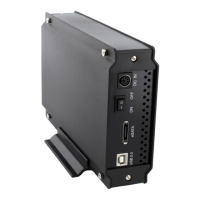
Sabrent EC-UEIS7 USB 2.0/ESATA TO 3.5″ IDE/SATA/SATA II ALUMINUM HARD DRIVE ENCLOSURE WITH COOLING FAN
1. Device Setup
3.5 Inch IDE Drive:
1. Check if your IDE drive has Jumpers, if so make sure they are set to Master. (Note: Please refer to the drive
manufacturer’s website for more information regarding your specific hard drive model.):
2. Remove the screws, on the side without the fan, using the included screwdriver. Remove the panel:
Figure A:

Other manuals for Sabrent EC-UEIS7

Question and Answer IconNeed help?

Do you have a question about the Sabrent EC-UEIS7 and is the answer not in the manual?

Sabrent EC-UEIS7 Specifications

General IconGeneral
BrandSabrent
ModelEC-UEIS7
CategoryEnclosure
LanguageEnglish

Summary

Hard Drive Enclosure Setup

IDE Drive Installation Procedure

Details the steps for installing a 3.5-inch IDE hard drive, including jumper configuration and cable connections.

SATA Drive Installation Procedure

Outlines the procedure for installing a 3.5-inch SATA hard drive, covering connection ports and physical placement.

Connecting the Enclosure

Enclosure to Computer Connection

Details connecting the hard drive enclosure to a computer using USB/eSATA and power cables.

Software and Initialization

Windows Driver Setup

Information on installing drivers for Windows, noting that they are often not required for the enclosure.

Hard Drive Initialization Steps

Process for initializing new hard drives using Windows Disk Management for proper system recognition.

Troubleshooting and FAQs

Drive Recognition Troubleshooting

Addresses common problems such as drives not appearing, jumper settings, and data access.

Large Drive Capacity Management

Explains 2TB partition limits and the GPT conversion process for utilizing full drive capacity.
Related product manuals