15
ENGLISH
USING THE AIR CONDITIONER
Switching the unit on
Press the ON/OFF button (A), the unit will start to work at the last setting. If the wall socket
was switched off, the unit defaults to the factory setting.
To turn the unit off, press the ON/OFF button again.
MODE selection
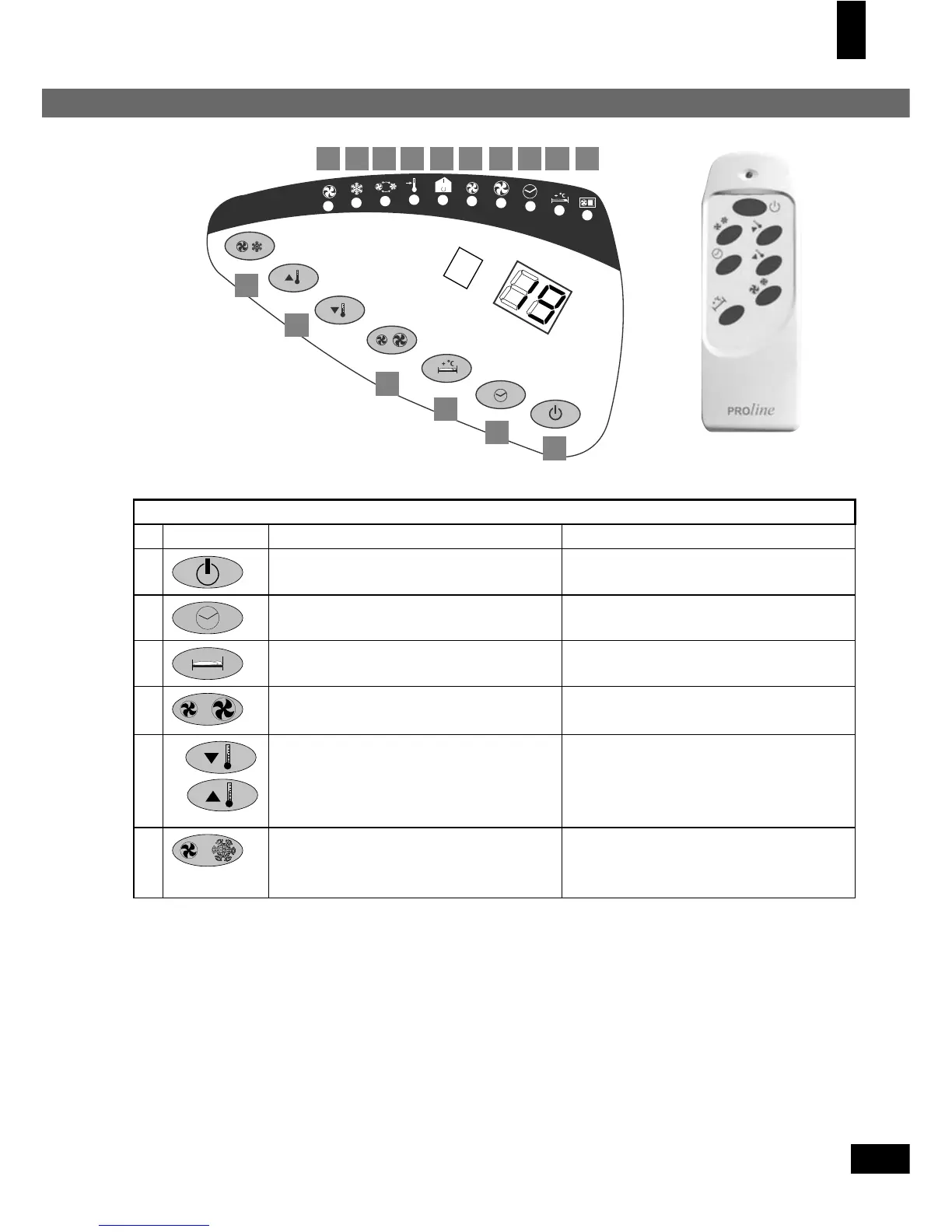
Press the MODE button (F) to select the required working mode. The LED illustrating your
selected mode lights up (8), (9) or (10).
When in auto mode, the unit will work in cooling mode when the temperature is higher than
Legend of the controls (on the control panel and on the remote control) and of the indicators on the control panel
Button Description LED
A ON/OFF switch -
B
TIMER function switch 3
C
SLEEP function switch 2
D
Fan speed selection switch 4 - high speed
5 - low speed
E
a
b
Temperature setting switches:
a: decrease
b: increase
the temperature to be maintained
6 - when on: the room temperature
is displayed
7 - when on: the set temperature is
displayed
F
MODE switch, to select ventilation
or cooling
9 - cooling is selected
10 - ventilation is selected (LED 4 or
5 indicates at which fan speed)
4 3 2 156789
D
C
B
A
E
F
10
Control panel Remote control
Downloaded from www.vandenborre.be


 To Next Page