8
LED battery functions for ROCKit S case
When earbuds are charging in
case - LED funcon
Indicaon of LED funcon
1 blink 0-25% power on the case
2 blink 25-50% power on the case
3 blink 50-75% power on the case
4 blink 75-100% power on the case
LED o Fully charged earbuds
When case is charging by plug or
wireless - LED funcon
Indicaon of LED funcon
1 blink 0-25% power on the case
2 blink 25-50% power on the case
3 blink 50-75% power on the case
4 blink 75-100% power on the case
LED on Fully charged case
RESET ROCKIT S
A video tutorial of how to reset your ROCKit S earbuds can be found at SACKit’s YouTube channel:
https://bit.ly/34TWCjk
1. Before you reset make your device forget ROCKit S in Bluetooth sengs on your device
2. Turn Bluetooth OFF before reseng ROCKit S
3. Place both earbuds in the charging case
4. Take both earbuds out of the charging case
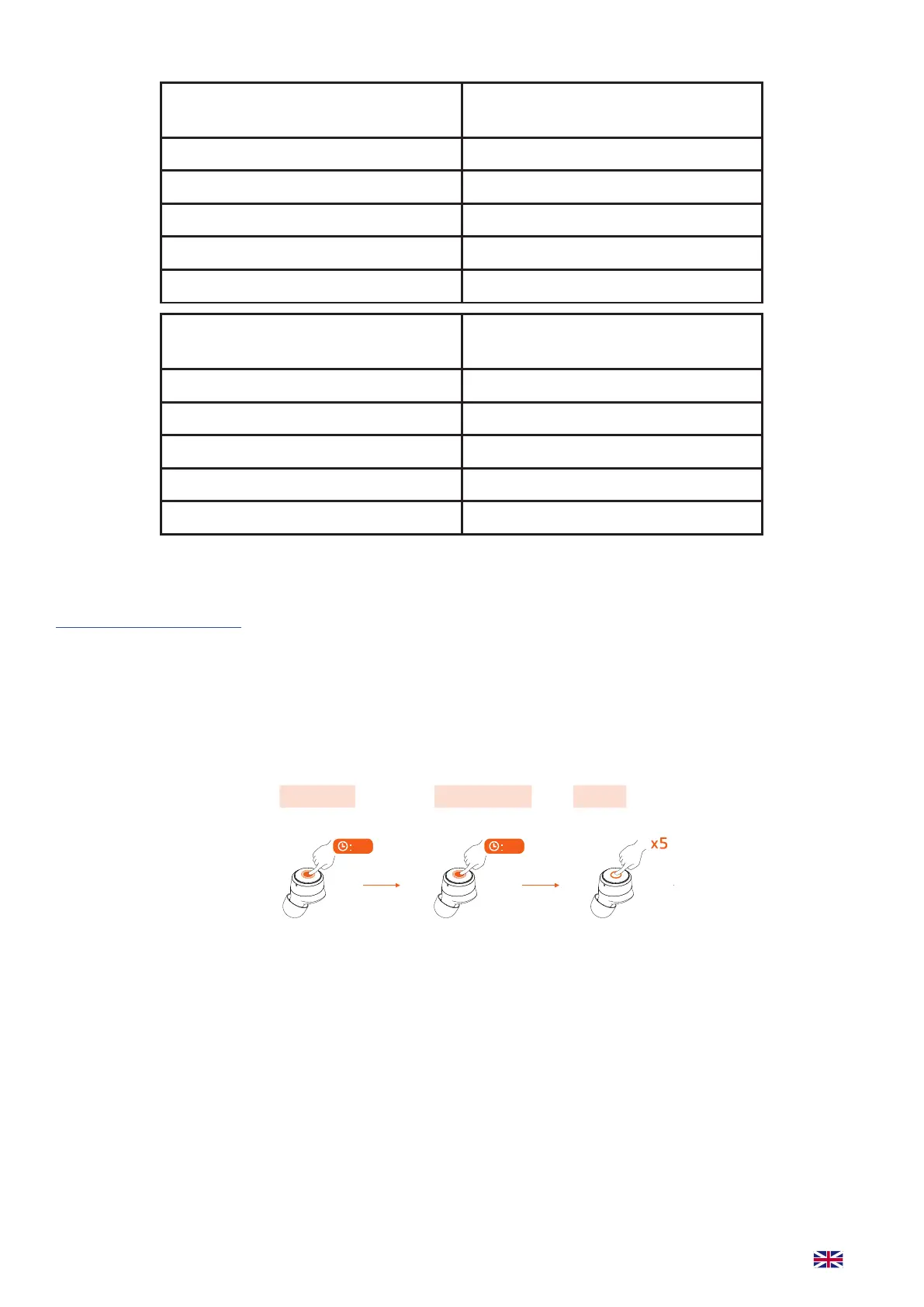
5. Follow bellow steps one earbud at a me
Click 5 mes quickly. When
you see a red ash, the
earbud has been reset. This
might require several aemps.
Click and hold
for 5 sec. unl
earbud ash red
and turns o.
Click and hold for
5 sec. unl earbud
ashes red and
white connuously.
6. When both earbuds are reset, put them back into the charging case and wait 10 sec. before ta-
king both earbuds up at the same me. The earbuds they will automacally pair with each other.
7. Now folllow “How to pair ROCKit S earbuds with Bluetooth devices” on page 6.
It did not work? Okay, rst and foremost: Do Not Panic! Your ROCKit S will work just ne if you
follow these steps:
• Has the LED on the earbud turned red? If the LED has not turned red the earbuds have not been
reset correctly. It is essenal that the 5 taps happens quickly, this may take a few tries.
• If the LED tuned red, it worked! Your earbuds have been reset. You now have to put them back
into the charging case for 10 seconds before they are ready to reconnect.
Pairing mode Reset
Connects automatically
Click and hold
Power off
Click and hold
Power on
Click and hold
R
Click five times
TIPS: red and white LED
quickly flash alternately
TIPS: red and white LED slowly flash alternately
L
05
L
05
L
L
03
03
After reset, L earbud will automatically
enter the pairing mode with red and white
LED, then the phone can search for earbuds.
ROCKit L
Select on phone


 To Next Page