1 2 3
4
7
6
5
When the right temperature is reached, the machine performs a priming and
a rinse cycle of the internal circuits. A small quantity of water is dispensed.
Wait for this cycle to be completed automatically.
See page 21 to enable/disable the rinse function.
The screen for beverage dispensing appears on the display; see page 8.
INSTALLATION
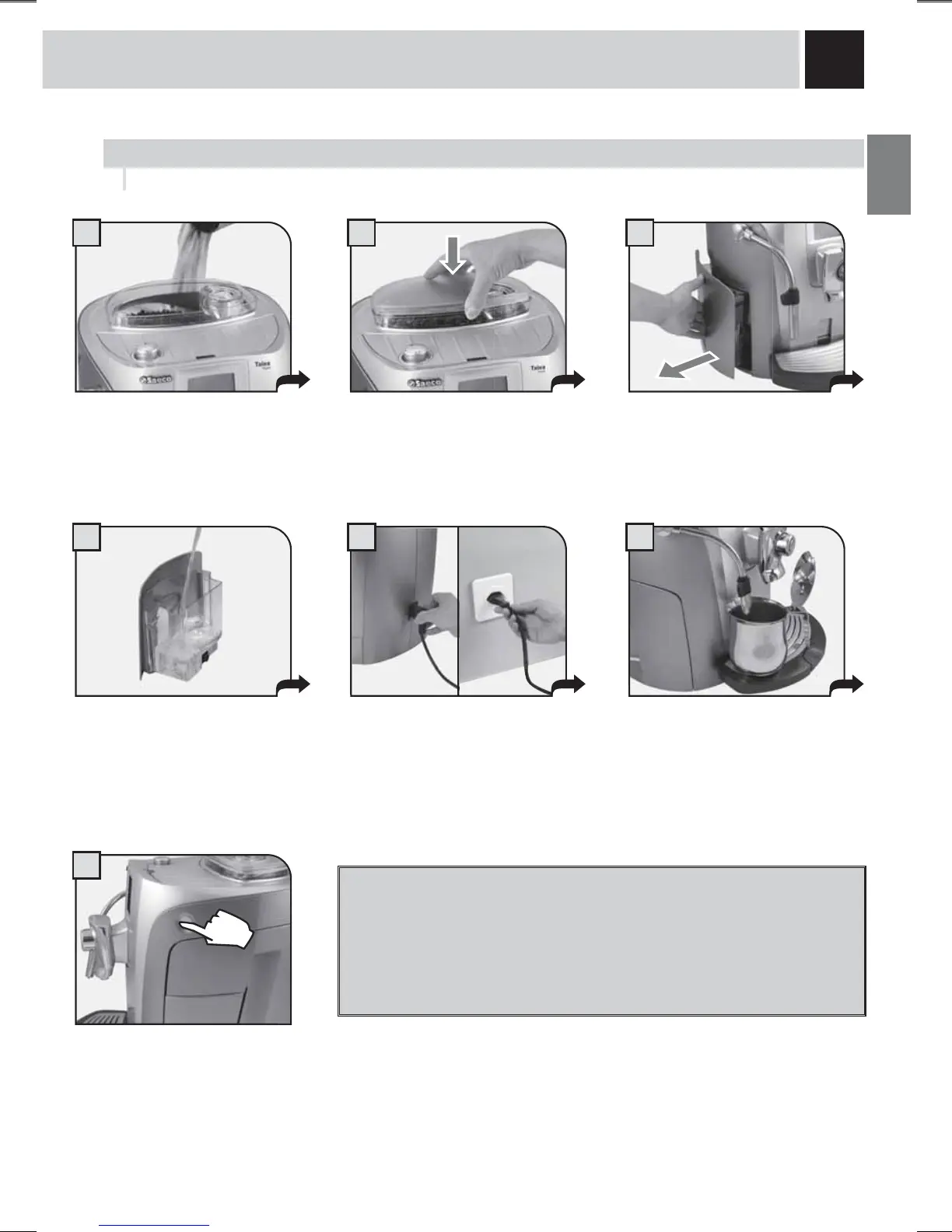
Attach the female end of the power
cord to the machine. Insert the
male end into the power outlet
(see data tag).
Place a container beneath the hot
water spout.
Remove the coffee bean hopper
cover.
Fill the hopper with coffee beans.
Close the cover pushing it down
completely.
Remove the water tank. We
recommend installing the “Aqua
3ULPD´ZDWHU¿OWHUVHHSDJH
Press the main power button to the
“ON” position.
Make sure that the main power button is not pressed in the “ON” position.
Fill the tank with fresh drinking
water. Do not exceed the “max”
level indicated on the water tank.
2QFH¿OOHGSODFHWKHWDQNEDFNLQWR
the machine.
STARTING THE MACHINE
TO ASSESS WATER HARDNESS, SEE “WATER
HARDNESS MENU” ON PAGE 22.



 To Next Page