EasyManua.ls Logo

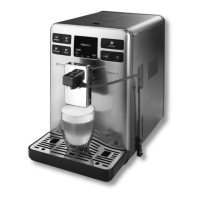
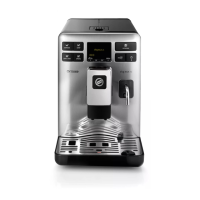
Saeco Energica - User Manual

Saeco Energica
52 pages
Print Icon
To Next Page IconTo Next Page
Loading...
www.philips.com/saeco
Rev.01 del 15-08-12
The manufacturer reserves the right to change the features of the product without prior notice.
EN
02
02
Question and Answer IconNeed help?

Do you have a question about the Saeco Energica and is the answer not in the manual?

Summary

Operating Instructions

Important Safeguards

Power Supply Cord Safety

Carafe Assembly Procedure

General Information and Technical Data

Using the Manual

Guidance on how to effectively use the operating instructions manual.

Machine Components and Control Panel

Control Panel Overview

Explanation of the coffee machine's control panel and its functions.

Machine Installation

Starting the Machine

Instructions on how to turn on and start the coffee machine for the first time.

Setting the Language

Measuring Water Hardness

Installation

Water Dispensing Spout Installation

Instructions for correctly installing the water dispensing spout.

Water Dispensing Spout Removal

Instructions for safely removing the water dispensing spout.

First Use and Post-Inactivity Procedures

Intenza Water Filter Installation

Adjustments

Coffee Grinder Adjustment

Instructions for adjusting the coffee grinder fineness for optimal taste.

Opti-Dose: Adjusting Coffee Amount

Dispensing Spout Height Adjustment

Saeco Adapting System

Stand-by Mode

Milk Carafe Usage

Removing the Milk Carafe

Coffee Brewing

Espresso, Coffee, and Long Coffee

How to brew single or double servings of espresso, coffee, or long coffee.

Brewing with Pre-Ground Coffee

Cappuccino Preparation

Product Brewing Sequence

Details on the sequence of milk dispensing and coffee brewing for milk drinks.

Cleaning Cycle

Performing a Cleaning Cycle

How to execute a quick cleaning cycle before or after brewing.

Special Beverages

Latte Macchiato Preparation

Hot Milk Preparation

Hot Water Dispensing

Beverage Length Quick Programming

Beverage Menu Customization

Customizing Beverage Settings

Coffee Quantity Adjustment

Programming the amount of coffee for brewing, affecting aroma.

Prebrewing Function

Explanation of the prebrewing function for enhancing coffee taste.

Coffee Temperature Settings

Programming the brewing temperature for coffee.

Coffee Length Adjustment

Programming the quantity of water for each beverage.

Beverage Menu Customization Options

Milk Quantity Programming

Programming the quantity of milk to be dispensed for each beverage.

Water Quantity Programming

Programming the quantity of water for hot water dispensing.

Resetting to Default Settings

Restoring factory settings for beverages, deleting customized settings.

Machine Menu Navigation

Machine Menu Settings

General Machine Settings

Adjusting machine operation settings like tone, Ecomode, and stand-by.

Tone Settings

Activating or deactivating acoustic alarms for machine functions.

Ecomode Settings

Configuring Ecomode to choose how boilers are activated for energy saving.

Stand-by Settings

Setting the time interval for the machine to enter stand-by mode.

Menu Display Settings

Display Menu Options

Accessing settings for language and display brightness.

Language Selection

Setting the operating language and adjusting machine parameters by country.

Display Brightness Adjustment

Setting the correct display brightness according to room illumination.

Machine Menu: Water Settings

Water Menu Options

Accessing settings for water hardness, filter enable, and filter activation.

Water Hardness Setting

Changing the machine's water hardness setting for descaling requests.

Enable Water Filter Warning

Activating/deactivating the warning signal for water filter replacement.

Activate Water Filter

Activating the water filter after installation or replacement.

Machine Maintenance Overview

Product Counters

View product counts since last reset.

Brew Group Cleaning

Initiate the wash cycle for the brew group.

Milk Carafe Cleaning

Initiate the wash cycle for the milk carafe.

Descaling Procedure

Start the descaling cycle to remove mineral buildup.

Automatic Carafe Cleaning

Enable automatic cleaning of the carafe after milk beverages.

Factory Settings Restoration

Restore all machine settings to default.

Brew Group Cleaning Cycle

Boiler Descaling Cycle Menu

Descaling Rinse Cycles

Milk Circuit Maintenance

Milk Carafe Assembly

Machine Warnings and Error Messages

Error Message Handling

Resolving common machine messages by following reset procedures.

Machine Warnings and Troubleshooting

Troubleshooting Guide

Guidance on resolving specific warning messages and machine states.

Safety Rules

Emergency Procedures

Immediate actions to take in case of an emergency.

Appliance Usage Precautions

Guidelines for proper and safe use of the coffee machine.

Electrical Connection Safety

Safety requirements for connecting the machine to electrical power.

Installation Safety Guidelines

Precautions to ensure safe and proper installation of the appliance.

Safety Rules: Dangers and Best Practices

Dangers and Failure Handling

Information on potential hazards and what to do if the appliance fails.

Cleaning and Descaling Safety

Safety precautions during cleaning and descaling operations.

Parts, Disposal, and Fire Safety

Guidelines on replacement parts, waste disposal, and fire safety measures.

Intenza Water Filter Usage Information

Specific instructions and safety warnings for the Intenza water filter.

Summary

Operating Instructions

Important Safeguards

Power Supply Cord Safety

Carafe Assembly Procedure

General Information and Technical Data

Using the Manual

Guidance on how to effectively use the operating instructions manual.

Machine Components and Control Panel

Control Panel Overview

Explanation of the coffee machine's control panel and its functions.

Machine Installation

Starting the Machine

Instructions on how to turn on and start the coffee machine for the first time.

Setting the Language

Measuring Water Hardness

Installation

Water Dispensing Spout Installation

Instructions for correctly installing the water dispensing spout.

Water Dispensing Spout Removal

Instructions for safely removing the water dispensing spout.

First Use and Post-Inactivity Procedures

Intenza Water Filter Installation

Adjustments

Coffee Grinder Adjustment

Instructions for adjusting the coffee grinder fineness for optimal taste.

Opti-Dose: Adjusting Coffee Amount

Dispensing Spout Height Adjustment

Saeco Adapting System

Stand-by Mode

Milk Carafe Usage

Removing the Milk Carafe

Coffee Brewing

Espresso, Coffee, and Long Coffee

How to brew single or double servings of espresso, coffee, or long coffee.

Brewing with Pre-Ground Coffee

Cappuccino Preparation

Product Brewing Sequence

Details on the sequence of milk dispensing and coffee brewing for milk drinks.

Cleaning Cycle

Performing a Cleaning Cycle

How to execute a quick cleaning cycle before or after brewing.

Special Beverages

Latte Macchiato Preparation

Hot Milk Preparation

Hot Water Dispensing

Beverage Length Quick Programming

Beverage Menu Customization

Customizing Beverage Settings

Coffee Quantity Adjustment

Programming the amount of coffee for brewing, affecting aroma.

Prebrewing Function

Explanation of the prebrewing function for enhancing coffee taste.

Coffee Temperature Settings

Programming the brewing temperature for coffee.

Coffee Length Adjustment

Programming the quantity of water for each beverage.

Beverage Menu Customization Options

Milk Quantity Programming

Programming the quantity of milk to be dispensed for each beverage.

Water Quantity Programming

Programming the quantity of water for hot water dispensing.

Resetting to Default Settings

Restoring factory settings for beverages, deleting customized settings.

Machine Menu Navigation

Machine Menu Settings

General Machine Settings

Adjusting machine operation settings like tone, Ecomode, and stand-by.

Tone Settings

Activating or deactivating acoustic alarms for machine functions.

Ecomode Settings

Configuring Ecomode to choose how boilers are activated for energy saving.

Stand-by Settings

Setting the time interval for the machine to enter stand-by mode.

Menu Display Settings

Display Menu Options

Accessing settings for language and display brightness.

Language Selection

Setting the operating language and adjusting machine parameters by country.

Display Brightness Adjustment

Setting the correct display brightness according to room illumination.

Machine Menu: Water Settings

Water Menu Options

Accessing settings for water hardness, filter enable, and filter activation.

Water Hardness Setting

Changing the machine's water hardness setting for descaling requests.

Enable Water Filter Warning

Activating/deactivating the warning signal for water filter replacement.

Activate Water Filter

Activating the water filter after installation or replacement.

Machine Maintenance Overview

Product Counters

View product counts since last reset.

Brew Group Cleaning

Initiate the wash cycle for the brew group.

Milk Carafe Cleaning

Initiate the wash cycle for the milk carafe.

Descaling Procedure

Start the descaling cycle to remove mineral buildup.

Automatic Carafe Cleaning

Enable automatic cleaning of the carafe after milk beverages.

Factory Settings Restoration

Restore all machine settings to default.

Brew Group Cleaning Cycle

Boiler Descaling Cycle Menu

Descaling Rinse Cycles

Milk Circuit Maintenance

Milk Carafe Assembly

Machine Warnings and Error Messages

Error Message Handling

Resolving common machine messages by following reset procedures.

Machine Warnings and Troubleshooting

Troubleshooting Guide

Guidance on resolving specific warning messages and machine states.

Safety Rules

Emergency Procedures

Immediate actions to take in case of an emergency.

Appliance Usage Precautions

Guidelines for proper and safe use of the coffee machine.

Electrical Connection Safety

Safety requirements for connecting the machine to electrical power.

Installation Safety Guidelines

Precautions to ensure safe and proper installation of the appliance.

Safety Rules: Dangers and Best Practices

Dangers and Failure Handling

Information on potential hazards and what to do if the appliance fails.

Cleaning and Descaling Safety

Safety precautions during cleaning and descaling operations.

Parts, Disposal, and Fire Safety

Guidelines on replacement parts, waste disposal, and fire safety measures.

Intenza Water Filter Usage Information

Specific instructions and safety warnings for the Intenza water filter.

Saeco Energica Specifications

General IconGeneral
BrandSaeco
ModelEnergica
CategoryCoffee Maker
LanguageEnglish

Related product manuals