22
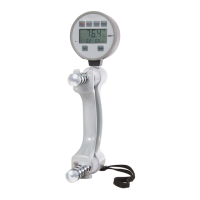
DHD-1 Digital Hand Dynamometer – Operation
Testing Mode
Prior to testing, create a file and record the subject’s name, gender, age,
dominant hand (right hand or left hand), and allow space to later record the test
results for each hand.
1. Press the PWR button to turn on the device in Testing Mode.
2. Press the SET button to select the unit of measure as lb or kg.
3. Press the ZERO button to calibrate the device to 0.0.
4. Press the HAND button to select the hand to be tested.
5. Instruct the patient to grip the DHD-1 according to proper testing protocol
and to switch hands after each test.
6. Press the SAVE button to save test results by Test Number for the selected hand.
7. Repeat steps 4-6 for additional testing and saving up to 20 test results per hand.
Note: Accuracy of the maximum grip force measured is not affected if the beginning
reading is not exactly 0.0. See Calibration on Page 20 for more information.
Reading Mode
1. Press the PWR button to power on the DHD-1.
2. Press the READ button to change into Reading Mode.
3. Press the HAND button to select test results for either the RIGHT or LEFT
hand.
4. Press the READ button to display the Test Number and saved test result
for the selected hand. Record the test result, then press the READ button
again to display the next test result for the same hand in descending Test
Number order. Either the DATE and TIME for each individually saved test
result, or the AVG, SD and CV based on the total number of test results for
the selected hand are displayed sequentially by pressing the SET button.
5. Repeat steps 3 and 4 for the other hand.
6. Press ZERO once to erase an individually displayed Test Number and test
result. Press and hold ZERO to erase all saved Test Numbers and test results.


 To Next Page
 Loading...