Need help?
Do you have a question about the SAESHIN FORTE 100 and is the answer not in the manual?
General introduction and purpose of the manual.
Equipment classification by protection type and operation mode.
Critical safety warnings and precautions for product use.
Key features and advantages of the FORTE 100 series products.
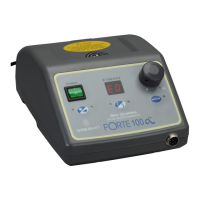
List and images of components included with the FORTE 100 model.
Description of the indicator display functions like RPM and error codes.
Explanation of the speed control dial for adjusting RPM.
Switch to turn the product power on or off.
Dial used to adjust the speed of the handpiece.
Instructions for connecting power cord, foot controller, and handpiece.
Steps for inserting and securing a bur into the handpiece.
Steps for operating the handpiece using hand control.
Steps for operating the handpiece using foot control.
Explanation of the overload protection feature and error indication.
List of error codes and their causes/remedies for FORTE 100.
List of error codes and their causes/remedies for FORTE 100α/100aD.
Instructions for replacing the fuse in the fuse box.
Technical specifications for the control box and handpieces.
Key features and advantages of the FORTE 200 series products.
List and images of components included with the FORTE 200 model.
Description of the indicator display functions like RPM and error codes.
Explanation of the speed control dial for adjusting RPM.
Button to operate the handpiece when using knee control.
Dial used to adjust the speed of the handpiece.
Instructions for installing the wall mounting bracket.
Instructions for connecting the power cord, foot controller, and handpiece.
Step-by-step guide for operating the handpiece.
Explanation of the overload protection feature and error indication.
List of error codes and their causes/remedies for FORTE 200.
List of error codes and their causes/remedies for FORTE 200α/200aD.
Instructions for replacing the fuse in the fuse box.
Technical specifications for the control box and handpieces.
Key features and advantages of the FORTE 300 series products.
List and images of components included with the FORTE 300 model.
List and images of components included with the FORTE 300α model.
List and images of components included with the FORTE 300aD model.
Description of the indicator display functions like RPM and error codes.
Explanation of the speed control dial for adjusting RPM.
Switch to turn the product power on or off.
Description of the indicator display functions like RPM and error codes.
Instructions for connecting the power cord, foot controller, and handpiece.
Steps for inserting and securing a bur into the handpiece.
Steps for operating the handpiece using hand control.
Steps for operating the handpiece using foot control.
Explanation of the overload protection feature and error indication.
Steps for operating the handpiece using hand control.
Steps for operating the handpiece using foot control.
Explanation of the overload protection feature and error indication.
Instructions for replacing the fuse in the fuse box.
Technical specifications for the control box and handpieces.
Key features and advantages of the FORTE 400 series products.
List and images of components included with the FORTE 400α model.
List and images of components included with the FORTE 400s model.
Description of the indicator display functions like RPM and error codes.
Explanation of the speed control dial for adjusting RPM.
Switch to turn the product power on or off.
Dial used to adjust the speed of the handpiece.
Instructions for connecting the power cord, foot controller, and handpiece.
Step-by-step guide for operating the handpiece.
Explanation of the overload protection feature and error indication.
List of error codes and their causes/remedies for FORTE 400α/400s.
Instructions for replacing the fuse in the fuse box.
Technical specifications for the control box and handpieces.
Conditions and situations not covered by the product warranty.
Explanation of various symbols used in the manual.
 General
| Torque | 4.5 Ncm |
|---|---|
| Power Supply | AC 100-240V, 50/60Hz |
| LED Display | Yes |
| Type | Micromotor |
| Handpiece Type | Brushless |
| Cooling System | Air Cooling |
| Foot Control | Variable Speed |

 To Next Page