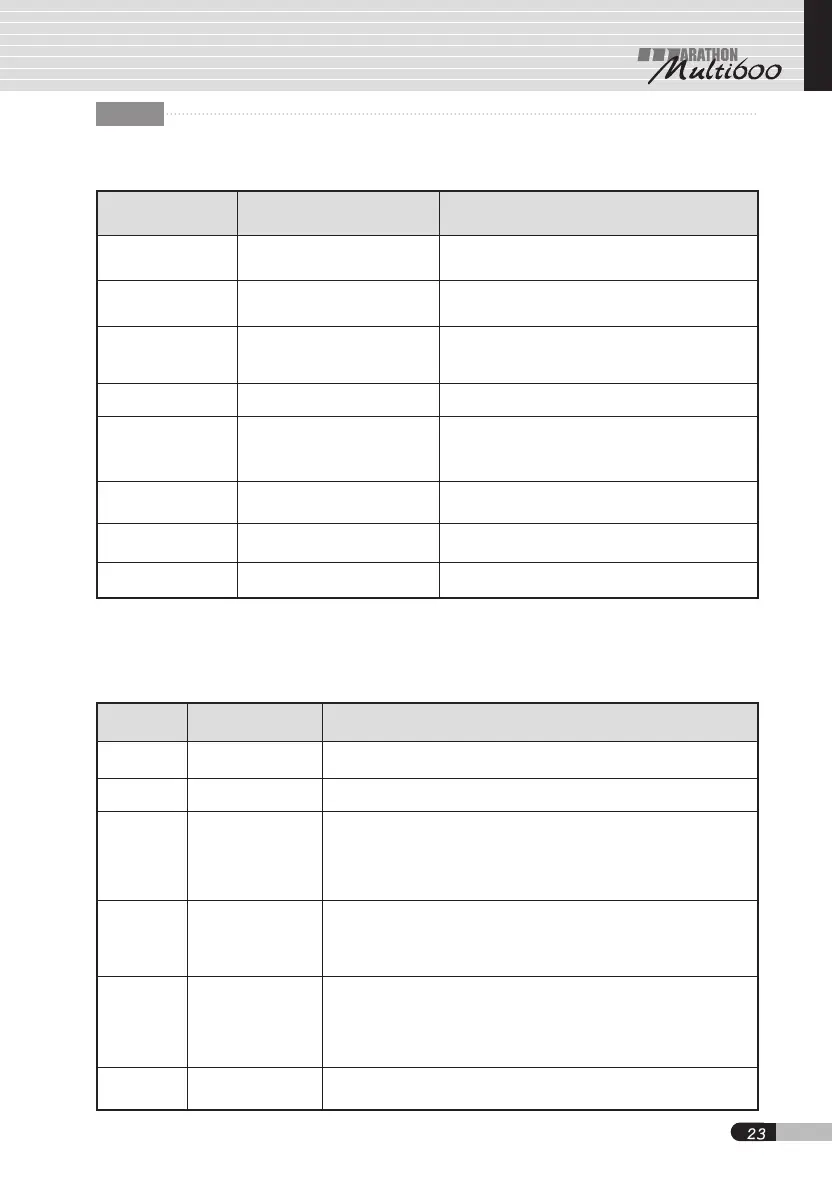
Error code Status Cause
Motor sensor error
1. Motor holl sensor is troubled.
2. Motor cord is unplugged or defective.
3. Motor cord is broken.
1. Collet chuck is opened.
2. Motor handpiece is troubled.
3. Motor handpiece is electrically broken.
1. Power supply is not in normal condition.
2. The control unit circuit is defective.
1. The unit has been excessively
operated under too high load condition.
2. Motor cord(power cord) is broken or
makes a short circuit.
Motor lock error
Overcurrent
detection error
Overvoltage
detection error
Overheat error
Overdrive error
Self-check error
Internal circuit
error
"1E"
"2E"
"3E"
"4E"
"5E"
"6E"
"7E"
"8E"
1. The motor was vibrated or suddenly
stopped after started in good condition.
1. The control unit interface is troubled.
2. The control unit memory is troubled.
1. The control unit circuit is troubled.
1. The unit has been excessively
operated under too high load condition.
2. The control unit has been exposed to
so hot environment
Check mode
Function How to check
Switch
By pressing each of the switches on the panel to
turn on individual LEDs, it is possible to make sure that the unit is in good condition.
Press forward/reverse selector (Rev.) switch ④ to turn on each of the 7 segment
LEDs, in order to check that the display is in normal condition.
Values are as much displayed on the 7 segments LEDs in 17 digits(0~9, A~F)
as the foot pedal is pressed. The LED of the turbo switch is on by pressing the
pedal slightly, but it is off by pressing fully. In doing so, it is possible to
make sure that the foot pedal is good condition. This function is released by
pressing the forward/reverse
selector
(Rev.) switch again.
One or two lines are displayed on the 7 segment LEDs by pressing
forward/reverse
selector
(Rev.) switch ④.
Then, one or two lines are turned on in such manner as one and two lines, one
and two lines............. by manually turning the motor, so as to make sure that
the hall sensor is in normal condition. This function is released by pressing the
forward/reverse
selector (Rev.)
switch again.
Display
Hall sensor
Foot pedal
Knee control panel
Recovery
“Sc”
“dc”
“Hc”
“Fc”
“nc”
“rc”
The maintenance mode is returned to the main mode by pressing
forward/reverse
selector
(Rev.) ④.
By slowly pressing the foot pedal after pushing the forward/reverse switch,
values are as much displayed as pressed on the 7 segments LEDs in 17
digits(0~9, A~F). The LED of the turbo switch is on by pressing the pedal
slightly, but it is off by pressing fully. In the way, it is possible to make sure
that the foot pedal is normal condition. The function is released by pressing
the forward/reverse
selector
(Rev.) switch again.
9. Technical data
9.1 Error code
9.2 Maintenance mode
Beeps are made 2 seconds after turning on the power switch while pressing both forward/reverse
selector(Rev.) switch ④ and run switch ⑤ at a time, which indicate the maintenance mode.
Turning speed control knob ② makes it possible to change the maintenance mode to check
modes of “Sc,” “dc,” “Hc,” “Fc,” “nc” and “rc.”
GB


 To Next Page
 Loading...