INTEGRA/-S/-G/-GS User Manual WEB GUI
SAF Tehnika JSC
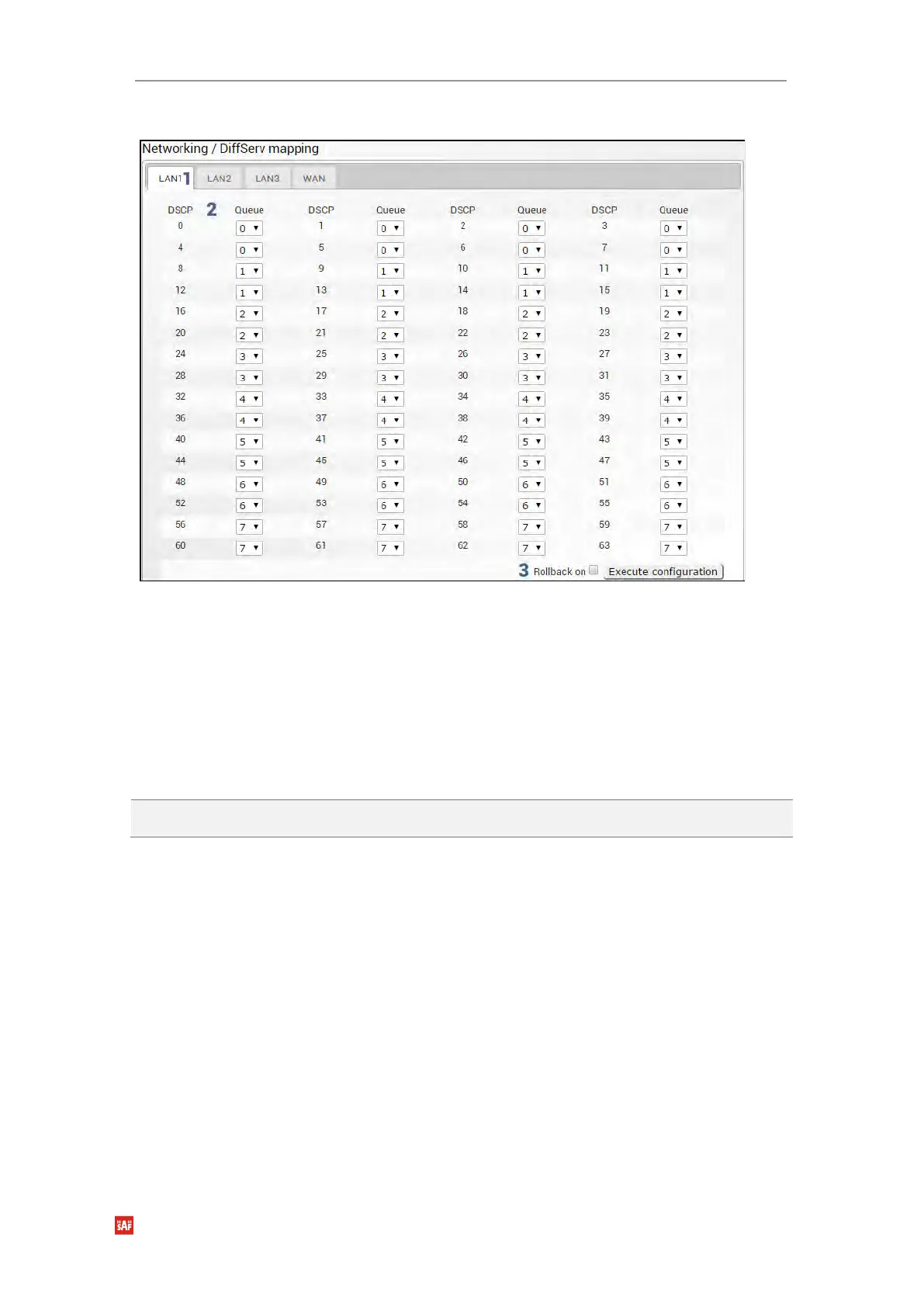
Modify mode
1) LAN1/LAN2/LAN3/WAN – Tabs allow selecting a particular port.
2) The table shows the mapping between DSCP values and CoS queues (status mode);
allows modifying the default mapping of DSCP priority values and queues (modify
mode).
3) By pressing „Execute configuration”, changes made to the corresponding section
apply only to the local side Integra/Integra-S/Integra-G/Integra-GS. If „Rollback on” is
selected, the configuration will be reverted in case erroneous configuration changes
are applied.
CLI commands (Chapter 4: COMMAND LINE INTERFACE)
network qos set <port> diffserv
dscp <0..63> priority <0..7>
Use to change default DiffServ priority (DSCP) mapping.
Networking → QoS → CoSQ configuration
The CoSQ configuration page allows modifying droplimit (buffer) size, queue weights or
sizes (depending on queueing), and queueing scheduler. On the WAN port, it is possible to
enable packet fragmentation and interleaving (by disabling low latency queues).


 To Next Page
 Loading...
