EasyManua.ls Logo

Safeguard Supply WDK-ERA-STROBE - User Manual

Safeguard Supply WDK-ERA-STROBE
2 pages
Print Icon
To Next Page IconTo Next Page
Loading...
Pair Transmitter to Receiver:
(Always test unit prior to installation)
The transmitter works with the ERA-DCRX receiver & basic programming
calls for the user to pair the transmitters with a receiver & select a
melody for the transmitter to instruct the receiver to play when
triggered.
For quick setup, however, each zone defaults to a basic "ding-dong" sound allowing
you to easily pair the transmitter for a faster set up process.
1. Flip over the ERA-UTX & remove the gray
silicon grommets (one per corner). The screws
are under the grommets.
2. Remove the four screws on the back of the
case and open to find the battery compartment.
(Figure
1)
3. Remove top half of case from lower case.
4. Install the included CR-2 battery in the holder
(Figure 1).
5. Re-tighted screws & insert grommets.
6. Note: When battery gets weak, it will cause
paired zone to flash LED on receiver for 10
minutes when triggered.
LED Indicator Light in Button:
The default setting is for the LED indicator to light up for two seconds
when the ERA-UTX
is activated.
(Figure 1)
Battery Installation:
Changing the Zone Melody:
By default, each zone is programmed by the factory
to play the ding-dong sound
1. Hold down the "zone" button until you hear a short tone & all
LEDs on front panel of receiver are red (approx 3 seconds). The
zone you are programming will flash.
2. Press the "volume" button to scroll through the 12 available
melodies for selection. Once you find a melody you like, move to
step 3.
3. Press the "zone" button to scroll to the next zone & repeat step 2
to program a melody to other zones.
4. Once you have programmed a melody to all necessary zones,
move to step 5.
5. Hold down the "zone" button until you hear a short tone sound
(approx 3 seconds) notifying the receiver is out of melody
programming mode.
WDK-ERA-STROBE Kit
Owner’s Manual
This device complies with Part 15 of the FCC rules, Operation of this device is subject
to the following conditions: 1. This device may not cause harmful interference. 2. This
device must accept any interference, including interference that may cause unde-
sired operation.
Introduction
The ERA-UTX is a Universal Transmitter compatible with the ERA-DCRX
Receiver and is included in the kit. The ERA-UTX has several methods
of activation. First, it has a push button that can be used as a panic
button or doorbell button. The ERA-UTX also has terminals for a normally
open (N/O) or normally closed (N/C) input. These inputs can be used
with any detector contacts. There is also a magnetic contact that can
be used for doors or windows. When the transmitter is activated, it will
send a signal to the receiver which will sound one of 12 different tones for
a few seconds, and trigger the connected strobe light to flash.
Each receiver is capable of pairing with four (4) transmitters per zone.
Each zone features 1 x 12V DC output.
Output duration for the 12V DC output may be set to 5 sec, 10 sec, 1
min, & 2 min. The receiver features 1 x C-Form relay assignable to one
or multiple zones & will take on the duration of the 12V DC output.
Volume control: 4 levels plus mute, plus off.
Each transmitter must be paired to a zone on the receiver.
Each zone is programmed to the "ding-dong" sound from the factory.
User may change this melody.
When transmitter battery is low, it sends a signal to the receiver when
triggered & the corresponding LED on the receiver will continue to
flash for 10 minutes & the receiver will double-play the melody..
Volume, Mute, Off:
The volume button on the side of the receiver controls the four different volume
levels, mutes & turns off the receiver. Pushing the volume button controls these
functions.
No LED lights (no zone LED or power indicator) means the unit is
off. Pushing volume again turns it back on to max volume.
(Figure 2)
1. On the ERA-DCRX receiver, hold down the "mode" (left button in
figure 2 below) button until you hear a short tone sound & the "zone
1" LED flashes.
2. If you are programming the transmitter to zone 1, press the gray
button on your transmitter. You will hear the receiver play a short
musical note (zone 1 will continue to flash).
3. To program a transmitter to a different zone, press the "zone" button
on the receiver to scroll to the appropriate zone . The zone you want
to program will flash. Repeat step 2 above.
4. Once you have programmed all the zones move to the next step.
5. To exit program mode, hold down the "mode" button until you hear
a short tone sound (approx 3 sec)
When all four zone LED lights are red, this indicates maximum
volume.
Three zone LED lights indicate the third volume level.
Two zone LED lights indicate the second volume level.
One zone LED light indicates the minimum volume level.
No zone LED lights & a red power indicator light means the
sound is muted.
Helpful Notes
What;'s in the Kit:
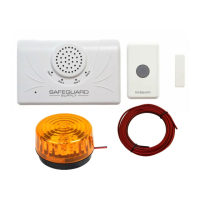
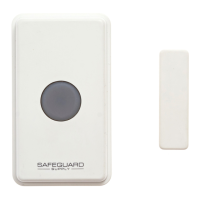
ERA-UTX transmitter with mounting bracket & hardware
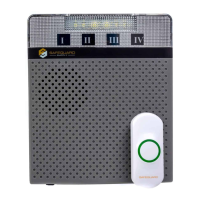
ERA-DCRX
Strobe light
Wire (if needed)
Question and Answer IconNeed help?

Do you have a question about the Safeguard Supply WDK-ERA-STROBE and is the answer not in the manual?

Summary

Introduction to ERA-UTX Transmitter

Kit Contents and Helpful Notes

Lists the items included in the WDK-ERA-STROBE Kit and provides helpful operational notes for the receiver.

ERA-UTX Battery Installation

Step-by-step instructions for installing the CR-2 battery into the ERA-UTX transmitter.

Pairing Transmitter to Receiver

Changing Zone Melody Settings

Receiver Volume, Mute, and Off Functions

Erasing Transmitter Programming

Using the Magnetic Contact

Mounting the ERA-UTX Transmitter

Connecting a 12 V DC Strobe to the Receiver

Locating and Connecting Strobe Wires

Details on how to connect a 12V DC strobe light to the ERA-DCRX receiver's zone terminal block.

Using the Relay on the ERA-UTX

Connecting Normally Open;Closed Contacts

Instructions for connecting N/O and N/C detector contacts to the ERA-UTX relay terminals.

Overview

The Safeguard Supply WDK-ERA-STROBE Kit is a universal wireless alert system designed to provide audible and visual notifications for various events. It consists of an ERA-UTX Universal Transmitter, an ERA-DCRX Receiver, and a strobe light.

Function Description:

The ERA-UTX transmitter is a versatile device that can be activated in multiple ways: via a push button (for panic or doorbell functions), through normally open (N/O) or normally closed (N/C) input terminals for connection to external detectors, or by a magnetic contact for door/window monitoring. When activated, the transmitter sends a wireless signal to the ERA-DCRX receiver. The receiver then plays one of 12 selectable tones and triggers the connected strobe light to flash, providing both an audible and visual alert. The system is designed for easy setup, with default "ding-dong" sounds for quick pairing, but allows for customization of melodies per zone.

Important Technical Specifications:

  • Transmitter (ERA-UTX):
    • Activation Methods: Push button, N/O/N/C input terminals, magnetic contact.
    • Battery: CR-2 (3V) battery.
    • LED Indicator: Lights for two seconds upon activation (default setting).
  • Receiver (ERA-DCRX):
    • Zones: Capable of pairing with four (4) transmitters per zone.
    • Outputs: Each zone features 1 x 12V DC output.
    • Output Duration: Selectable to 5 sec, 10 sec, 1 min, or 2 min via dip switches. This setting applies to all zones.
    • Relay: 1 x C-Form relay, assignable to one or multiple zones, taking on the 12V DC output duration.
    • 12V DC Output Current: 400mA maximum.
    • Form "C" Relay Rating: 24 VDC at 3 Amp maximum current (does not supply power to external devices).
    • Volume Control: 4 levels plus mute, plus off.
    • Melodies: 12 selectable tones per zone.
    • Low Battery Indication: Receiver LED flashes for 10 minutes and plays the melody twice when a paired transmitter has a low battery.

Usage Features:

  • Pairing Transmitters:
    1. Hold down the "mode" button on the receiver until a short tone is heard and "zone 1" LED flashes.
    2. Press the gray button on the transmitter to pair it to the flashing zone. A short musical note confirms pairing.
    3. To pair to a different zone, press the "zone" button to scroll to the desired zone, then repeat step 2.
    4. Exit program mode by holding down the "mode" button until a short tone is heard (approx. 3 seconds).
  • Changing Zone Melody:
    1. Hold down the "zone" button until a short tone is heard and all front panel LEDs are red (approx. 3 seconds). The current programming zone will flash.
    2. Press the "volume" button to scroll through the 12 available melodies.
    3. Press the "zone" button to move to the next zone and repeat step 2 for other zones.
    4. Exit melody programming mode by holding down the "zone" button until a short tone is heard (approx. 3 seconds).
  • Volume Control: The "volume" button on the side of the receiver cycles through four volume levels, mute, and off.
    • All four zone LEDs red: Maximum volume.
    • Three zone LEDs red: Third volume level.
    • Two zone LEDs red: Second volume level.
    • One zone LED red: Minimum volume level.
    • No zone LEDs, red power indicator: Muted.
    • No LEDs: Unit is off. Pressing volume again turns it back on to max volume.
  • Erasing Programming (Memory):
    1. Hold down the "mode" button until a short tone is heard and "zone 1" LED flashes.
    2. Hold down the "mode" and "volume" buttons simultaneously until all LEDs stop flashing and a short melody is heard (approx. 5 seconds). All LEDs will stop flashing, and only the green power indicator will display, indicating memory is erased.
  • Magnetic Contact Usage:
    • Effective for gaps less than 1½ inch.
    • Mount the push button on the door jamb and the magnet on the door (within ½" of the push button).
    • The magnetic contact can be used on either side of the push button.
  • Relay Usage (ERA-UTX):
    • Terminals are located at the bottom of the case.
    • For N/C connection, connect wires to NC and Common (center) terminals.
    • For N/O connection, connect wires between NO and Common (center) terminals.
    • Multiple N/C contacts should be wired in series.
    • Multiple N/O contacts should be wired in parallel.
    • Both N/O and N/C contacts can be used simultaneously with the magnetic contact and push button.
  • Connecting Strobe Light:
    1. Unplug the receiver and separate the top and bottom halves of the case.
    2. Identify the positive (red) and negative (black/red stripped) wires of the strobe.
    3. Locate the external 12V DC terminal connection block corresponding to the desired zone on the ERA receiver.
    4. Loosen the positive and negative screws for that zone.
    5. Insert the strobe's positive wire into the positive screw and the negative wire into the negative screw on the terminal block.
    6. Re-tighten screws.
    7. Plug in the receiver.
    8. Verify the transmitter triggers the receiver and the strobe.
    9. Ensure receiver volume is on, transmitter battery is installed, and transmitter is programmed.
    10. Snap the cover back on.

Maintenance Features:

  • Battery Installation (ERA-UTX):
    1. Remove the gray silicon grommets and four screws from the back of the case.
    2. Open the case to access the battery compartment.
    3. Install the included CR-2 battery.
    4. Re-tighten screws and insert grommets.
    5. Low battery causes the paired zone LED on the receiver to flash for 10 minutes when triggered.
  • Mounting the Transmitter:
    1. The transmitter mounts to a wall using the included mounting bracket.
    2. The bracket slides off the back of the ERA-UTX.
    3. Position the bracket and secure with two screws.
    4. Slide the ERA-UTX back onto the bracket.
    5. For outdoor mounting, use silicone plugs in the screw holes to prevent moisture.

Safeguard Supply WDK-ERA-STROBE Specifications

General IconGeneral
BrandSafeguard Supply
ModelWDK-ERA-STROBE
CategoryAccessories
LanguageEnglish

Related product manuals