Pleasereadallsafetyinstructionwarningscarefullybeforeusingthisproduct.Improperuseofthisproductmay
resultin damage to this or attachedproducts.Toensuretheproductsworkwell,please never use this in the
followingconditions:
1. Moistorunderwaterconditions.
2. Conditionsnearheaterorhigh‐temperatureservice.
3. Conditionswithdirectandstrongsunshine,
4. Conditionswithadapterdamage
5. Neverdismantletheproductwithoutduepermission,otherwiseitmaynullifythewarrantyclause.
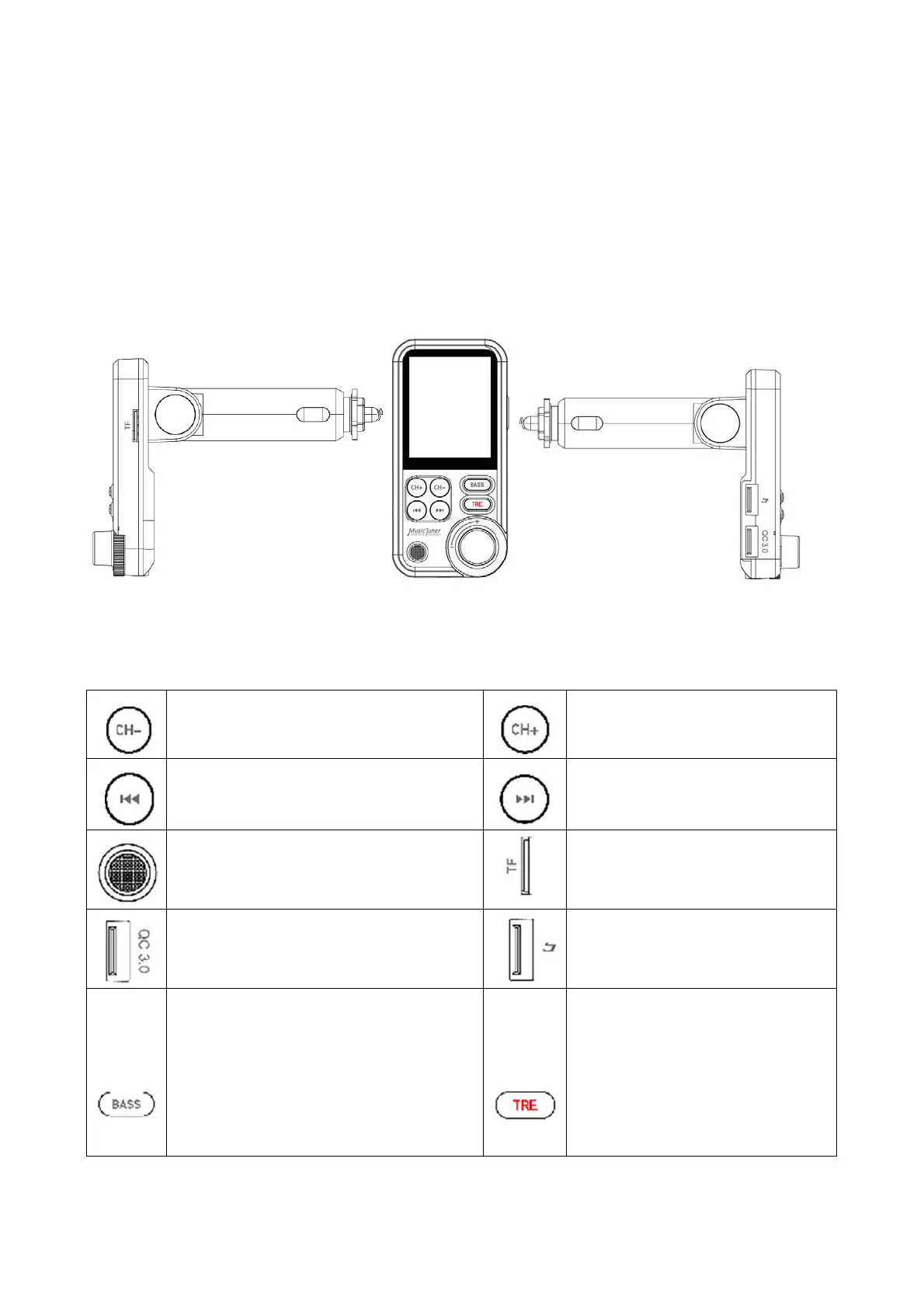
Appearance:
OperationInstructions
Frequency decrease
Frequency increase
Previous song
Next song
Microphone
TF card slot
QC3.0 Charging port
USB port for reading music & 5V/1A
charging
Press "BASS" button to adjust bass effect. In
"BASS" status, increase or decrease the bass
by:
1.Press CH+ or CH-
2.Press previous or next button
3.Rotary the spin button
Press "TRE" button to adjust treble
effect. In "TRE" status, increase or
decrease the treble by:
1.Press CH+ or CH-
2.Press previous or next button
3.Rotary the spin button


 To Next Page