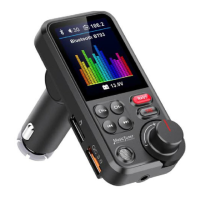
Spin button:
1.Clockwise rotation to increase the volume, Anti-clockwise rotation to decrease the volume
2. Long press to entry the main menu (EQ and Language).Press "EQ" or "Language" to entry the
sub-menu .
3. Double press to redial the last number.
4. Short Press to pick up the calling, press again to hang off the calling.
5. Long press to reject the calling when incoming a call.
6. During a calling, long press to switch the private calling.
USEINGTHEFMTRANSMITTERFUNCTION
1. TurnyourcarradiotoanunoccupiedFMfrequency,presstheCHbuttonandadjustthefrequencytomakethe
deviceandcarradiointhesamefrequency.
2. InserttheTFcardorUSBdiskwhichcontainingtheMP3/WMA/WAV/FLACfilesintotheslot,itwillplayand
transmittheMP3filesautomatically.
USEINGTHEBLUETOOTHFUNCTION
1. PairtheBluetoothforthefirsttime,youneedtoactivateyourmobilephone’sBluetoothfunction,andthen
searchthenewdevice.Whenthemobilephonedetectsthisunit(namedas“BT93”),clickthisnametoconnect.
2. Inthemusicplayingmode,simplypressthe“BASS”and“TRE”buttonstoDIYyourmusic.Whenthereisan
incomingcall,thisdevicewillautomaticallyswitchtothecalling.
USEINGTHECHARGINGFUNCTION
ThisdevicewithdualUSBportsforcharging,OneportisQC3.0,Anotherportis5V/1A.Total23W.Whenthisunit
poweredfromcarlightersocket,connecttheUSBChargerporttoyourmobile phone or othersdevicewitha
specialUSBcable(notincluded)forcharging.
USEINGTHEBLUETOOTHCALLING
1. Pressthespinbuttontoanswertheincomingcallorhangoffacall.
2. LongpressthespinbuttontorejecttheincomingcallinBluetoothcallingmode.
3. DoublepressthespinbuttontodialthelastNumberautomatically.
4. Whenmakingacall,youcanonlydialthephonenumberbyyourmobilephone,butoncethecallconnected,
youcanusethehands‐freefunctiontoenjoyit.
TROUBLESHOOTINGGUIDE
Nosound
• Checkthevolumeontheradio,FMtransmitterandtheexternaldevice.
ConnectingviaBluetooth
• ChecktheBluetoothconnection
Audiocableconnection
• Makesurethatthecableisundamaged
andproperlyconnected.
Memorycard
• Check that thememory card works and that there are MP3 files on thememory
card.Themaximumallowedmemorycapacityonthecardis32GB.


 To Next Page
 Loading...