Need help?
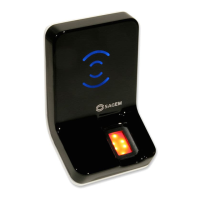
Do you have a question about the Sagem Securite MorphoAccess J-Dual and is the answer not in the manual?
Provides essential safety guidelines for the installation and use of the MorphoAccess ® terminal.
Describes the user interface, power supply, administration, and access control interfaces of the terminal.
Explains how to configure the terminal's IP address for network connectivity and record download.
Covers configuration via USB key administration for standalone terminals.
Details how configuration parameters are stored in files and organized within the application.
Describes remote management and configuration of terminals over a network.
Provides instructions on how to upgrade the terminal's firmware via IP or other methods.
Explains how to unlock additional terminal features by downloading licenses.
Summarizes the different recognition modes available for the terminal.
Provides an overview of typical access control systems and terminal operating modes.
Details how to configure and perform access control using fingerprint identification.
Covers various modes of access control using authentication with contactless cards.
Details how to configure recognition modes, including the two-attempts mode and timeouts.
Explains how to adjust the matching threshold to balance security and convenience.
Explains how to send access control results and user IDs to a central security controller.
Details the terminal's anti-tamper and anti-pulling switch features and alarm handling.
Describes how to configure time masks to restrict access based on time of day.
Offers solutions for common issues like unreachable terminals, sensor problems, and network errors.
 General
| Model | MorphoAccess J-Dual |
|---|---|
| Category | Touch terminals |
| Operating System | Linux |
| Power Supply | 12V DC |
| Enclosure Rating | IP54 |
| Certifications | CE, FCC |
| Authentication Methods | Fingerprint, Card |
| Card Reader | Yes |
| Communication Interfaces | Ethernet, USB |
| Operating Temperature | -10°C to +50°C |
| Storage Temperature | -20°C to +60°C |
| Humidity | non-condensing |
| Display | LCD |
| Keypad | Numeric keypad |
| Fingerprint Sensor | Optical sensor |


 To Next Page