EasyManua.ls Logo

Sagitter FLOORBAT PLUS - Menu Navigation and DMX Channels; Menu Structure and Settings

Sagitter FLOORBAT PLUS
Print Icon
To Next Page IconTo Next Page
To Previous Page IconTo Previous Page
Loading...
62
7. – MENU AND DMX CHANNELS
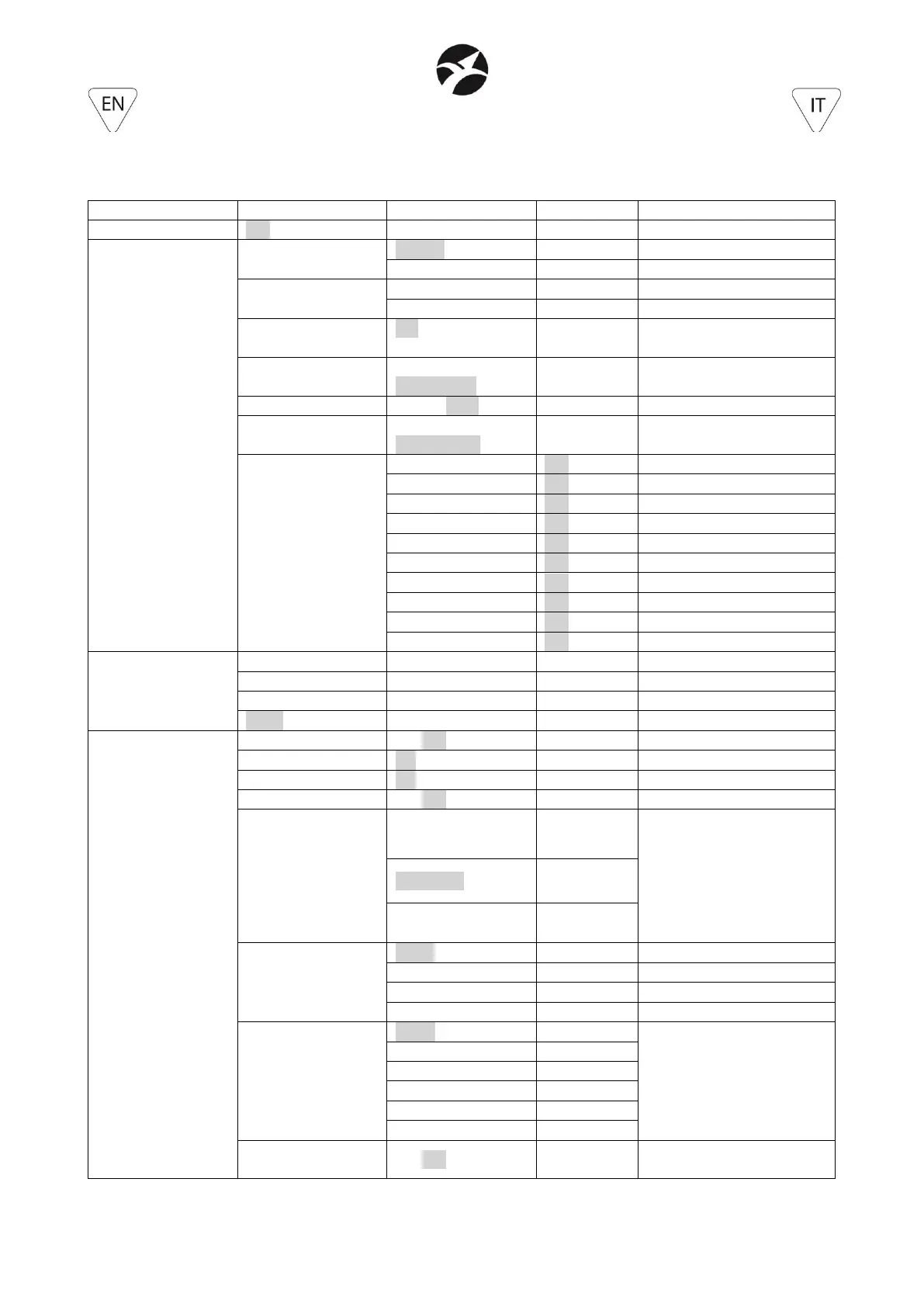
7.1 – MENU (highlighted the default values)
Level 1
Level 2
Level 3
Level 4
Description
DMX Address
001 – 512
DMX address setting
Operate mode
Control Mode
W-DMX
Control by Wireless DMX
IRC
Control by IRC
Wireless
Link / Unlink
In case of Master
Unlink
In case of Slave or DMX
Auto Mode
OFF, Auto01,…,
Auto08
Automatic mode
Auto SP
000 – 100
(default 050)
Speed of automatic mode
Master/Slave
Master, Slave
Master/Slave setting
Sound
OFF, 001%…100%
(default 60%)
Sound activation and
sensitivity setting
Static Control
Dimmer
000 – 255
Manual dimmer setting
Strobe
000 – 255
Manual strobe setting
Macro effects
000 – 008
Macro effects setting
Speed
000 – 255
Macro effects speed
Color Macro
000 – 044
Color macro setting
White Macro
000 – 011
White macro setting
Red
000 – 255
Manual Red setting
Green
000 – 255
Manual Green setting
Blue
000 – 255
Manual Blue setting
White
000 – 255
Manual White setting
Channels
3 CH
3-channels mode
4 CH
4-channels mode
6 CH
6-channels mode
12 CH
12-channels mode
Settings
Black out
ON/OFF
Black out mode if no DMX
Hold
ON/OFF
Hold mode if no DMX
RDM
ON/OFF
RDM mode
Display reverse
ON/OFF
Inversion of display
Battery
Boost (100%)
Battery power:
- Boost: max output and
max consumption
- High: high output and
high consumption
- Med: med output and
med consumption
High (75%)
Med (50%)
Dimmer curve
Linear
Linear dimmer curve
Exp
Exp dimmer curve
Log
Log dimmer curve
S-Curve
S dimmer curve
Rate
600Hz
LED refresh frequency
1200Hz
2400Hz
4800Hz
9600Hz
15000Hz
Black Light
ON/OFF
Backlight display:
- ON: display always ON

Related product manuals