EasyManua.ls Logo

Saitek Aria - User Manual

Saitek Aria
15 pages
Print Icon
To Next Page IconTo Next Page
Loading...
1
STOP
STOP
STOPSTOP
GO
GO
GOGO
9
10
A

Questions and Answers

Summary

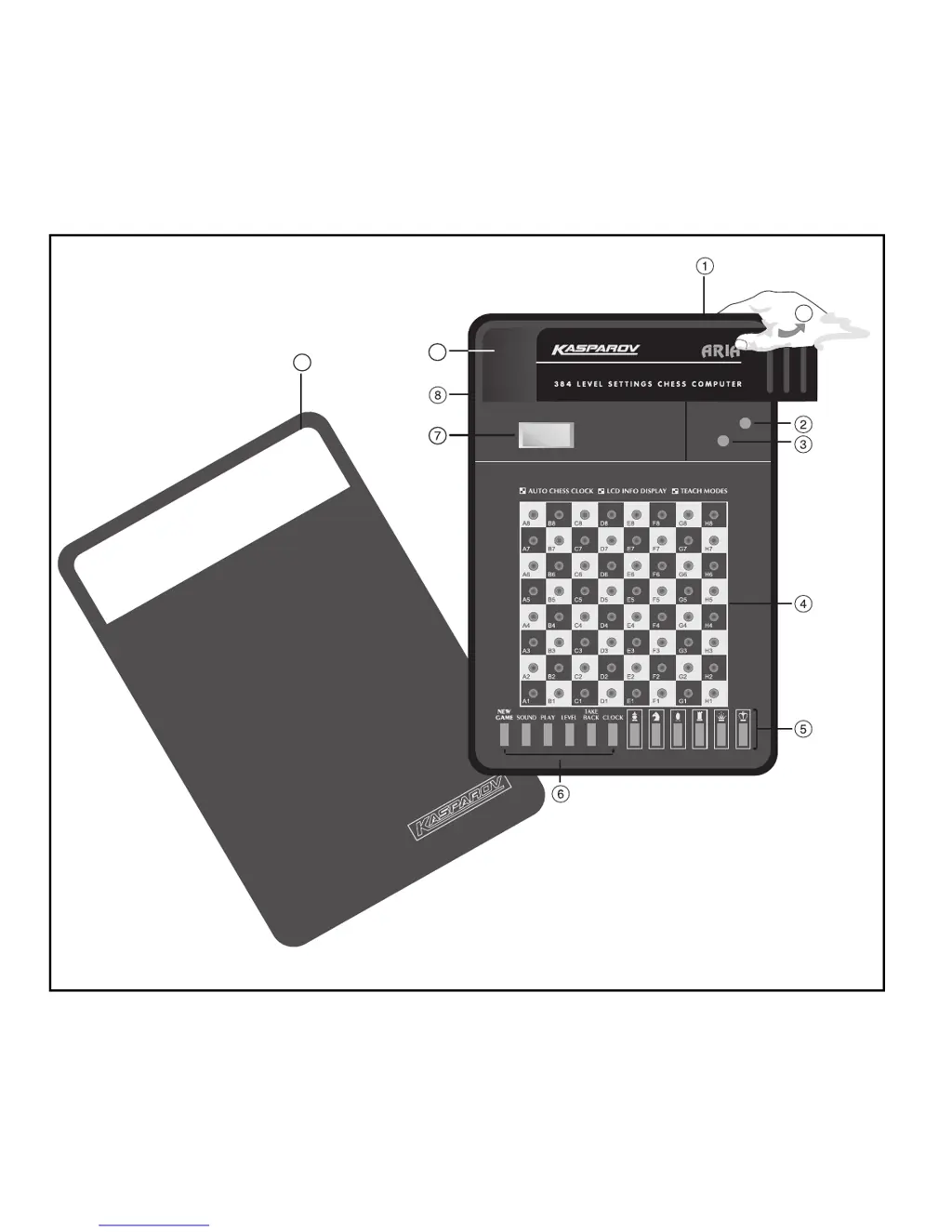
Keys and Features

Battery Compartment

Compartment for two "AAA" batteries, located on the base of the unit.

Stop Key

Turns the computer off, retaining the current game in memory.

Go Key

Turns the computer on, initiating game readiness.

Sensory Chessboard

Features sensors on each square to automatically register piece movement.

Piece Symbol Keys

Used to verify chess positions and select Teach Modes.

New Game Key

Resets the computer to start a new game.

Sound Key

Toggles the computer's sound effects on and off.

Play Key

Allows changing sides, forcing a computer move, or getting move suggestions.

Level Key

Enters Level Mode or accesses Teach Modes.

Take Back Key

Allows undoing one or two previous moves.

Clock Key

Enables or disables the built-in chess clock.

LCD Display Window

Shows moves, game info, and chess clock; used for level selection.

ACL (Reset)

Resets the computer, located in the base, to clear static discharge.

Piece Storage Compartment

Compartment for storing captured chess pieces during play.

Protective Lid

Covers the unit to protect pieces and from dust.

Using Your Computer

First, Install the Batteries

Guide to installing two "AAA" batteries for computer operation.

Ready to Play? Heres How to Move!

Steps to start a game, set up pieces, and make the first move.

The Computer Makes Its Move

Explains how the computer indicates its move and how to complete it.

Change Your Mind? Take Back!

Instructions for taking back up to two individual moves.

Its Check, Mate, or Draw!

Describes symbols displayed for check, checkmate, or draw outcomes.

Game Over? Start a New Game

How to initiate a new game at any time.

Too Easy;Hard? Change Levels!

Guide to selecting from 64 skill levels and 384 total settings.

Additional Features

Piece and Color Symbols

Explanation of symbols used for chess pieces and color indication.

Chess Clocks

Details on the built-in chess clock and its display.

Capturing and Special Moves

How to perform captures and special moves like en passant.

Illegal Moves

Explains how the computer handles and rejects illegal moves.

Interrupting the Computers Search

How to force the computer to make its current best move.

Changing Sides with the Computer

Instructions on how to switch playing sides with the computer.

Getting Hints from the Computer

How to get move suggestions or have the computer play for you.

The Computer Plays Against Itself

Method for observing the computer play against itself.

Game Memory

The computer remembers game position for up to two years.

Levels and Special Modes

Levels of Play

Overview of 384 level settings categorized by skill.

Teach Modes: Learn Tactics!

Five built-in modes to learn basic moves and piece tactics.

Verify Mode: Check Piece Positions!

Function to check piece positions on the board if they are disturbed.

Having Problems? Some Hints & Tips!

Troubleshooting advice for common issues and game problems.

Technical Details

The ACL Function

Procedure to reset the computer using the ACL hole.

Care and Maintenance

Guidelines for cleaning, handling, and battery care.

Technical Specifications

Details on clock frequency, keys, display, sound, batteries, and dimensions.

Troubleshooting Guide

Saitek Aria Specifications

General IconGeneral
BrandSaitek
ModelAria
CategoryToy
LanguageEnglish

Related product manuals