29
the water
in line with standards for drinking)
3.Push the※key to start ice making;
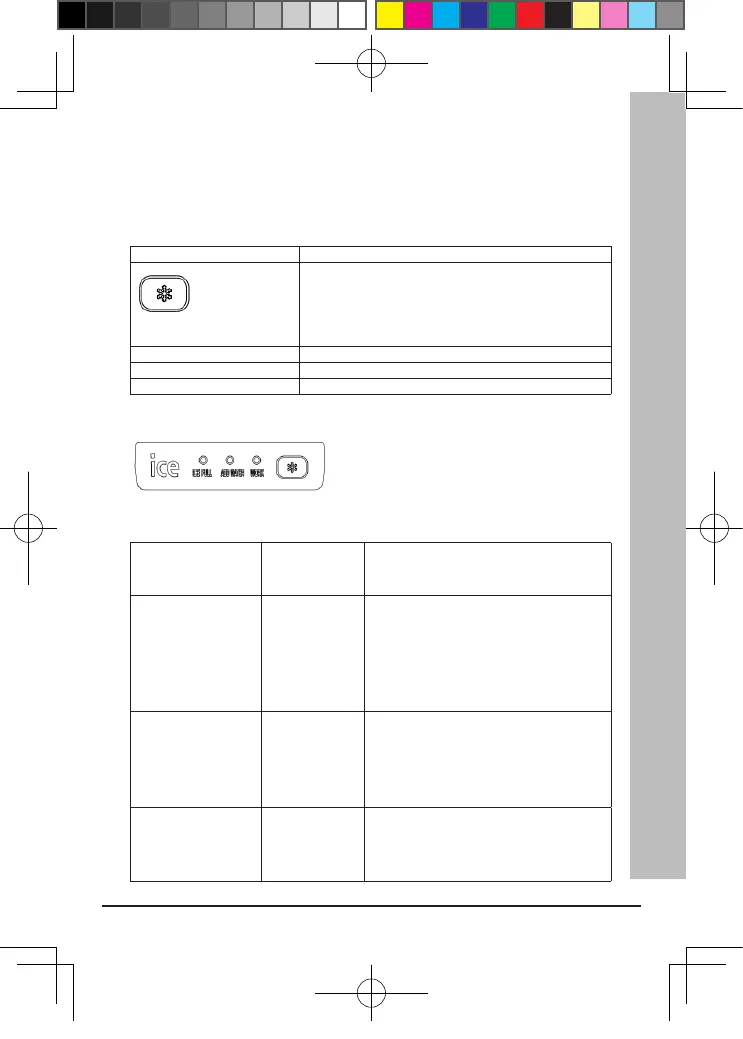
VII . OPERATION PANEL
BUTTONS AND ICON FUNCTIONS
KEY ICE MAKING, STANDBY, FAILURES ELIMINATING
KEYS
WORK LED POWER INDICATOR
ICE FULL LED ICE FULL INDICATOR
ADD WATER LED FILL WATER INDICATOR LIGHT
VIII.
FAILURE AND TREATMENT
Failure symptoms Failure reasons
Treatment
No display or power
indicator
is not lit
1.Check the input power supply matches
2.Check the power cord is connected
correctly
3.The internal parts wear, send to
professional service maintenance
department.
Ice full LED light on
or blink
1. Ice full
2. Low-
temperature
protection
(ambient
temperature ≤
5℃)
1. Automatic recovery after removal of ice.
Place ice machine into the environment to
ensure that ambient temperature above 5℃.
Fill water led Absence of water 1. Pour the storage room into clean water
push the key to eliminate the failure.
2. Water supply system or components
damaged, send to professional service
department to maintenance.
FHS 2012.indd 29 4/18/2016 4:51:17 PM


 To Next Page