37
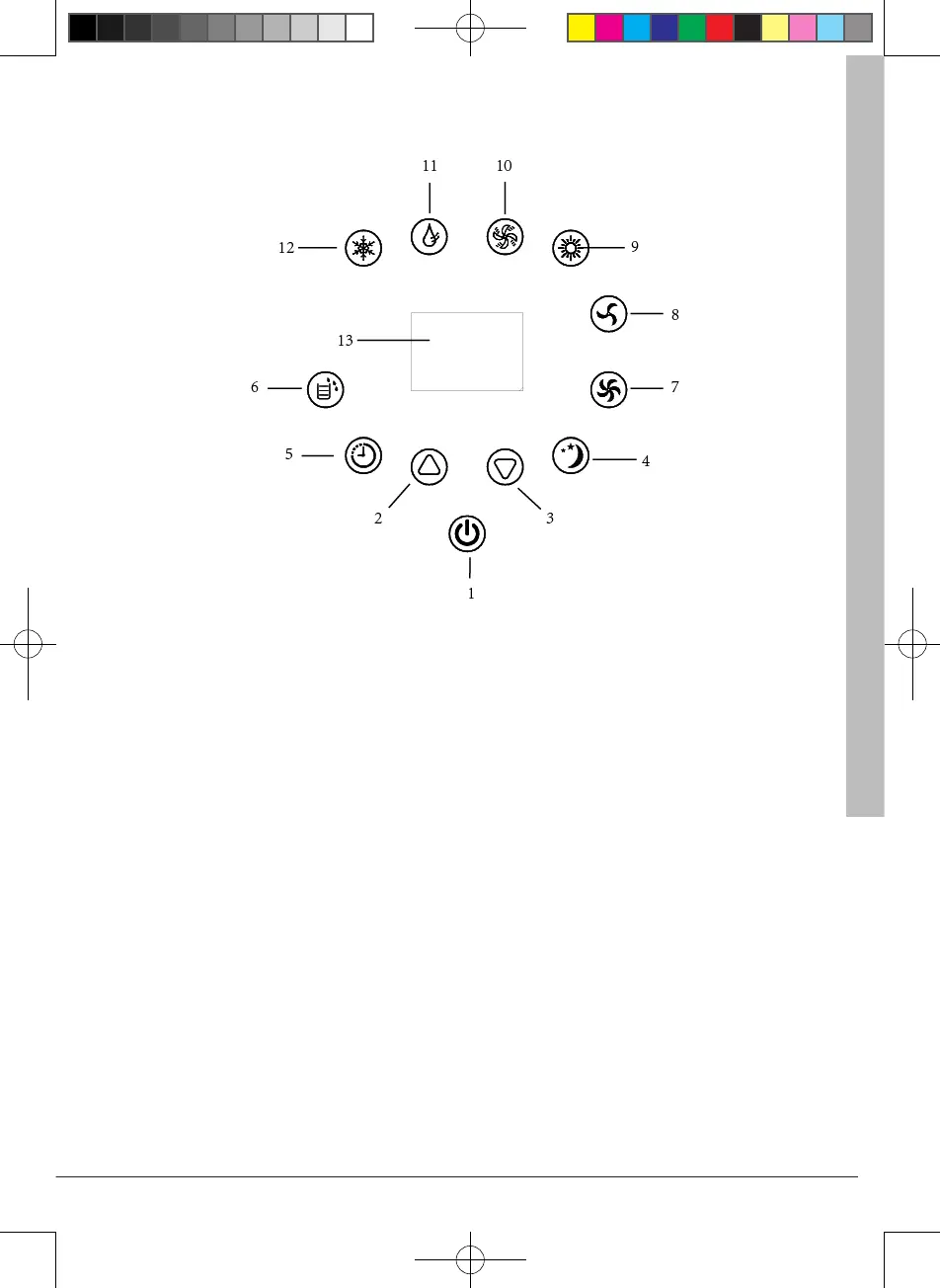
Control Panel
1. Power button
2. Up button
3. Down button
4. Sleep mode indicator
5. Timer mode indicator
6. “Water Full” indicator
7. High fan speed indicator
8. Low fan speed indicator
9. Heater indicator
10. Fan mode indicator
11. Dehumidify mode indicator
12. Cooling mode indicator
13. Display window
POWER: press this key to turn on/o machine. After machine turns on, default value is cool-
ing mode with low fan speed.
MODE: after machine turns on, press this key to select cooling, dehumidifying and fan ,Heat-
ing mode.
FAN: after machine turns on, press this key to select fan speed (high and low).
DOWN: under cooling mode, press this key to downward setting temperature from 16~31℃.
UP: under cooling mode, press this key to upward temperature from 16~31℃.
SLEEP: under cooling mode, press this key to turn on/o sleeping function.
TIMER: under power-on or standby mode, press this key to setup on/o time from 1~24.
DEHUMIDIFY: select dehumidifying mode, dehumidifying mode indicator turns on.
JHS.indd 37 2018/1/24 17:10:13


 To Next Page