
 Need help?
Do you have a question about the Salora 28LED9112CSW and is the answer not in the manual?
Essential safety guidelines for TV operation and safe environment.
Instructions for safe power cord handling to prevent shocks.
Guidance on avoiding humidity, liquids, and device damage.
Placement advice, fire prevention, and wall mounting instructions.
Proper methods for screen maintenance and cleaning.
Tips for reducing energy usage via TV power saving modes.
Explains messages displayed upon TV reactivation from standby.
An overview of the TV's main functionalities and capabilities.
Details the items provided with the television set.
Guide on how to switch between different connected devices.
Instructions for using buttons to change channels and volume.
Steps for inserting batteries into the remote control.
Guide for connecting power, aerial, and cable inputs.
General instructions for using the remote control effectively.
Details on brand marks, logos, and usage rights.
Instructions for the environmentally sound disposal of TV and batteries.
Explanation of the teletext functionality and its features.
Guide to navigating and utilizing digital teletext services.
Comprehensive explanation of all buttons on the remote control.
Guide for setting user-defined functions for dedicated buttons.
Description of available ports and their respective uses.
Safety notes and best practices for making external device connections.
Steps for switching the television on and off from standby.
Guide for initial language, region, and preference setup.
Instructions for performing aerial and cable channel searches.
How to view photos, music, and videos from connected USB devices.
Specifications for USB devices used for PVR functions.
Functions for pausing live TV and immediate program recording.
Accessing and playing back recorded programs from USB.
Customizing recording preferences and formatting USB drives.
Options like loop and shuffle for media playback.
Accessing frequently used settings via the Quick Menu.
Streaming TV content to mobile and accessing the digital manual.
Controlling CEC devices and exploring other smart features.
Selecting predefined picture settings for different content types.
Adjusting contrast, brightness, sharpness, and color levels.
Managing energy saving modes and backlight intensity.
Fine-tuning contrast, color temperature, and noise reduction.
Restoring picture settings to their factory default values.
Adjusting volume, equalizer, balance, and headphone settings.
Selecting sound profiles and using automatic volume limiting.
Setting up menu locks, maturity locks, and PIN codes.
Scheduling recordings and setting program timers.
Configuring network connections and updating TV software.
Accessing audio description, auto-off, media renderer, and remote features.
Performing automatic, manual, and network channel scans.
Managing stored channels, setting favorites, and editing lists.
Configuring child lock, maturity lock, and new PIN codes.
Viewing and utilizing TV program schedules.
Setting timers for programs and managing event options.
Updating TV firmware via broadcast signal or manual scan.
Connecting and using the TV as a wireless display device.
Resolving issues with picture, sound, and remote control.
Addressing recording errors and USB speed problems.
Table of typical video display modes and resolutions supported.
Overview of supported video and audio formats.
List of video file types and their specifications for USB playback.
List of audio file types and their specifications for USB playback.
List of image and subtitle file types for USB playback.
Supported resolutions and frequencies when using DVI connection.
Step-by-step guide for connecting to a wired network.
Steps for connecting to a wireless network using a dongle.
Adjusting parameters for both wired and wireless network types.
Enabling Wi-Fi features and selecting available networks.
Sharing content with smartphones and tablets wirelessly.
Solutions for common wireless network connection problems.
Understanding DLNA and installing the required Nero MediaHome software.
Guide on playing content stored on network devices via Media Browser.
Setup necessary for accessing the TV's online portal.
Instructions for interacting with the internet portal interface.
Utilizing the PIP feature while accessing the internet portal.
Details on brand, model number, and energy efficiency rating.
Visible screen dimensions and average power usage.
Specifics on power usage in on, standby, and off modes.
Figures for the television's yearly energy consumption.
 General
| Screen shape | Flat |
|---|---|
| Response time | 6.5 ms |
| Display diagonal | 28 \ |
| Display brightness | 300 cd/m² |
| Display resolution | 1366 x 768 pixels |
| Display technology | LED |
| Native aspect ratio | 16:9 |
| Supported video modes | 1080i, 1080p, 480i, 480p, 576i, 576p, 720p |
| Contrast ratio (dynamic) | 3000:1 |
| Display diagonal (metric) | 71 cm |
| Motion interpolation technology | BPR (Best Picture Rate) 100 Hz |
| 3D | No |
| Interactive TV | Yes |
| Annual energy consumption | 36 kWh |
| Operating relative humidity (H-H) | 0 - 85 % |
| Tuner type | Digital |
| Analog signal format system | NTSC, PAL, PAL BG, PAL DK |
| Digital signal format system | DVB-C, DVB-T |
| Video apps | Netflix, YouTube |
| Lifestyle apps | Facebook, Twitter |
| RMS rated power | 12 W |
| Number of speakers | 2 |
| HDMI version | 1.4 |
| DVI-D ports quantity | 0 |
| USB 2.0 ports quantity | USB 2.0 ports have a data transmission speed of 480 Mbps, and are backwards compatible with USB 1.1 ports. You can connect all kinds of peripheral devices to them. |
| Digital audio optical out | 1 |
| Audio formats supported | AAC, AC3, EAC3, HE-AAC, LPCM, MP3, PCM, WMA |
| Image formats supported | BMP, JPG, PNG |
| Video formats supported | AVS, H.263, H.264, MPEG1, MPEG2, MPEG4, MVC, VC-1, XVID |
| On/off switch | - |
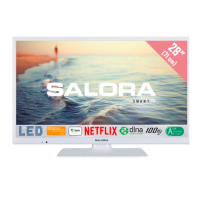
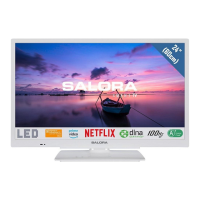
| Product color | White |
| Panel mounting interface | 100 x 100 mm |
| AC input voltage | 220 - 240 V |
| AC input frequency | 50 Hz |
| Power consumption (standby) | 0.5 W |
| Power consumption (typical) | 25 W |
| Package depth | 128 mm |
| Package width | 850 mm |
| Package height | 465 mm |
| Package weight | 6700 g |
| Operating temperature (T-T) | 0 - 40 °C |
 Weight and Dimensions
| Depth (with stand) | 185 mm |
|---|---|
| Height (with stand) | 427 mm |
| Weight (with stand) | 5700 g |
| Depth (without stand) | 65 mm |
| Width (without stand) | 640 mm |
| Height (without stand) | 387 mm |
| Weight (without stand) | 5200 g |




 To Next Page