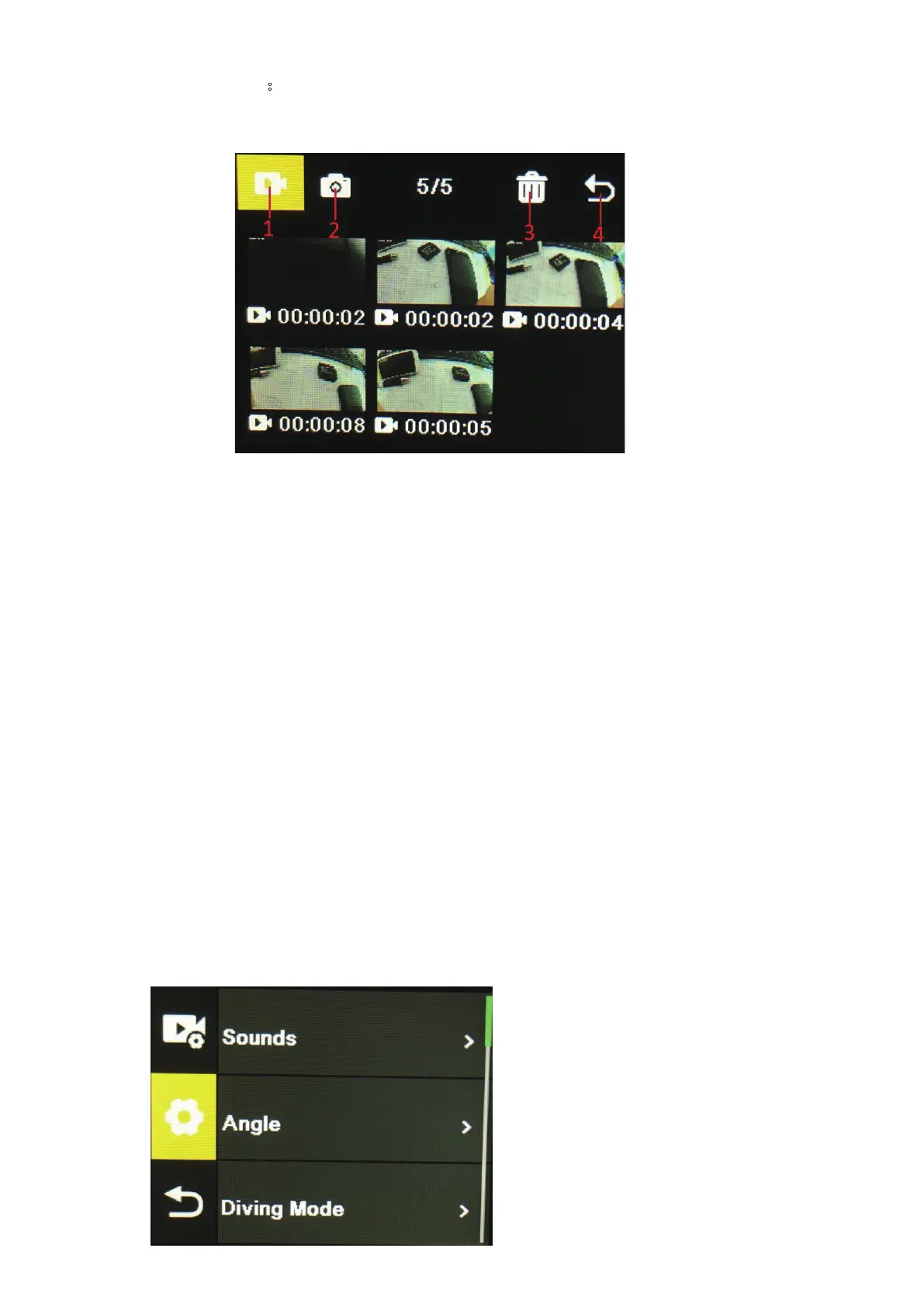
1. Playback mode:
After entering playback mode, press th e up/do wn buttons to select video albu m, photo album,
Delete an d Exit.
1) Video album: Select the video albu m icon, press Mode button to enter the video file selection,
press up/down to select, and press OK button to play the video. When a video is playing , press
the OK button to play/pause it, and press the Mode button to exit. Press the Mode button to
return to album selection.
2) Photo album: Select the photo album icon and press OK button t
o open the album, press
Mode button to enter the photo file sele ction, press up and down to select, press OK button to
display photos in full screen, and press up/down to browse. Press the Mode button to return to
album selection.
3) Delete: After opening the video or photo album, press the up/down button to select the
delete function, then press the mode button to enter the corresponding album to select the file
to be deleted, press the up/down button to select, press the OK butto
n to confirm, and finally
press the mode button to enter the delete operation. You can c hoose to delete selected and
delete all.
4) Exit playback Mode
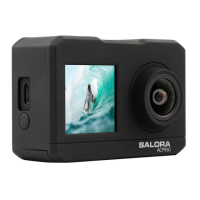
2. Settings Menu
Enter the menu interface after selecting video settings or camera settings


 To Next Page