7
8
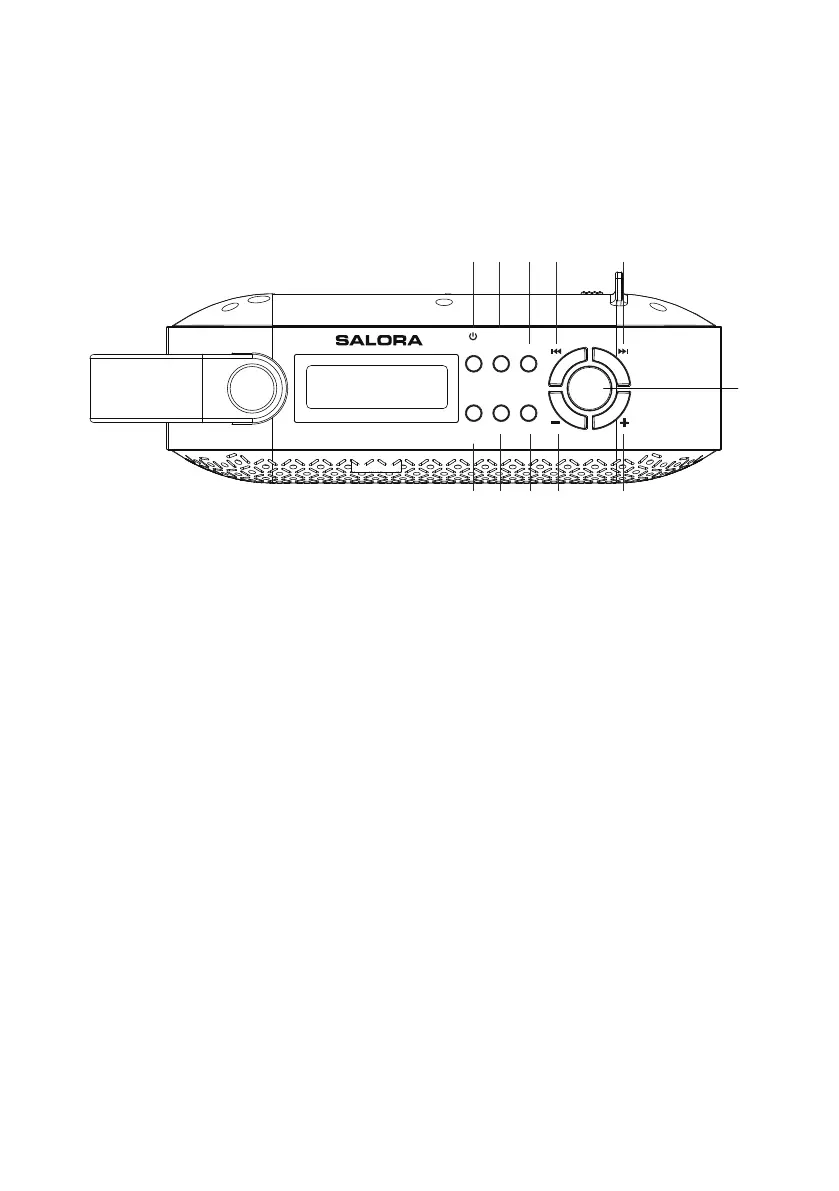
Product Overview
1
Press to turn on the radio from standby mode.
While the radio is on, press to switch between
DAB+ and FM modes. Press and hold to place the
radio in Standby.
2
Menu /Info
Sleep/Snooze
3
Preset
Store and access up to 10 DAB+ and 10 FM Station
Presets.
4/5
Vol +/-
Increase/decrease the volume.
6
Scan
11
Enter
Alarm
Auto-scan all DAB+ and FM stations.
Press to confirm your option
9/10
Prev/Next
Select previous/next frequency, station, preset
station or menu option.
Top View
Power / Mode
Press repeatedly to access station information and
Press to activate 9 minute snooze mode when the
alarm is sounding.
Press to do alarm setting
Menu settings
Mode
Scan
Alarm
Preset
Enter
Sleep
Snooze
1 2 3 4 5
6 7 8 9 10
11
Menu
Info



 To Next Page